
Yes. MSPs can assess publicly visible Microsoft 365-related domain and email-security evidence without collecting a prospect's login credentials, but assessing internal tenant controls requires customer-authorized access; a password-free review is not an access-free review.
- Can MSPs assess Microsoft 365 security without login credentials? Yes, but public evidence cannot establish internal tenant controls.
- SCOUTz suits MSPs preparing evidence-led prospect conversations; Microsoft 365 Review requires customer authorization.
- Public DNS evidence cannot establish Conditional Access coverage, application permissions, license assignments or tenant sharing configuration.
- Read-only Microsoft 365 reviews still require consent, scoped permissions and explicit reporting of unread sources.
Can MSPs Assess Microsoft 365 Security Without Login Credentials?
Yes for public-domain observations. Internal Microsoft 365 assessments require authorized access to the evidence being assessed. Separate the act of sharing a password from the act of granting permission. A customer can authorize a review without handing an MSP a user's password.
The distinction also applies to security assessments without client-network access. Avoiding a network connection does not make internal cloud configuration publicly observable.
| Review approach | Best for | Useful evidence | Main limitation |
|---|---|---|---|
| Public-domain review | Preparing an initial prospect conversation | Published DNS and email-security records, with source and observation date | Cannot establish internal Microsoft 365 settings or enforcement |
| Customer-authorized read-only review | Scoping a tenant-specific assessment | Configuration and metadata available through the permissions granted | Coverage depends on permissions, licensing and readable sources |
These are 2 evidence sources with different boundaries, rather than interchangeable ways to produce the same assessment. Keep their observations separate in the report. A public-domain finding does not become a tenant finding because the domain uses Microsoft 365.
Why This Matters
In 2026, an MSP proposal should distinguish what was observed from what still needs authorization. That distinction sets the scope of the next meeting and prevents a limited review from becoming an unsupported security claim.
A prospect asking for an assessment without credentials often wants to avoid sharing passwords, installing software or exposing business content. Clarify those concerns individually. They do not all require the same answer.
A public-domain review supports an introductory conversation. A consented tenant review supports questions about internal configuration. Neither establishes a breach, buying intent or an unresolved problem simply because a finding appears.
Sell the next justified decision, not the most alarming interpretation of the evidence. Your report should help the prospect choose whether to clarify ownership, authorize deeper assessment, scope work or take no action.
Public-Domain Review: Useful Before Tenant Authorization
A public-domain review examines externally available evidence. Published SPF and DMARC records are examples. Record the exact domain, source, check and observation date so another practitioner can understand the basis of the finding.
For example, an observed DMARC policy of p=none requests monitoring rather than quarantine or rejection through that policy. It does not establish that someone has spoofed the domain successfully. It also does not establish the state of the organization's internal Microsoft 365 controls.
Translate that observation into a bounded business conversation:
- Condition: The published DMARC policy requests monitoring only.
- Evidence: Retain the returned record, queried domain, check name and run date.
- Boundary: The record alone does not establish compromise, report-review activity or the intended rollout stage.
- Owner: Ask who owns email authentication and reviews reporting.
- Next choice: Confirm whether monitoring remains intentional before proposing enforcement work.
This approach gives your first meeting a concrete starting point. Its limitation is equally concrete: public evidence cannot establish Conditional Access coverage, application permissions, license assignments, Intune device state or tenant sharing configuration.
Public availability also does not provide blanket permission for every scanning technique. Distinguish public observation from active probing, review the applicable rules and obtain authorization for the agreed scope. Offer an outreach assessment as an opt-in courtesy after a reply rather than treating silence as consent.
Authorized Microsoft 365 Review: Password-Free, With Scoped Access
An internal Microsoft 365 review needs customer authorization and an approved access mechanism. The customer should understand the requested permissions, the evidence collected and how to end that access. Password collection is a separate issue.
Read-only describes what the review can do with its access. It does not mean the review has no access, and it does not remove the need to explain permissions. Document the approved tenant and scope before collecting evidence.
SCOUTz, by RYTHMz, provides cybersecurity prospect intelligence for MSPs. Its Microsoft 365 evidence boundary is configuration and metadata only; mail, files, chats, documents and prompts are outside that boundary. The review is read-only, requires no agent or install and makes no automatic configuration changes.
SCOUTz is best for MSPs preparing prospect conversations with dated cybersecurity evidence. Its limitation is that available evidence still depends on authorization, readable sources and coverage; it does not replace MSP judgment.
The client-supplied product reference dated October 15, 2026, places Microsoft 365 Review in Open Beta. Confirm the current permission requirements and review scope before describing a proposed assessment to a prospect.
Explain the boundary in the authorization request. Name the configuration areas being reviewed, identify exclusions and state that evidence collection does not authorize remediation. Agree separately on any later configuration changes.
Why Microsoft 365 Assessment Coverage Varies
The phrase without login credentials does not define assessment depth. These factors determine what your report can support:
- Evidence source: Public DNS and internal tenant configuration answer different questions.
- Customer authorization: The approved scope determines which internal evidence the review can request.
- Granted permissions: Restricted access leaves some sources unread or only partially assessed.
- License availability: License-limited coverage must remain visible instead of becoming an assumed pass.
- Source readability: An unavailable or unreadable response does not establish an absent control.
- Observation date: A dated finding describes the observed state; subsequent changes require fresh evidence.
In a 2026 assessment, describe each limitation beside the affected finding. A general disclaimer at the end cannot repair a finding that overstates what the source established.
Keep evidence states separate from coverage. Observed, Inferred, Possible, Unknown and Unreadable describe different evidence conditions; Assessed, Partial, Not assessed, Permission limited and License limited describe coverage. They are not a single score ladder.
Build An Evidence Packet Before Writing The Proposal
Use the same evidence packet structure whether the first observation came from a public record or an authorized tenant review. The source changes. The requirement to preserve its boundaries does not.
Evidence
Attach the check name, affected object, source, run date and returned condition. Include the review's coverage status. If the source was unreadable, record that state and list it under NOT ASSESSED THIS SCAN.
Keep the raw observation separate from the explanation. A reviewer should be able to see what the source returned without accepting the sales interpretation attached to it.
Insight
Explain the possible consequence and the decision it creates. A monitoring-only DMARC record raises a question about intended enforcement and reporting ownership. It does not establish the owner's priorities or willingness to buy a project.
For internal evidence, preserve the same distinctions. Tenant-wide application permission is not evidence of a malicious application. MFA registration and MFA enforcement are different questions; consult the MFA registration versus enforcement guide when preparing that discussion.
Proof
Define proof as a rescan against a pinned baseline. Name the condition you expect to change and retain the original observation for comparison. A completed task and a changed configuration are different records.
For a 2026 follow-up, use newly dated evidence rather than recycling the discovery deck as a current assessment. If a source cannot be reread, say so. Do not present an old observation as fresh confirmation.
Move From Evidence To An Agreed Next Action
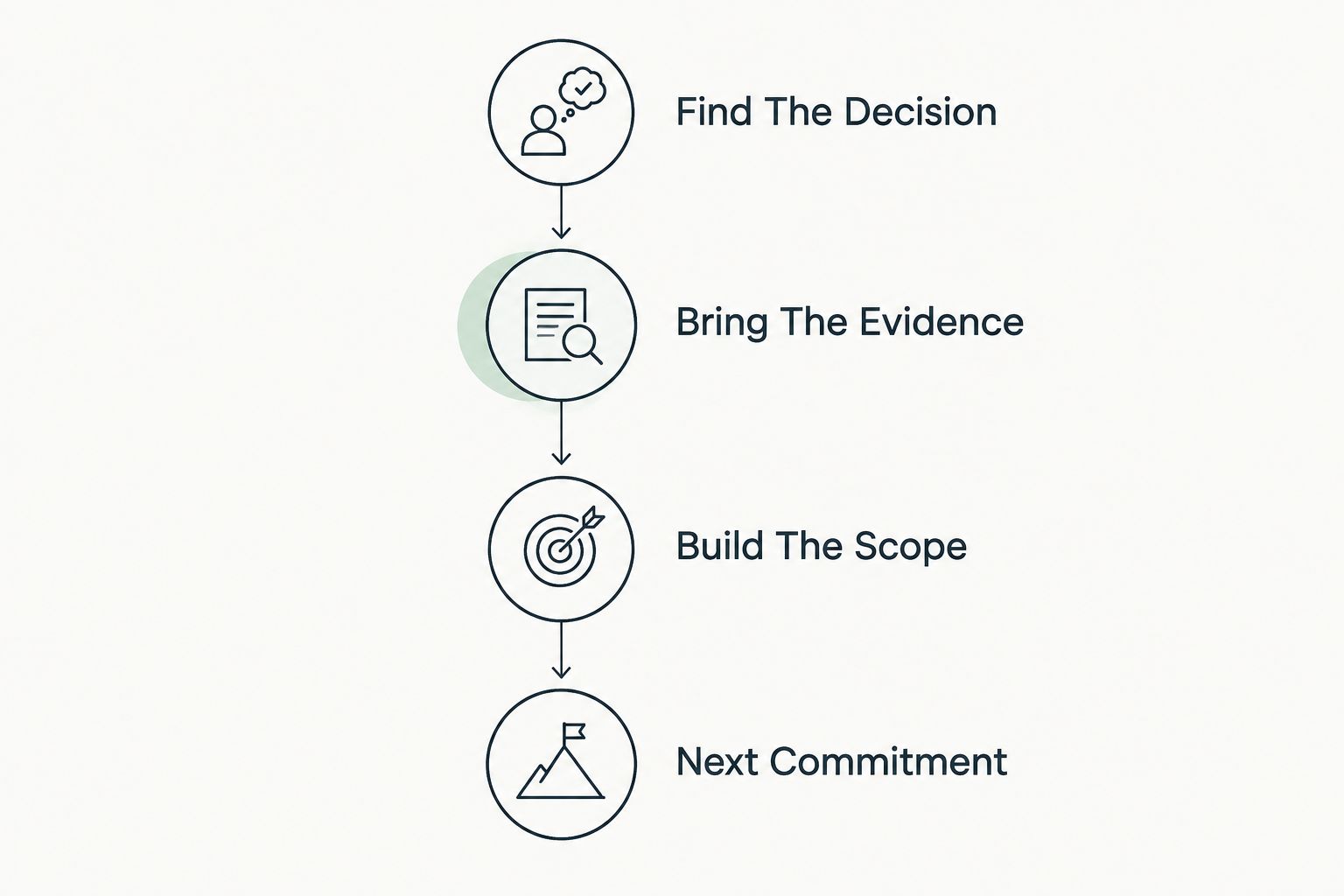
The SCOUTz Evidence-to-Agreement Framework gives MSP sales teams 4 conversation steps: Find the decision, Bring the evidence, Build the scope and Earn the next commitment. It is a conversation framework, not a validated close-rate intervention.
Find The Decision
Identify what the prospect needs to decide before choosing the next review. The decision might be whether to authorize a tenant assessment, confirm email-security ownership or commission a bounded configuration project.
Do not infer buying intent from a public event, a report download or an email open. Use those signals to prioritize research or follow-up. Let the prospect state the business decision and who owns it.
Bring The Evidence
Present the condition, date and boundary together. Start with the source rather than an overall score. Ask the prospect to confirm context before describing a service.
Illustrative dialogue, not a customer exchange:
MSP: The public record returned a monitoring-only DMARC policy. We have not assessed your internal Microsoft 365 controls. Who owns reporting, and is that policy intentional?
Prospect: Our existing provider handles email. We do not want to share passwords.
MSP: Password sharing is not the proposed step. We can first confirm the public record with your provider, or discuss a separately authorized read-only tenant review.
The response preserves the incumbent provider's role. It also gives the prospect a choice that matches the available evidence.
Build The Scope
Keep the condition, affected object, unknowns and recommended outcome separate from vendor selection. The MSP chooses the appropriate product, service, process, project or no action after discovery.
For example, a public-record review can establish an observed policy but cannot answer whether Conditional Access covers the intended users and applications. Make that unanswered question a proposed assessment scope, rather than a claimed defect.
Next Commitment
Earn a specific next commitment: an introduction to the configuration owner, approval of the read-only scope or agreement to review a proposal. Record who agreed, what they agreed to and what remains unapproved.
Do not treat permission to discuss a finding as permission to scan a tenant or change a setting. Each commitment should match the next action you intend to take.
Offer A Scope The Prospect Can Actually Approve
Present 3 scope choices when the prospect wants to understand the access boundary. These are assessment choices, not product tiers. Recommend the smallest scope that answers the agreed decision.
| Scope choice | Best for | Advantage | Limitation |
|---|---|---|---|
| Public evidence only | An initial conversation before tenant authorization | Creates a dated starting point from observable records | Leaves internal tenant controls unassessed |
| Authorized tenant review | A decision about internal configuration | Adds customer-approved configuration and metadata evidence | Requires consent and sufficient access; unread sources remain unknown |
| Verification rescan | Checking an agreed change against a baseline | Shows what changed in the assessed evidence | Does not establish broader security or remediation success outside that scope |
A proposal should name the selected scope, exclusions, owner and expected deliverable. Keep assessment work separate from remediation work. If the prospect declines internal access, deliver the public evidence with its boundaries intact.
Illustrative follow-up script:
Thank you for confirming the review boundary. The attached observation covers the public record and its run date. Internal Microsoft 365 controls remain unassessed. Please confirm whether you want to review this with your current provider or approve a separate read-only assessment scope.
That message creates a decision without manufacturing urgency. It also leaves a clear record for the next conversation.
For MSPs evaluating SCOUTz cybersecurity prospect intelligence in 2026, Join Open Beta is the primary next step. Keep the evaluation focused on evidence quality, coverage clarity and the usefulness of the resulting conversation.
Prepare Your Next Prospect Conversation
Explore dated domain evidence and customer-authorized Microsoft 365 review boundaries.
FAQ
Can an MSP check Microsoft 365 security without my password?
Yes, an MSP can review public-domain evidence without your password, and internal reviews can use customer-authorized access without password sharing. Internal configuration still requires appropriate authorization and permissions.
Can a public domain scan show whether Conditional Access is working?
No, a public-domain scan cannot establish Conditional Access coverage or enforcement. That question requires authorized internal evidence and a clearly defined assessment scope.
Does read-only access mean the MSP can read our email?
Read-only alone does not define which data a review can access. Check the requested permissions and collection scope; the Microsoft 365 review described here is limited to configuration and metadata, excluding mail, files, chats, documents and prompts.
Is a DMARC policy of p=none proof that our email is compromised?
No, a DMARC policy of p=none is not proof of compromise. It requests monitoring through that policy and creates a question about intended enforcement and report ownership.
What happens if the assessment cannot read a Microsoft 365 source?
An unread source remains unknown or unreadable, with the coverage limitation recorded. It must not become a clean result or evidence that a control is absent.
Can an MSP change settings during a read-only review?
A read-only review does not authorize configuration changes. Remediation requires a separate agreed scope and appropriate authorization.
Can a prospect refuse tenant access and still receive something useful?
Yes, a prospect can receive a dated public-domain evidence packet with explicit limits. Internal Microsoft 365 controls remain unassessed until an authorized review supplies that evidence.
One Last Thing
An explicit unknown can be more useful than an unsupported pass. It identifies the evidence needed for the next decision without pretending the review answered every question.
Before sending the report, read every sentence that describes internal Microsoft 365 security. Confirm that each claim has an authorized source, a run date and a stated boundary. Reclassify everything else as a question, inference or unassessed area.
SCOUTz prepares the conversation. The relationship and the sale stay yours. A scan supplies evidence; the MSP remains responsible for the interpretation, recommendation and agreement.