
Best for prospect-meeting evidence: SCOUTz. Best for a native improvement baseline: Microsoft Secure Score. Best for identity controls: Microsoft Entra ID. Best for email-threat protection: Microsoft Defender for Office 365. Best for data governance: Microsoft Purview. The best Microsoft 365 security tools for MSPs serving mid-market clients form a stack with distinct jobs, rather than a single winner.
- The best Microsoft 365 security tools for MSPs serving mid-market clients address different security jobs.
- SCOUTz is best for MSPs preparing evidence-led Microsoft 365 prospect conversations.
- Microsoft Entra ID handles identity controls; Microsoft Defender for Office 365 addresses email and collaboration threats.
- Microsoft Secure Score supports improvement planning; Microsoft Purview supports data governance.
- Keep customer-authorized tenant evidence separate from public-domain observations, and record unread sources explicitly.
Why This Matters
A prospect meeting and a security operation need different outputs. Your sales team needs a dated condition, its limits, an accountable owner and an agreed next action. Your delivery team needs controls, investigation workflows and change authority.
For your 2026 shortlist, separate those requirements before comparing features. A reporting tool cannot substitute for enforcement. An enforcement tool does not automatically produce a buyer-ready explanation.
SCOUTz is best for MSPs preparing evidence-led Microsoft 365 prospect conversations. The relationship and the sale stay with the MSP.
What Makes the Best Microsoft 365 Security Tools
Use these criteria before choosing a platform. They make the ranking auditable and keep product selection tied to the work you actually need.
- Evidence boundaries: Identify whether a claim comes from public DNS, authorized tenant configuration, activity records or inference.
- Permission clarity: Document required access, customer approval and the effect of unavailable permissions.
- Operational fit: Separate assessment, enforcement, investigation and governance responsibilities.
- Explainable findings: Preserve the check, affected object, run date, unknowns and recommended outcome.
- Verification: Define how you will confirm a change against the original baseline.
- Commercial fit: Check the client's licenses, your service obligations and the work your team can support.
Do not rank these tools by a combined security score. Compare them by their jobs, then choose the minimum set that covers your agreed scope.
Microsoft 365 Security Tools at a Glance
| Tool | Best For | Standout Function | Key Limitation |
|---|---|---|---|
| SCOUTz | Prospect-meeting evidence | Dated domain and customer-authorized Microsoft 365 evidence | Read-only evidence does not enforce controls |
| Microsoft Secure Score | Native improvement planning | Microsoft security recommendations and score history | A score is not proof of complete coverage |
| Microsoft Entra ID | Identity and access controls | Conditional Access and identity administration | Policy behavior depends on configuration and licensing |
| Microsoft Defender for Office 365 | Email and collaboration threat protection | Threat-protection and investigation capabilities | Does not replace tenant-wide identity or governance work |
| Microsoft Purview | Information protection and governance | Classification, labeling and data loss prevention capabilities | Requires policy design and business ownership |
This 2026 comparison assigns each option a distinct role. Product capabilities, licensing and tenant configuration still require review before you commit to a scope.
1. SCOUTz: Best Microsoft 365 Tool for Prospect Evidence
SCOUTz provides dated cybersecurity evidence and account context for MSP sales preparation. Its customer-authorized Microsoft 365 review examines configuration and metadata through read-only access, without reading mail, files, chats, documents or prompts.
The client-supplied product reference dated October 15, 2026 identifies Microsoft 365 Review and Evidence Reports as Open Beta. Treat that dated reference as a product-status boundary, not proof of current operational readiness for every workflow.
Evidence, Insight and Proof
Evidence records what ran and what was observed. Insight connects that condition to an owner-facing question. Proof requires a rescan against a pinned baseline after an agreed change.
Public Domain Review cannot establish Conditional Access coverage, application permissions, license assignments, Intune device state or tenant sharing configuration. Those require appropriate authorized internal evidence.
SCOUTz Pros:
- Keeps dated evidence attached to the prospect conversation.
- Separates public observations from customer-authorized tenant evidence.
- Uses read-only review without automatic configuration changes.
SCOUTz Cons:
- Does not enforce identity, email or data-protection controls.
- Unread evidence remains unknown and cannot support a clean assessment.
- Beta workflows require validation against your intended use.
Best For: MSP owners and sales leaders who need evidence-led discovery and proposal preparation.
Verdict: Buy for the evidence-preparation role only after validating beta fit; retain separate delivery controls.
2. Microsoft Secure Score: Best for Native Improvement Planning
Microsoft Secure Score presents recommended security improvement actions and tracks a tenant's score over time. It gives your team a native starting point for discussing configuration priorities.
Use the recommendations as an assessment input. Validate applicability, affected users and implementation consequences before turning an action into a proposal line item.
Microsoft Secure Score Pros:
- Provides a Microsoft-native improvement reference.
- Helps organize discussions around recommended actions.
- Supports comparison of score changes over time.
Microsoft Secure Score Cons:
- A higher score does not establish that an incident cannot occur.
- Recommendations still require tenant-specific interpretation.
- Score movement alone does not explain every underlying configuration change.
Best For: MSPs that need a repeatable starting point for native security improvement reviews.
For a 2026 QBR, retain the dated recommendation and the underlying condition. Explain why an action matters to this client instead of presenting the score as a stand-alone verdict.
Verdict: Buy into the workflow as a baseline; do not use the score as your complete assessment.
3. Microsoft Entra ID: Best for Identity and Access Controls
Microsoft Entra ID handles identity and access administration. Conditional Access lets administrators define access requirements using policy conditions and controls, subject to applicable licensing.
For an MSP, the important distinction is between a configured policy and demonstrated coverage. Review policy scope, exclusions, enforcement state and relevant sign-in evidence before saying a requirement applies to everyone.
Microsoft Entra ID Pros:
- Places identity controls close to tenant access decisions.
- Supports Conditional Access policy administration.
- Provides identity and sign-in information for authorized review.
Microsoft Entra ID Cons:
- Available capabilities depend on licensing.
- Exclusions and policy interactions require careful validation.
- Changes can affect legitimate access and require controlled rollout.
Best For: MSPs responsible for implementing and maintaining identity access requirements.
MFA registration and MFA enforcement answer different questions. Record both separately, then test the intended access path under approved conditions.
Verdict: Buy for identity enforcement when your scope includes policy ownership, testing and ongoing review.
4. Microsoft Defender for Office 365: Best for Email-Threat Protection
Microsoft Defender for Office 365 provides protection against threats involving email and supported collaboration workloads. Its capabilities include protections such as Safe Links and Safe Attachments, with investigation features depending on the plan.
Your assessment should connect the selected capabilities to actual policy scope. A license assignment alone does not establish that the intended protection applies to every relevant user.
Microsoft Defender for Office 365 Pros:
- Supports protection against malicious links and attachments.
- Connects protection policies with threat investigation workflows.
- Fits an email-security service anchored in Microsoft 365.
Microsoft Defender for Office 365 Cons:
- Capabilities vary by plan.
- Policy scope and exceptions require review.
- It does not resolve identity governance or information-governance requirements by itself.
Best For: MSPs operating email-threat protection and response for Microsoft 365 clients.
In your 2026 service proposal, distinguish configuration review from ongoing monitoring and investigation. Name who handles alerts, who authorizes changes and what happens outside the contracted scope.
Verdict: Buy for managed email-threat protection when you can support the associated response work.
5. Microsoft Purview: Best for Information Protection and Governance
Microsoft Purview includes capabilities for information protection, data loss prevention and governance. It supports policy work around how business information is classified and handled.
Start with the client's business rules. A technical policy needs an owner who can decide what information is sensitive, which sharing paths are legitimate and how exceptions are approved.
Microsoft Purview Pros:
- Supports classification and sensitivity-labeling approaches.
- Provides data loss prevention capabilities for supported workloads.
- Connects technical policies to information-handling requirements.
Microsoft Purview Cons:
- Policy design requires business participation.
- Licensing and workload coverage need separate confirmation.
- Poorly scoped rules can disrupt legitimate work.
Best For: MSPs delivering information-protection and governance projects with named client stakeholders.
External sharing is a configuration condition, not proof of a data leak. Preserve that distinction when translating a sharing review into a proposed governance project.
Verdict: Buy for an agreed governance program; wait when the client has not assigned policy ownership.
How the Tools Were Ranked
The ranking uses the criteria above: evidence boundaries, permissions, operational fit, explainability, verification and commercial fit. It assigns each tool a different decision slot rather than claiming a universal performance winner.
This is a role-based shortlist, not a hands-on benchmark. No close-rate improvement, detection-rate comparison or deployment-time result is claimed.
Turn the Shortlist Into an Agreed Next Action
The SCOUTz Evidence-to-Agreement Framework, supplied in the client's October 24, 2026 editorial direction, connects assessment work to a decision. It is an original conversation framework, not a validated sales-performance model.
Find the Decision
Name the decision before opening the report. Examples include approving a consented tenant review, assigning an identity-policy owner or deciding whether a sharing policy needs revision.
Bring the Evidence
Attach the check, run date, affected object and access limits. Keep Observed, Inferred, Possible and Unknown distinct; they are different evidence states, not steps on a scoring ladder.
Build the Scope
Offer 3 scope choices: validate the condition, make an authorized change, or retain the current configuration with a documented owner. Product selection follows the desired outcome.
Earn the Commitment
Ask for an agreed action, an accountable person and a decision date. A finding becomes useful when the buyer can choose what happens next.
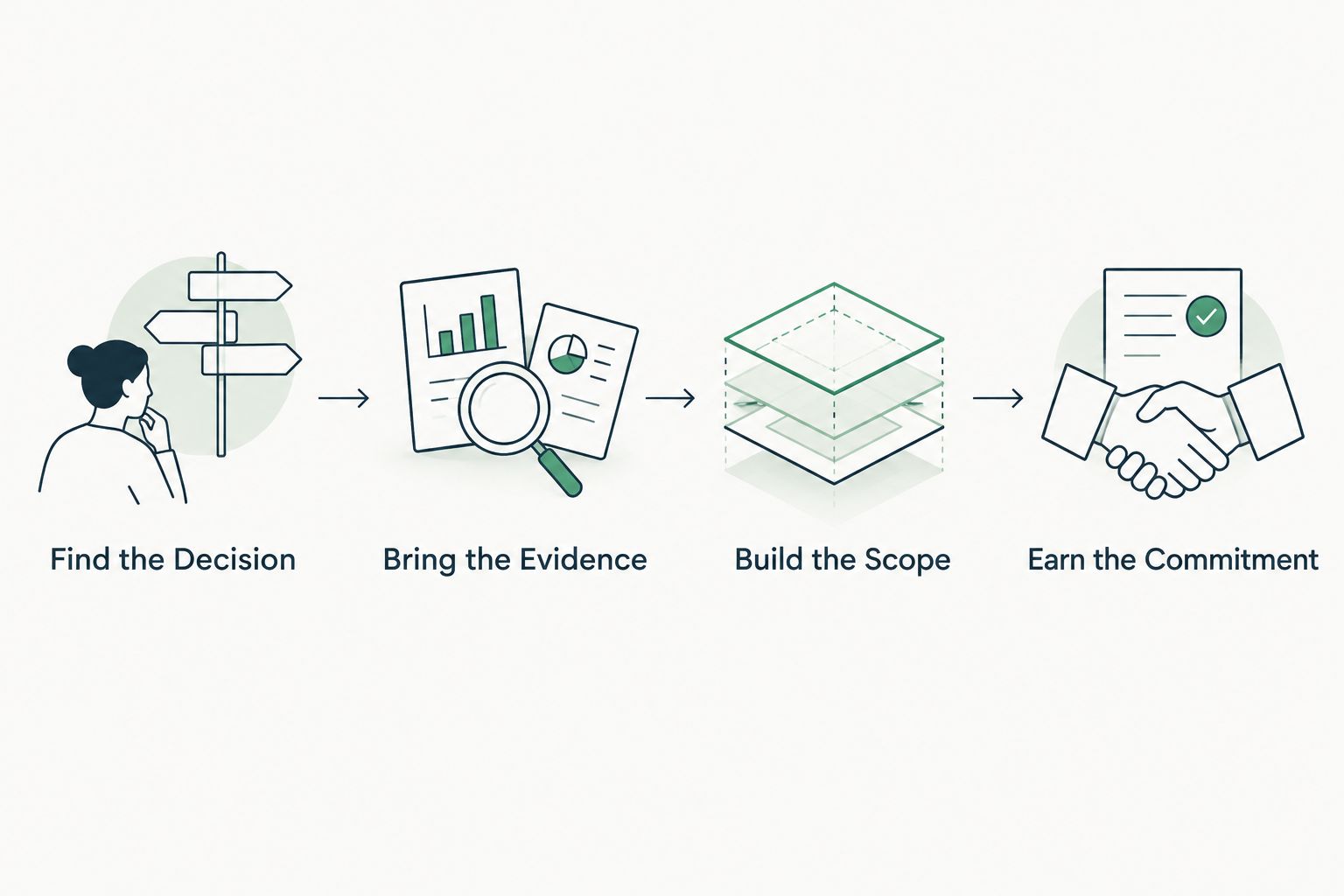
Use 4 questions to prepare the handoff: What was observed? What remains unknown? Who owns the decision? What evidence will establish completion?
The following dialogue is illustrative, not a customer result or a product finding: “This review records a policy condition at the stated run date. It does not establish compromise. Would you prefer to validate its intended scope with your administrator or approve a separately scoped review?”
If the buyer says the existing provider handles it, request confirmation of the intended outcome and responsible owner. Do not turn uncertainty into an accusation.
For follow-up, summarize the agreed choice: “You selected validation before changes. The next step is an authorized review of policy scope, exclusions and relevant evidence. We will return with the observed condition, remaining unknowns and an implementation option if needed.”
Which Microsoft 365 Security Tools Should You Choose?
Choose the job first, then the tool. Use an evidence-preparation platform for the prospect conversation, Secure Score for a native improvement baseline, Entra ID for identity controls, Defender for Office 365 for email-threat protection and Purview for information governance.
Join Open Beta is the primary next step for MSPs evaluating the evidence-led workflow. Book a demo to discuss fit and confirm the current review scope before relying on beta outputs in a client engagement.
FAQ
What's the best Microsoft 365 security tool for MSPs serving mid-market clients?
The best choice depends on the job: evidence preparation, improvement planning, identity enforcement, email protection or governance. Choose a distinct owner and verification method for each job rather than expecting one platform to cover everything.
Is Microsoft Secure Score enough for a Microsoft 365 security assessment?
Microsoft Secure Score is a starting point, not a complete assessment. Validate the underlying conditions, policy scope, permissions and unavailable evidence before making a client-facing claim.
Can a public-domain scan reveal Microsoft 365 Conditional Access coverage?
A public-domain scan cannot establish Conditional Access coverage. That requires authorized internal evidence covering the relevant policies, scope and exclusions.
Does a read-only Microsoft 365 review fix security settings?
A read-only review does not change security settings. It provides evidence for a separately authorized decision, implementation task and verification step.
Is Microsoft Defender for Office 365 a replacement for Microsoft Entra ID?
Microsoft Defender for Office 365 and Microsoft Entra ID perform different jobs. Defender for Office 365 addresses email and collaboration threats, while Entra ID handles identity and access controls.
How should an MSP compare Microsoft 365 security-tool costs?
Compare the required licenses, service responsibilities and implementation scope rather than subscription charges alone. Confirm current commercial terms directly and separate assessment work from ongoing administration and response.
Does missing tenant evidence mean a control is absent?
Missing tenant evidence does not establish that a control is absent. Mark the source Unknown or Unreadable as appropriate, record the coverage limitation and identify the authorized follow-up needed.
One Last Thing
Keep 2 evidence sources separate: public-domain observations and customer-authorized tenant evidence. A clean-looking public result cannot fill a tenant-access gap.
Before presenting your next report, add a section titled NOT ASSESSED THIS SCAN. Naming the unread sources makes the proposal boundary clearer and gives the buyer a specific next choice.