
Best overall for evidence-led prospect preparation: SCOUTz. Best for a narrow email-policy question: a DNS/email-authentication checker. Best for internal configuration review: a customer-authorized Microsoft 365 assessment. This 2026 ranking orders onboarding paths by access requirements and setup dependencies, not measured deployment times.
- For best MSP tools ranked by onboarding speed, compare access requirements before comparing feature lists.
- SCOUTz fits MSP prospect intelligence and dated security evidence for sales preparation.
- Public-domain observations cannot establish internal Microsoft 365 configuration or tenant security.
- Choose the smallest assessment scope that supports the buyer's next decision.
Why This Matters
An account login is not a completed onboarding. Your team needs a defensible finding, a clear explanation and an agreed next action before the tool contributes to a prospect conversation.
For a 2026 shortlist, separate time to first observation from time to a client-safe evidence packet. A domain observation and an authorized tenant review answer different questions. Ranking them by a single stopwatch hides that difference.
SCOUTz is best for MSP owners and sales leaders who need dated cybersecurity prospect intelligence before a sales conversation. The relationship and the sale stay with the MSP.
What Makes The Best MSP Tool For Fast Onboarding
Use these six criteria before accepting a vendor's setup claim:
- Access prerequisites: identify whether the job requires a domain, customer consent, administrative permissions or network access.
- Deployment requirements: distinguish a read-only review from an agent deployment or delivery-platform implementation.
- Evidence traceability: keep the check, affected object, source and run date attached to the finding.
- Coverage disclosure: show unreadable sources, permission limits and unassessed areas separately from results.
- Operator readiness: require a salesperson to explain the condition without overstating its consequence.
- Decision readiness: connect the evidence to an owner, a scoped choice and a verification method.
A lightweight setup deserves a high position only when its evidence answers the intended question. An external observation does not become a tenant assessment because the report looks complete.
Onboarding Paths At A Glance
The order below favors fewer access dependencies for prospect preparation. It is a use-case ranking, not a timed benchmark or a claim that one category replaces another.
| Rank And Option | Best For | Standout Capability | Main Onboarding Dependency | Key Limitation |
|---|---|---|---|---|
| 1. Public-domain review | Broad external evidence before discovery | Dated observations about a prospect domain | Correct domain and an agreed, appropriate review scope | Cannot establish internal tenant controls |
| 2. DNS/email-authentication checker | A specific published email-policy question | Focused inspection of DNS policy records | Domain selection and policy interpretation | Does not establish mailbox protection or compromise |
| 3. Authorized Microsoft 365 assessment | Internal configuration discovery | Customer-consented configuration and metadata evidence | Consent, permissions and applicable license coverage | Unread sources remain unknown |
| 4. Network vulnerability scanner | Authorized technical exposure assessment | Findings within a defined network scope | Written authorization, targets and assessment setup | Findings require validation and scope context |
| 5. PSA workflow tooling | Moving agreed work into service delivery | Ownership and delivery workflow | Service definitions, roles and process configuration | Does not supply prospect-security evidence by itself |
1. Public-Domain Review: Best For Broad Prospect Preparation
A public-domain review is the first choice when your question concerns externally observable domain and email-security conditions. It gives discovery a factual starting point without presenting public evidence as internal access.
SCOUTz provides MSP prospect intelligence and domain reviews. The client's product reference dated October 15, 2026 distinguishes public-domain review capabilities from customer-authorized cloud review; use that boundary when defining your pilot.
Public-Domain Review Pros
- Starts with an external evidence scope rather than tenant configuration access.
- Supports concrete discovery questions tied to dated observations.
- Keeps the initial conversation focused on an identifiable domain.
Public-Domain Review Cons
- Cannot establish Conditional Access coverage, application permissions or tenant sharing configuration.
- Requires interpretation before an observation becomes a useful business question.
- Public visibility does not establish blanket permission for active probing.
Best for: MSP sales teams preparing a broad, evidence-led first conversation.
Start with 1 prospect domain as a deliberately limited pilot scope. Confirm that it belongs to the intended organization and distinguish public observation from active assessment. Offer additional outreach scans as opt-in courtesies after a reply, with an appropriate scope.
Verdict: Buy for external prospect preparation when the evidence scope matches the meeting.
2. DNS/Email-Authentication Checker: Best For A Narrow Policy Question
A focused DNS/email-authentication checker suits a specific question about published SPF, DKIM or DMARC information. Its scope is narrower than a broader prospect-intelligence review, which makes it useful when you already know what you need to inspect.
For example, a published DMARC policy requesting monitoring supports a discussion about intended enforcement and reporting ownership. It does not prove mailbox compromise or establish that the current policy is an unresolved mistake.
DNS/Email-Authentication Checker Pros
- Keeps the review tied to a specific published policy.
- Produces a focused topic for technical discovery.
- Supports an explicit distinction between observed configuration and inferred consequence.
DNS/Email-Authentication Checker Cons
- Cannot establish internal identity controls or mailbox access history.
- A record alone does not explain the organization's intended rollout.
- Interpretation still needs an accountable reviewer.
Best for: A technician or salesperson investigating a defined email-policy question.
Ask the operator to preserve the record, source and observation date. Then identify who owns the policy and whether its present configuration is intentional. That conversation determines the next scope.
Verdict: Buy for a narrow policy review; skip as a substitute for a complete security assessment.
3. Authorized Microsoft 365 Assessment: Best For Internal Discovery
A customer-authorized Microsoft 365 assessment belongs next when the decision depends on internal configuration. Public-domain evidence cannot answer questions about tenant-wide application permissions, license assignments, Intune device state or sharing configuration.
SCOUTz's client reference dated October 15, 2026 labels Microsoft 365 Review Open Beta. Its stated boundary is read-only configuration and metadata evidence, without reading mail, files, chats, documents or prompts; no agent, install or automatic configuration changes are part of that review.
Microsoft 365 Assessment Pros
- Addresses internal questions that public-domain observations cannot resolve.
- Supports a defined consent and permission boundary.
- Lets the reviewer distinguish assessed configuration from coverage gaps.
Microsoft 365 Assessment Cons
- Requires customer authorization before internal evidence collection.
- Permission and license limits can restrict coverage.
- Configuration evidence alone does not establish malicious activity.
Best for: Consented discovery after the prospect agrees to an internal configuration review.
For your 2026 evaluation, inspect the coverage statement before discussing the findings. Keep evidence states such as Observed, Inferred, Unknown and Unreadable separate from coverage states such as Partial or Permission limited. These labels answer different questions.
Verdict: Hold until authorization and the business question are explicit; then evaluate against that scope.
4. Network Vulnerability Scanner: Best For Authorized Technical Exposure Work
A network vulnerability scanner fits a technical assessment with defined targets and authorization. It serves a different purpose from preparing a domain-based discovery conversation.
Onboarding includes deciding what the assessment covers and how findings will be validated. Do not count the first generated report as completion if your team cannot explain the affected asset, assessment limits and recommended outcome.
Network Vulnerability Scanner Pros
- Supports an explicitly bounded technical assessment.
- Connects findings to assets within the agreed scope.
- Can support verification when the same assessment is repeated against a baseline.
Network Vulnerability Scanner Cons
- Requires authorization and target validation.
- Findings need practitioner review before client presentation.
- A technical result does not establish buying intent or an agreed project.
Best for: Security practitioners investigating an authorized technical question.
Keep an answering service separate from an exploitable service. Record what was observed and what remains unverified. The proposal should explain the validation or remediation work being offered rather than treating every result as a confirmed incident.
Verdict: Buy for authorized technical assessment; skip as the default first-contact sales exercise.
5. PSA Workflow Tooling: Best For Delivery Handoff
PSA tooling belongs in this comparison because MSP onboarding extends beyond producing a report. Once a prospect agrees to work, someone must own the scope, tasks and delivery process.
This is a later dependency for prospect preparation, not a judgment about PSA value. CRM owns the relationship; PSA, RMM and security platforms run delivery. Compare those jobs separately from collecting sales evidence.
PSA Workflow Tooling Pros
- Gives agreed work an operational owner.
- Supports a defined handoff from sales into delivery.
- Helps make service responsibilities explicit.
PSA Workflow Tooling Cons
- Process configuration is a separate implementation task.
- It does not establish the underlying security condition.
- A configured workflow cannot substitute for an agreed scope.
Best for: MSP operations teams turning accepted work into a delivery process.
Before adding integrations, prove that your team can transfer 1 evidence packet into an understandable work scope. Include the condition, affected object, unknowns, owner and intended outcome. Treat this as a pilot requirement, not a product performance claim.
Verdict: Buy for delivery coordination; hold if the immediate gap is prospect evidence.
How The Ranking Works
This 2026 ranking uses access requirements and workflow dependencies as its ordering principle. No elapsed-time benchmark is assigned to a product or category.
Public-domain review ranks first for broad external preparation. A focused checker follows for narrower policy work. Internal tenant assessment, network assessment and PSA implementation introduce different authorization or operational dependencies.
Time your own pilot from scope approval to a usable output. Record waiting time separately from operator work so that customer consent delays do not become misleading claims about software speed.
Turn Fast Setup Into An Agreed Next Action
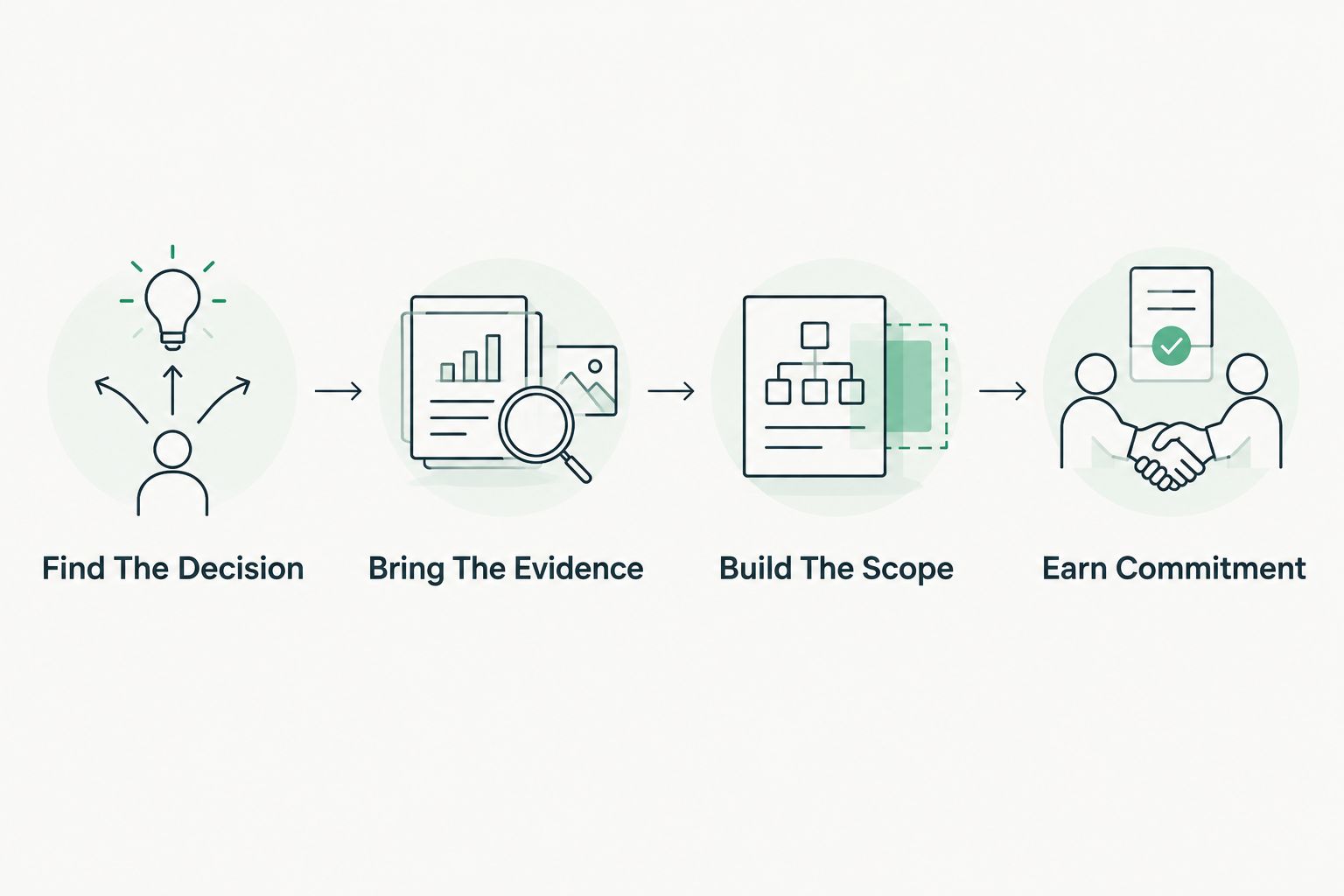
The SCOUTz Evidence-to-Agreement Framework connects preparation to a buyer decision. It is an original conversation framework, not a validated close-rate intervention.
Find The Decision
Identify what the prospect needs to decide before collecting more evidence. Name the decision owner and the limits of the proposed review.
Bring The Evidence
Present the condition with its source, run date and coverage boundary. A salesperson should be able to explain why an observation matters while preserving what remains unknown.
Build The Scope
Separate the recommended outcome from vendor selection. The MSP and buyer can choose a product, service, process change, project or no action.
Earn Commitment
Ask for a specific next step with an owner. Proof means a rescan against a pinned baseline, so plan 2 timestamped runs when verification is part of the proposed work.
The following dialogue is illustrative, not a customer transcript or scan result:
MSP: The observed DMARC policy requests monitoring. That tells us the published policy, not whether anyone has been compromised. Who reviews the reports, and is monitoring still the intended setting?
Buyer: Our existing provider manages that.
MSP: Let's keep that owner involved. Would you prefer to confirm the intended policy with them first, or authorize a scoped review together?
A suitable follow-up preserves that choice: Please confirm the policy owner and whether you want a review. Any proposed work will separate the observed condition, unknowns and intended outcome.
Which MSP Tool Should You Choose?
Choose a public-domain review for external prospect preparation. Choose an authorized internal assessment when the decision requires tenant evidence. Add technical scanning or delivery tooling when the agreed job requires it.
For SCOUTz, make Join Open Beta the primary next step when evaluating the beta workflow. Use a demo to clarify fit, evidence boundaries and the onboarding work your team must own.
FAQ
What's the best MSP tool for fast prospect preparation?
A public-domain review is the best starting point when the meeting concerns externally observable domain conditions. SCOUTz fits MSP teams preparing dated cybersecurity evidence, while internal tenant questions require customer-authorized review.
Which MSP tool onboards fastest?
Choose by prerequisites rather than an unsupported time claim. Compare domain selection, customer authorization, permissions, deployment work and operator review for the job you need completed.
Can a domain review replace a Microsoft 365 assessment?
No. Public-domain observations cannot establish Conditional Access coverage, application permissions, license assignments, Intune device state or tenant sharing configuration.
Does read-only assessment mean every source was assessed?
No. Read-only describes the access boundary, while permissions, licenses and unreadable sources affect coverage. Keep unassessed sources explicitly unknown.
Should an MSP deploy network scanning before a first sales call?
Use network scanning only when an authorized technical assessment is the agreed job. A first conversation does not itself establish permission or justify that assessment scope.
What should an MSP measure during a tool pilot?
Measure elapsed time to a usable evidence packet, operator work and external waiting time separately. Also check whether the output preserves its source, date, limits and next decision.
Does faster onboarding mean more MSP sales?
Faster onboarding does not establish sales gains. The MSP still owns qualification, interpretation, scope, buyer choice and the relationship.
One Last Thing
An explicit Unknown is more useful than an unsupported clean result. During your 2026 pilot, deliberately inspect an unread source and check how the report represents it. A tool that makes its limits visible gives your salesperson a boundary they can defend.