
Best overall for a ConnectWise-centered shortlist: ConnectWise PSA with ConnectWise Automate. Best for an Autotask-centered shortlist: Autotask PSA with Datto RMM. Best for comparing separate vendors: HaloPSA with NinjaOne. This 2026 guide ranks those pairings by workflow fit and places SCOUTz separately as prospect intelligence, rather than treating sales preparation as PSA or RMM integration.
- For best MSP tools ranked by PSA and RMM integration, start with your existing operational system and test the handoff.
- ConnectWise PSA with ConnectWise Automate leads the shortlist for ConnectWise-centered operations.
- Autotask PSA with Datto RMM suits an Autotask-centered evaluation; HaloPSA with NinjaOne suits a separate-vendor comparison.
- SCOUTz is best for MSP prospect intelligence and dated sales evidence; native ConnectWise sending remains planned.
Why This Matters
An integration badge does not tell you whether a technician receives enough context to act. Your evaluation needs to follow an account, an affected device, a finding and an assigned action through the actual workflow.
The sales handoff needs a different test. Prospect evidence belongs beside a decision and an agreed scope before it becomes delivery work. SCOUTz is best for MSP owners who need dated cybersecurity evidence before a prospect conversation. The SCOUTz platform prepares that conversation; the MSP retains responsibility for the relationship and sale.
For your 2026 shortlist, keep these jobs separate: the PSA organizes service work, the RMM manages endpoints, and prospect intelligence prepares discovery. Buying one does not establish that you have covered the others.
What Makes the Best MSP Tools for PSA and RMM Integration
Use these criteria before comparing vendors. A feature name is a starting point; an observed workflow is the evidence.
- Account matching: Confirm that organizations, sites and devices resolve to the intended customer without duplicate records.
- Actionable handoffs: Require the affected object, observation time, condition and ownership to survive the transfer.
- Defined direction: Establish which system creates, updates and closes each record, including conflicting updates.
- Permission boundaries: Identify what the connector reads, what it writes and which identity authorizes access.
- Failure visibility: Check what happens when credentials expire, a request fails or a destination record disappears.
- Exit ownership: Establish who maintains the connector and how you export the information needed to leave.
The best integration is the one that preserves meaning and ownership across the handoff. A connector that creates a ticket without its evidence has moved text, not established an actionable record.
MSP Integration Shortlist at a Glance
The order below reflects distinct purchasing situations. It is a decision tree, not a measured performance ranking. The pairings are evaluation candidates; exact connector behavior must pass your acceptance test.
| Rank | Tool or Pairing | Best For | Standout Evaluation Focus | Key Limitation |
|---|---|---|---|---|
| 1 | ConnectWise PSA + ConnectWise Automate | ConnectWise-centered operations | Service-work and endpoint-management handoff | Shared vendor does not prove your required workflow |
| 2 | Autotask PSA + Datto RMM | Autotask-centered operations | Customer, device and service-record continuity | Mapping and lifecycle behavior still require testing |
| 3 | HaloPSA + NinjaOne | Comparing separate PSA and RMM vendors | Independent product fit with a defined connector boundary | Connector ownership must be explicit |
| 4 | SCOUTz | Evidence-led prospect preparation | Dated domain and consented Microsoft 365 evidence | Native Send to ConnectWise is planned |
1. ConnectWise PSA + ConnectWise Automate: Best for ConnectWise Operations
ConnectWise PSA addresses professional services automation. ConnectWise Automate addresses remote monitoring and management. Put this pairing first when ConnectWise already anchors your service operation and you are evaluating the endpoint-to-service handoff.
That starting position reflects operational fit, not a claim that every connection works automatically. The acceptance test must establish what your configuration actually transfers.
ConnectWise pairing pros:
- A clear pairing to evaluate when your existing service records reside in ConnectWise PSA.
- Separate PSA and RMM responsibilities make the ownership test concrete.
- An existing ConnectWise workflow gives your team a baseline for comparison.
ConnectWise pairing cons:
- A shared vendor name does not establish field coverage, update direction or error handling.
- An existing workflow still needs examination before adding another source of service work.
Start with 1 test organization and 1 test device. Generate a controlled event, inspect its destination record, change its ownership, then resolve it through the intended process. Record every manual intervention rather than describing the workflow as automatic.
For a 2026 purchasing decision, require a demonstration using your required fields and permissions. A demonstration built around a different workflow does not answer your operating question.
Best for: MSPs evaluating endpoint management around an established ConnectWise service operation.
Verdict: Buy only after the account, device and service-record handoff passes your acceptance test.
2. Autotask PSA + Datto RMM: Best for Autotask Operations
Autotask PSA handles professional services automation. Datto RMM handles remote monitoring and management. Place this pairing first when Autotask is already the service system your team intends to retain.
The important comparison is the cost of operational change in work, not a count of integration logos. Your customer hierarchy, technician ownership and resolution process define what the pairing must support.
Autotask pairing pros:
- An appropriate starting point for an MSP retaining Autotask as its service system.
- Distinct service and endpoint roles support a focused acceptance test.
- Existing account records provide a concrete mapping baseline.
Autotask pairing cons:
- Customer and site mapping still need validation against your own structure.
- Alert creation alone does not prove update, closure or duplicate-handling behavior.
Use a test customer with the same organizational structure you intend to support. Inspect what happens when an endpoint changes sites or an event repeats. Ask the provider to demonstrate which record becomes authoritative after a conflicting update.
Document the exception path as carefully as the successful path. A connector evaluation is incomplete until someone can identify a failed transfer and explain who repairs it.
Best for: MSPs preserving Autotask-centered service operations while evaluating RMM fit.
Verdict: Buy when customer mapping and the full service-record lifecycle work in your environment.
3. HaloPSA + NinjaOne: Best for a Separate-Vendor Comparison
HaloPSA is a professional services automation product. NinjaOne provides endpoint-management capabilities. Consider this pairing when you want to evaluate the PSA and endpoint-management jobs independently rather than begin with a shared-vendor preference.
Separate product selection makes the connector boundary an explicit purchasing requirement. Establish the supported connection, required permissions and responsible support team before relying on a proposed workflow.
HaloPSA and NinjaOne pros:
- Lets your team assess PSA fit separately from endpoint-management fit.
- Makes connector responsibilities a visible part of the buying decision.
- Supports a comparison organized around your required workflow rather than vendor alignment.
HaloPSA and NinjaOne cons:
- Cross-vendor troubleshooting needs a named owner and escalation route.
- Selecting each product independently does not prove that the combined workflow meets your requirements.
Ask each provider to describe its responsibility for the same failure scenario. Use one written account of the problem so that different terminology does not conceal a support gap.
For this 2026 evaluation, retain the connector documentation alongside your acceptance results. Record the configuration and permissions used. Otherwise, a later change leaves your team comparing different implementations without a reliable baseline.
Best for: MSPs that want independent PSA and endpoint-management selection with explicit connector accountability.
Verdict: Buy after both product fit and cross-vendor support ownership pass review.
4. SCOUTz: Best for Evidence-Led Prospect Preparation
SCOUTz provides cybersecurity prospect intelligence for MSPs. It brings dated domain evidence and customer-authorized Microsoft 365 evidence into sales preparation. It belongs beside your operational stack when discovery lacks account-specific evidence, rather than as a replacement for either operational system.
The client-supplied product reference dated October 15, 2026 places Microsoft 365 Review and Prospect Intelligence in Open Beta. It identifies native Send to ConnectWise as planned. Ticket-ready text exists, but that is different from sending a native PSA record.
SCOUTz pros:
- Keeps public-domain observations distinct from consented internal evidence.
- Provides a basis for discussing conditions, unknowns and the next decision.
- Uses rescans against a pinned baseline to establish what changed.
SCOUTz cons:
- Native ConnectWise sending is planned, so it cannot satisfy that requirement today on the supplied evidence.
- Public-domain evidence cannot establish tenant configuration or endpoint state.
- Beta workflows require validation against the MSP's own process.
Microsoft 365 reviews use read-only configuration and metadata evidence. They do not read mail, files, chats, documents or prompts. An unread source remains unknown, with declared non-reads separated from assessed evidence.
Best for: MSP owners and sales leaders preparing evidence-led discovery and proposals.
Verdict: Hold for a native PSA-integration requirement; evaluate Open Beta for prospect preparation.
How the Ranking Works
The ranking prioritizes the operational system you intend to keep, then the clarity of the handoff, permissions and support ownership. It does not assign invented integration scores or claim benchmarked performance.
ConnectWise-centered and Autotask-centered operations receive different default pairings because their starting records differ. The separate-vendor option addresses independent product selection. Prospect intelligence ranks separately because its job precedes service delivery.
Your acceptance results outrank this shortlist. If a candidate fails the required workflow, remove it even when its broader feature list looks stronger.
Test the Handoff Before Signing
Use a controlled evaluation rather than production customer changes. Agree on the expected outcome before anyone configures the connector.
- Evidence: Record the source, observation time, affected object and permission scope.
- Mapping: Confirm the destination customer, site and device.
- Ownership: Assign the person responsible for reviewing and acting.
- Action: Create the intended work record and inspect its context.
- Verification: Resolve or update the condition, then inspect the resulting records.
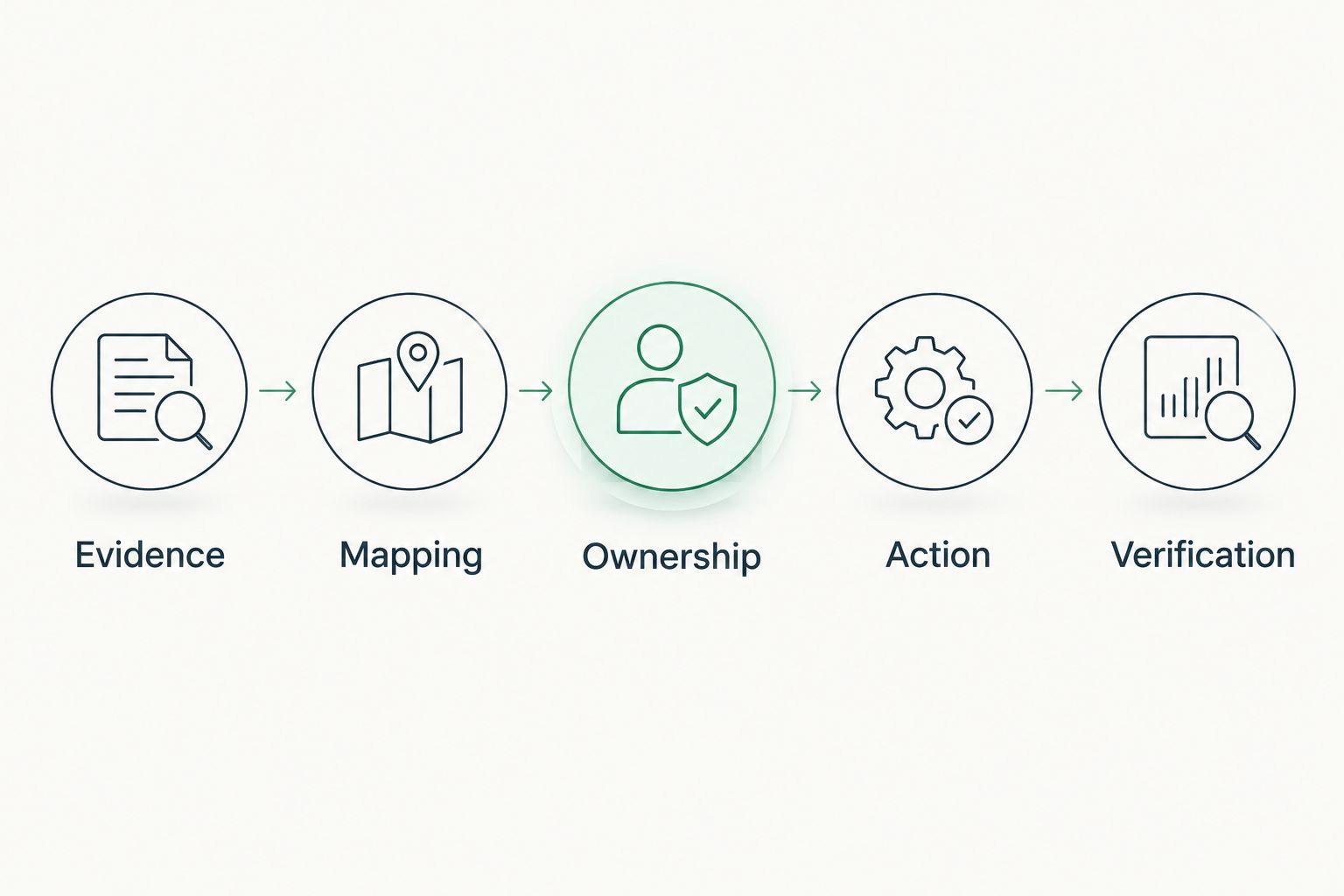
Run 1 controlled rerun after the first successful transfer. Check whether it updates the existing work, creates duplicate work or leaves an exception. Record the observed result without assuming the next run will behave identically.
Keep a failed-permission case in the test. A source that cannot be read must remain unknown; it must not become evidence of a healthy control.
Turn Prospect Evidence Into an Agreed Scope
The SCOUTz Evidence-to-Agreement Framework connects preparation to a buyer-approved next action: Find the decision, Bring the evidence, Build the scope, Earn the next commitment. It is a conversation framework, not a proven sales-performance intervention.
Consider an illustrative DMARC discussion. The condition is a published monitoring-only policy. Attach the domain, check and run date; explain that the observation does not establish compromise. Identify who owns reporting and whether monitoring-only remains intentional.
The scope comparison should preserve choice:
| Next Choice | Best For | Benefit | Limitation |
|---|---|---|---|
| Keep the intended configuration | An owner who confirms the current policy is deliberate | Preserves the agreed operating decision | Does not establish enforcement readiness |
| Authorize further review | Unclear sender ownership or reporting responsibility | Defines the evidence needed for a decision | Requires additional scope and authorization |
| Approve a scoped change | A validated requirement with an accountable owner | Creates an explicit implementation outcome | Needs verification after the change |
Illustrative follow-up script: The attached observation records the published policy and run date. Please confirm the reporting owner and whether monitoring-only remains intended. If further review is appropriate, approve the proposed scope before any configuration work begins.
Only the agreed action belongs in delivery. A finding alone does not establish an unresolved problem or a purchase decision.
For prospect preparation, Join Open Beta is the primary next step. Use the demo conversation to discuss MSP fit and the workflow you need evaluated.
Review Your Evidence Workflow
Discuss prospect preparation, evidence boundaries and your required operational handoff.
Which MSP Tools Should You Choose?
Keep your existing PSA as the default anchor unless the acceptance test establishes a reason to change it. Start with the matching operational shortlist, then compare alternatives against the same requirements.
Buy prospect intelligence when preparation is the missing job. Buy RMM for endpoint operations and PSA for service coordination. A broad product menu does not erase those boundaries.
FAQ
What are the best MSP tools ranked by PSA and RMM integration?
Start with ConnectWise PSA and ConnectWise Automate for ConnectWise-centered operations, Autotask PSA and Datto RMM for Autotask-centered operations, and HaloPSA with NinjaOne for a separate-vendor evaluation. This is a workflow-fit shortlist, not a measured integration-performance ranking.
Is a shared-vendor PSA and RMM pairing always better?
No. Shared ownership does not establish that your required fields, update direction, permissions and exception handling work. Test the complete workflow before choosing.
What should an MSP test before buying an integration?
Test account matching, affected-object context, ownership, updates, resolution and failure visibility. Include a controlled rerun and a failed-permission case rather than demonstrating only a successful transfer.
Does SCOUTz send records directly to ConnectWise?
Native Send to ConnectWise is planned in the client-supplied October 15, 2026 product reference. Ticket-ready text exists, but it is not evidence of native sending.
Can a public-domain review replace an RMM assessment?
No. Public-domain evidence cannot establish endpoint state or internal Microsoft 365 configuration. Keep public observations separate from authorized internal evidence.
Does a Microsoft 365 review read customer email?
SCOUTz Microsoft 365 evidence is read-only configuration and metadata, not email contents. The stated boundary also excludes files, chats, documents and prompts.
Should every security finding become a PSA ticket?
No. Confirm the condition, evidence boundary, owner and agreed outcome before creating delivery work. A finding does not establish buyer agreement or a required change.
One Last Thing
Test a withdrawn permission before you approve a connector. Successful transfers show what happens when the path is open; revoked access shows whether your team can distinguish missing evidence from a clean result. Keep that distinction in the sales report and the service record.