
To review Microsoft 365 permissions before adding AI agents, map each agent to its identity, permission model, accessible resources and business owner, then compare that access with the approved task. Review both existing grants and newly requested permissions using customer-authorized tenant evidence. Permission grants show authorized capability; they do not establish what an agent has read, whether it has misused access or whether a breach occurred.
- Review Microsoft 365 permissions before adding AI agents by tracing identity, consent, resource scope and ownership.
- SCOUTz is best for MSPs preparing Microsoft 365 evidence for client conversations.
- Delegated permissions and application permissions require different access reviews; neither establishes misuse by itself.
- Keep unread sources unknown, record the review date and verify approved changes against a pinned baseline.
Why this matters
An agent's advertised task is not its permission boundary. A meeting assistant, research workflow or background automation needs an access review tied to its actual implementation. Product descriptions alone do not establish which users, sites or applications are reachable.
For your 2026 review, separate capability from activity. A permission grant describes an authorization; activity evidence addresses use within the sources and retention window examined. Keep OAuth permissions versus compromise evidence separate in the client report.
The useful output is a decision record: what the agent needs, what the tenant currently permits, what remains unknown and who accepts the next action. A permission inventory without that decision leaves the MSP with findings but no agreed scope.
How to review Microsoft 365 permissions before adding AI agents
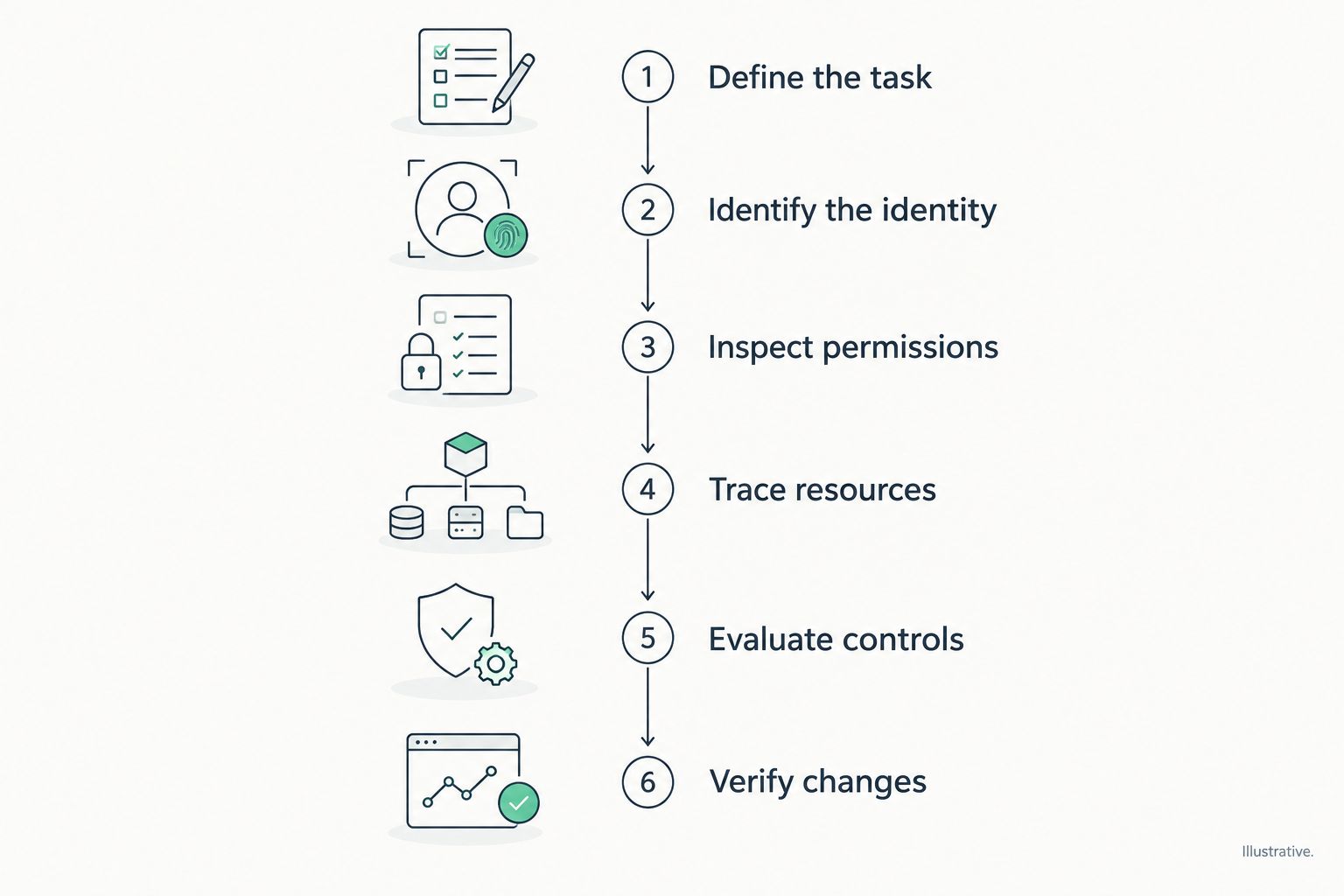
Use these 6 review steps before approving production access. Keep evidence collection read-only; configuration changes belong in a separately approved implementation plan.
1. Define the task and name the owner
Write down the agent's intended job in business terms. Specify the inputs it needs, the actions it performs and the people who receive its outputs. Name the business owner and the technical owner who can approve access changes.
Define the boundary before inspecting permissions. For example, a workflow intended to summarize an approved project site needs an explanation if its requested access extends beyond that site. This is a scope question, not evidence of malicious behavior.
Record what success means and which actions require human approval. Separate reading information from sending messages, changing records or taking administrative actions. Those capabilities carry different approval requirements.
2. Identify the execution identity
Determine whether the agent acts through a signed-in user, an application identity or another connector-specific identity. In Microsoft Entra, inspect the relevant enterprise application and service principal. Examine the app registration where applicable and accessible.
Capture the application ID, service principal object ID, publisher information and owner. Match these identifiers to the agent or connector documentation. Display names alone are insufficient for distinguishing similarly named applications.
Inspect existing integrations too. Adding an agent to established software can involve an existing application's grants rather than a newly created enterprise application. Record any identity you cannot map as unknown, with an owner assigned to investigate.
3. Inspect permissions and consent
Separate delegated permissions from application permissions. Record the resource API, exact permission name, consent type and scope of each grant. Distinguish permissions requested by an application from permissions actually granted in the tenant.
For delegated access, determine whose authorization is involved and how the service evaluates that user's access. For application access, inspect the app's granted roles and any supported resource restrictions. A tenant-wide permission deserves a specific business justification, but it does not establish that the application is malicious.
Do not stop at the consent screen. Consent is part of the authorization picture; resource assignments, service-specific controls and the agent's implementation also matter.
4. Trace the reachable resources
Map the approved task to the relevant SharePoint sites, Teams resources, mailboxes or other connected services. Review applicable group membership, guest access, sharing settings and resource-specific assignments. Keep each service's evidence separate.
Where an application uses selected-resource permissions, inspect the corresponding resource grants. The permission name alone does not describe which resources have been assigned. Likewise, a broad permission label does not prove that every resource was accessed.
Document the boundary of your inspection. A configuration review can describe grants and sharing settings without reading business content. State when content classification, document-level access or another source was outside the authorized review.
5. Evaluate identity controls and activity separately
Review the applicable authentication and access controls for the identity involved. Distinguish policies targeting users from controls applicable to workload identities. Confirm licensing, scope, exclusions and policy state before claiming coverage.
Inspect sign-in and audit evidence where authorized and available. Record the time window, filters and source. A successful sign-in establishes an authentication event in that source; it does not, by itself, establish document retrieval or data disclosure.
Keep absent activity and unread activity separate. An empty result requires context about the query, retention and collection success. A failed collection belongs under NOT ASSESSED THIS SCAN, with its reason.
6. Decide, document and verify
For each permission, record the approved purpose, affected object, evidence source, review date, unknowns and recommended outcome. Assign an owner to each action. Keep the desired outcome separate from the vendor or service selected to deliver it.
Use 3 decision outcomes: approve the documented scope, reduce the scope before approval, or defer pending evidence. These are approval decisions, not security scores. The business owner retains the choice.
Pin the pre-change baseline for the 2026 review. After authorized changes, repeat the relevant checks and compare the same objects and evidence sources. The comparison establishes what changed within the assessed scope.
Delegated permissions and application permissions
Start with these 2 permission models, then inspect service-specific authorization. Microsoft Graph documentation distinguishes delegated permissions, used on behalf of a signed-in user, from application permissions, used without a signed-in user. Neither model is an automatic approval or rejection.
| Permission model | Best for | Useful boundary | Limitation to review |
|---|---|---|---|
| Delegated permissions | Tasks performed on behalf of a signed-in user | For Microsoft Graph, access is constrained by granted scopes and the user's authorization | Excessive user access or broad scopes can exceed the intended task |
| Application permissions | Approved background tasks without an interactive user | An application has explicit authorization independent of a signed-in user | Broad application roles require scrutiny and supported resource restrictions |
A permission such as Microsoft Graph Files.Read.All must be interpreted in its delegated or application context. Recording the name without the permission type loses essential meaning. Capture both in the evidence packet.
Use Microsoft's current Graph permissions reference, Entra application-consent documentation and relevant service documentation to interpret grants. Attach the documentation consulted and consultation date to your workpaper. A 2026 decision record should preserve the basis for approval alongside the tenant evidence.
Why the review scope varies
The same agent label can describe different authorization paths. Scope the assessment from the actual integration and customer-authorized evidence, rather than assuming every agent uses the same access model.
- Execution identity: user-delegated and application-only workflows require different authorization checks.
- Connected services: SharePoint, Exchange, Teams and external connectors have distinct resources and controls.
- Existing access: user roles, group memberships and previously consented applications affect the review boundary.
- Supported restrictions: resource-specific permissions and service controls differ by integration.
- Evidence coverage: permission, license, retention and collection limits determine what you can substantiate.
- Intended actions: reading, writing, sending and administering require separate business justification.
Do not combine these factors into an invented readiness score. Give the owner a condition, its possible consequence and a next choice. That is enough to support a scoped decision without implying a confirmed incident.
Record evidence, insight and proof separately
Use a consistent finding format in the 2026 assessment. Keep the observation attached to its source and collection date, and distinguish the business interpretation from what the check actually established.
Illustrative finding format, not a customer result:
- Observed: an application has a granted permission broader than the documented task requires.
- Evidence: exact permission, permission type, application ID, affected resource and collection timestamp.
- Possible consequence: the authorization allows capability beyond the proposed workflow's stated scope.
- Boundary: the grant does not establish misuse, compromise or actual retrieval of information.
- Owner: the named application owner and customer approver.
- Next choice: justify the grant, narrow supported access or defer deployment.
- Proof: repeat the relevant checks after an approved change against the pinned baseline.
Keep evidence state separate from coverage. Observed describes an observation; Inferred identifies an interpretation. Coverage labels such as Partial, Permission limited and Not assessed explain the assessment boundary. They are not interchangeable confidence grades.
A public-domain review cannot establish Conditional Access coverage, application permissions, license assignments or tenant sharing configuration. Those require appropriate internal evidence. A domain observation cannot fill a tenant-evidence gap.
Turn the review into an agreed next action
Keep the technical recommendation short enough for the business owner to approve or decline. State the affected workflow, proposed boundary, implementation owner and verification method. Avoid converting a permission finding into an assumed sales opportunity.
Apply the SCOUTz Evidence-to-Agreement Framework to the review conversation:
- Find the decision: identify who approves the agent's task and access boundary.
- Bring the evidence: show the dated grant, resource scope and assessment limits.
- Build the scope: separate review work, configuration changes and post-change verification.
- Earn the next commitment: agree on an owner and the next approval or evidence request.
This is a conversation framework, not a proven sales intervention. For a client requesting immediate deployment, offer a documented approval boundary and unresolved-evidence list. For a client disputing a finding, return to the source and scope before discussing remediation.
Your proposal should preserve buyer choice. Permission reduction, a different workflow, further review or no change can each be an explicit decision. Record the rationale rather than treating every observation as mandatory project work.
Where SCOUTz fits
SCOUTz, by RYTHMz, provides dated cybersecurity evidence and account context for MSP preparation. In the client-provided product reference dated October 15, 2026, Microsoft 365 Review is Open Beta. Its customer-authorized review uses configuration and metadata, without reading mail, files, chats, documents or prompts.
That boundary supports evidence-led conversations while limiting what the review can establish. It does not establish the content of documents an agent accessed or replace agent-specific testing. The review is read-only, with no agent installation or automatic configuration changes; the MSP remains responsible for judgment and the client relationship.
FAQ
Do I need tenant access to review Microsoft 365 permissions before adding AI agents?
You need customer-authorized tenant evidence to establish internal application permissions and relevant configuration. Public-domain observations cannot establish those settings; an authorized administrator can supply appropriately scoped evidence.
Are delegated permissions safer than application permissions?
Delegated permissions are not automatically safer than application permissions. Review the task, granted scopes, user's authorization, resource restrictions and execution model before deciding which access is appropriate.
Does admin consent mean an application is safe?
Admin consent records authorization, not a security certification. Review the publisher, requested purpose, actual grants, resource scope and accountable owner separately.
Does a broad Microsoft Graph permission prove that an agent read confidential files?
A broad Microsoft Graph permission does not prove that an agent read confidential files. Establish actual activity using appropriate authorized evidence, and state its collection and retention limits.
Can I assess agent permissions without reading customer documents?
You can assess permission grants and relevant configuration without reading customer documents. That scope does not establish document contents, content sensitivity or every item an agent retrieved.
What should I do when permission evidence cannot be collected?
Record the evidence as unread or unknown and identify the coverage limitation. Assign an owner to obtain authorized evidence or defer the access decision; an unread source is not a clean result.
Can SCOUTz change permissions after a Microsoft 365 review?
SCOUTz performs a read-only review and makes no automatic configuration changes. The MSP and customer approve implementation separately, then verify authorized changes against the baseline.
One last thing
A smaller permission list is not proof of a smaller effective access boundary. Group membership, resource assignments and the remaining grants still require review. Verify the intended outcome, rather than counting removed permissions.
For MSPs evaluating SCOUTz for this preparation work, the primary next step is Join Open Beta. Keep the immediate client commitment narrower: an approved review scope, a named owner and a dated evidence baseline.