
Best overall for prospect evidence: SCOUTz. Best for Microsoft 365 posture context: Microsoft Secure Score. Best for a presenter-led deck: Microsoft PowerPoint. Best for shared editing: Google Slides. Choose the evidence source first, then the presentation tool.
- SCOUTz is the best fit for MSPs building security sales conversations around dated prospect evidence.
- For an MSP sales deck security posture review, separate public-domain findings from authorized Microsoft 365 evidence.
- Microsoft Secure Score adds tenant context; PowerPoint and Google Slides organize the presentation.
- End with an agreed scope, an owner and a verification step, rather than a frightening prediction.
Why this matters
A security sales deck has two jobs: explain what you know and help the prospect choose a next action. A finding earns a place only when its source, date, limits and business relevance survive the move from report to slide.
Your presentation software cannot supply that discipline. In 2026, evaluate evidence collection separately from slide production. A polished presentation with an unsupported claim still gives the buyer an unsupported claim.
Keep the distinction visible throughout the meeting. Public-domain observations describe externally observable conditions. Customer-authorized Microsoft 365 evidence describes the configuration and metadata actually reviewed, within the permissions and coverage of that review.
What makes the best tools for security sales decks
Use these criteria before comparing products:
- Source traceability: Each finding retains its check name, affected object, source and run date.
- Coverage boundaries: The presentation distinguishes assessed evidence from partial, unreadable and unassessed areas.
- Buyer relevance: Each observation supports a decision or a discovery question, with the consequence kept separate from the condition.
- Scope discipline: The evidence supports a proposed outcome without forcing a particular vendor or project.
- Verification: A follow-up review compares the agreed condition against a pinned baseline.
- Presentation control: You can separate the client-safe summary from the technical appendix and control who receives each.
For your 2026 shortlist, require an example of the entire handoff: finding, explanation, proposed scope and verification. An attractive summary alone does not demonstrate that chain.
Best tools at a glance
These tools occupy different jobs. The ranking starts with evidence preparation because the deck depends on it; the presentation editors follow because they organize evidence you already have.
| Rank and tool | Best for | Standout capability | Key limitation |
|---|---|---|---|
| 1. SCOUTz | Prospect-specific evidence preparation | Dated domain evidence and customer-authorized Microsoft 365 review context | Microsoft 365 Review and reporting were labeled Open Beta in the October 15, 2026 client reference |
| 2. Microsoft Secure Score | Authorized Microsoft tenant posture context | Microsoft's security posture measurement and recommended actions | A score does not establish a prospect's business priorities |
| 3. Microsoft PowerPoint | Presenter-led decks with technical appendices | Slide editing, presenter notes and presentation structure | Does not establish whether imported security claims are true |
| 4. Google Slides | Collaborative review before a prospect meeting | Shared slide editing and comments | Collaboration does not validate evidence or its scope |
1. SCOUTz: best security sales tool for prospect evidence
SCOUTz provides cybersecurity prospect intelligence for MSPs preparing sales conversations. It brings dated evidence and account context into discovery, with public-domain observations separated from customer-authorized Microsoft 365 reviews.
Use it to establish what was observed, explain why the condition deserves discussion and define what would count as proof of change. The relationship, qualification decision and sale remain the MSP's responsibility.
SCOUTz pros:
- Domain reviews support a prospect-specific starting point instead of a generic threat presentation.
- Microsoft 365 review boundaries restrict evidence to configuration and metadata, excluding mail, files, chats, documents and prompts.
- Evidence Reports / Studio + Reports support the reporting side of the conversation, subject to the supplied beta status.
- Rescans support verification against a pinned baseline.
SCOUTz cons:
- The October 15, 2026 client reference labels Microsoft 365 Review, Prospect Intelligence and reporting Open Beta; confirm the workflow before depending on it.
- Public Domain Review cannot establish Conditional Access coverage, application permissions, license assignments or tenant sharing configuration.
- Evidence still requires MSP interpretation and human sign-off before a sales claim reaches a prospect.
Best for: MSP owners and sales leaders who need dated prospect evidence before building the presentation.
For an evaluation, make Join Open Beta the next step. Review your intended evidence-to-report workflow during the human MSP-fit review rather than assuming acceptance or a particular reporting experience.
Verdict: Buy for the evidence-preparation job only after beta evaluation confirms your required workflow.
2. Microsoft Secure Score: best for authorized tenant posture context
Microsoft Secure Score measures security posture within supported Microsoft services and presents recommended actions. Use it when the prospect has authorized appropriate tenant access and Microsoft configuration is part of the decision.
Bring the relevant recommendation and its supporting context into the deck. Explain the reviewed scope separately from the score, and keep business priority distinct from Microsoft's scoring system.
Microsoft Secure Score pros:
- Gives Microsoft-focused discussions a named source for posture recommendations.
- Supports conversations about configuration improvement within its assessed scope.
- Helps a technical reviewer examine the basis of a Microsoft-specific recommendation.
Microsoft Secure Score cons:
- A posture score does not prove that a breach occurred or establish buying intent.
- Microsoft-focused evidence leaves other platforms and business processes outside that view.
- A recommended action still needs an owner, an operational review and an agreed outcome.
Best for: MSPs preparing an authorized Microsoft tenant discussion where the source recommendation matters more than a broad prospect narrative.
Avoid presenting a higher score as the contract's only success criterion. Define the configuration outcome the buyer approves, including any exceptions, and preserve the evidence used to verify it.
Verdict: Buy for Microsoft tenant context; keep the commercial decision separate from the score.
3. Microsoft PowerPoint: best for presenter-led security decks
Microsoft PowerPoint turns reviewed material into a presentation with slides, speaker notes and supporting detail. Use it when you need a concise business discussion backed by a technical appendix.
Put the decision on the main slide. Keep the check output, affected object, observation date and limitations in a clearly referenced evidence section so the presenter can explain the basis without crowding the opening discussion.
Microsoft PowerPoint pros:
- Supports separate presentation and speaker-note layers.
- Gives you direct control over slide sequence and appendix structure.
- Accommodates a client-safe summary alongside more detailed supporting slides.
Microsoft PowerPoint cons:
- Imported findings require manual checking against their source and date.
- Copies shared outside the working file need deliberate version control.
- Slide design cannot resolve an uncertain finding or missing assessment coverage.
Best for: MSP sellers leading a structured meeting with a technical reviewer available for deeper questions.
Before presenting, compare every evidence slide with the source report. If the source has changed, update the conclusion as well as the screenshot. A current image paired with an old explanation still misstates the evidence.
Verdict: Buy for presentation control once the underlying evidence has passed review.
4. Google Slides: best for collaborative deck review
Google Slides supports shared presentation editing and comments. Use it when the salesperson, technical reviewer and account owner need to work through the same draft before the meeting.
Give reviewers distinct responsibilities. The practitioner checks the evidence; the seller checks the decision and next action; the account owner checks the buyer context and distribution list.
Google Slides pros:
- Supports shared editing of a working presentation.
- Comments keep review discussion near the relevant slide.
- Sharing controls help you manage access to the draft.
Google Slides cons:
- Sharing permissions require review before prospect-specific evidence is added.
- Review comments do not prove that a technical claim has been approved.
- The team still needs a clear final version and an accountable presenter.
Best for: MSP teams that need collaborative review before delivering a prospect-facing presentation.
Separate the internal draft from the client-facing copy. Remove internal hypotheses, unresolved comments and sensitive operator material before sharing, while retaining the evidence boundaries the buyer needs to understand.
Verdict: Buy for collaborative preparation when shared editing is the main requirement.
How the ranking works
This is a job-based ranking, not a measured performance test. Evidence traceability, coverage boundaries, buyer relevance, scope discipline, verification and presentation control determine each tool's place.
The first choice supplies prospect evidence. The second supplies Microsoft-specific posture context. The remaining choices package reviewed material. No ranking here establishes faster sales cycles, higher close rates or better security outcomes.
Turn evidence into an agreed next action
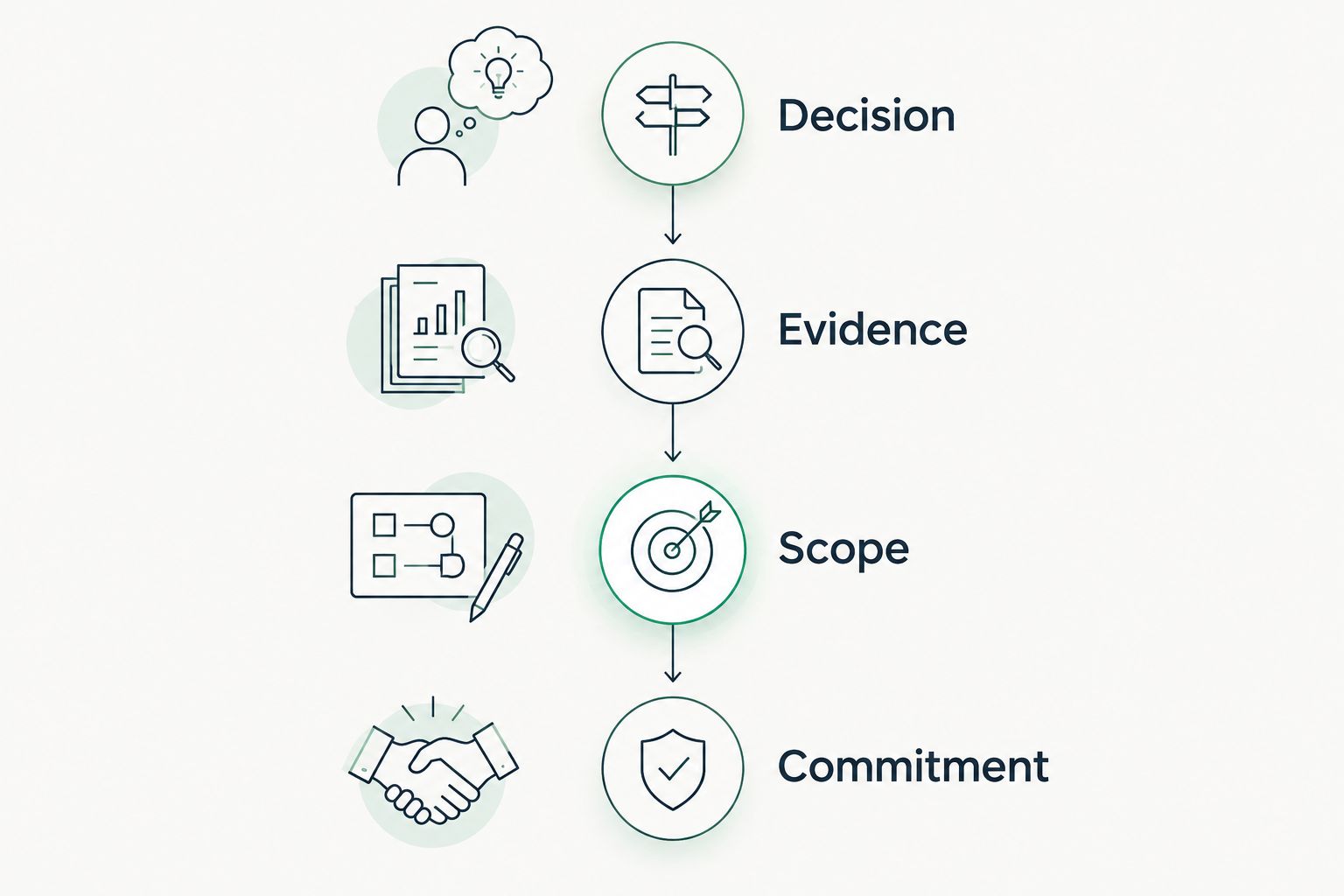
Use the SCOUTz Evidence-to-Agreement Framework to connect the deck to a decision: Find the decision, Bring the evidence, Build the scope, Earn the next commitment. This is a conversation framework, not a validated close-rate intervention.
Decision
Find the decision before choosing slides. Establish whether the buyer is deciding on an authorized review, a configuration change, a defined project or continued observation.
Write the decision in the meeting objective. Keep public events and enrichment as research context; neither establishes that the prospect intends to buy.
Evidence
Bring the evidence with its source and run date attached. State the observed condition, explain a possible consequence, name the unknowns and identify who can clarify the intended configuration.
For a published DMARC policy requesting monitoring only, discuss intended enforcement and report ownership. The policy alone does not establish compromise or an unresolved problem.
Scope
Build the scope around the agreed outcome. Offer 2 scope options when the decision genuinely supports alternatives, such as reviewing reporting and sender dependencies before proposing an enforcement change.
Name exclusions. A public-domain review cannot answer tenant-level questions that require customer-authorized internal evidence.
Commitment
Earn the next commitment by recording the action, owner and approval required. Assign 1 accountable owner to the next step so responsibility remains explicit.
Define how you will verify the result. A rescan against a pinned baseline supplies evidence of what changed within the reviewed scope.
Illustrative objection handling and follow-up
The following dialogue illustrates a conversation pattern, not a customer event or product result.
Prospect: Our provider already handles email security.
MSP: This observation concerns the published DMARC policy. It does not establish how your provider manages the service. With your approval, the next step is to confirm who reviews reports and whether monitoring-only remains intended.
Follow-up script: The decision is whether to review the intended DMARC configuration with your current owner. Proposed scope covers the published policy, report ownership and sender dependencies. Tenant controls remain outside this public-domain review. Please confirm the owner and whether you approve that review.
Build a six-slide security posture deck
Use 6 slides as an editorial starting point for your 2026 prospect meeting. Expand only when the buyer needs more evidence to make the decision.
- Decision: State the choice the meeting is intended to support.
- Coverage: List the sources reviewed, their dates and anything not assessed this scan.
- Observation: Show the condition, affected object and check evidence.
- Implication: Explain the possible consequence and the questions still open.
- Scope: Present the proposed outcome, exclusions and alternative path.
- Commitment: Record the next action, accountable owner and verification method.
Keep detailed technical output in the appendix. Preserve evidence states such as Observed, Inferred and Unknown without turning them into a linear score ladder. Record coverage separately, including Partial, Permission limited or Not assessed where applicable.
Which tools should you choose in 2026?
Choose the evidence workflow first and the slide editor second. Use Microsoft Secure Score for authorized Microsoft posture context, PowerPoint for presenter-led structure and Google Slides for shared preparation.
Before committing to a prospect-intelligence workflow, inspect a finding from source through report to rescan. Confirm that dates, unknowns, coverage and approval survive every handoff. Keep unread evidence explicitly unknown rather than presenting it as clean.
FAQ
What's the best tool for an MSP sales deck security posture review?
Choose an evidence-preparation tool before choosing a slide editor. SCOUTz fits MSP prospect evidence preparation; Microsoft Secure Score supplies Microsoft posture context, while PowerPoint and Google Slides organize reviewed material.
Is Microsoft Secure Score enough for a security sales deck?
Microsoft Secure Score supplies Microsoft-focused posture context, not a complete prospect decision. Add the assessed scope, source date, business objective, unknowns and proposed next action.
Can a public-domain review show Microsoft 365 security gaps?
A public-domain review cannot establish internal Microsoft 365 configuration such as Conditional Access coverage or application permissions. Those questions require appropriately authorized internal evidence with its access and coverage limits stated.
Does a monitoring-only DMARC policy prove a prospect is unsafe?
A monitoring-only DMARC policy establishes the published policy's requested treatment, not a confirmed compromise. Clarify intended enforcement, report ownership and sender dependencies before proposing changes.
How many slides should an MSP security sales deck have?
Use six slides as a starting structure: decision, coverage, observation, implication, scope and commitment. Keep detailed check output in an appendix and expand only when the decision requires it.
Should an MSP include a projected breach cost?
Do not invent breach-loss forecasts to justify a proposal. Explain the observed condition, its possible consequence, the evidence limits and the outcome the prospect can choose.
How should an MSP follow up after presenting security evidence?
Send a decision record naming the agreed scope, owner, approval and verification step. Keep unresolved questions explicit and avoid treating an email open as agreement or buying intent.
One last thing
Check the strongest claim in the deck before checking its design. If that sentence cannot carry a source, date and boundary, rewrite it before the meeting.
For your final 2026 review, distinguish evidence age from publication age. A newly exported deck can still contain an old observation. Recheck the condition before describing it as current.