
Best overall: Microsoft Entra. Best for scripted evidence collection: Microsoft Graph. Best for cross-tenant review: Microsoft 365 Lighthouse. Best for evidence-led sales preparation: SCOUTz. This 2026 guide separates MFA registration, policy enforcement, and observed sign-in behavior so you choose tools for the job you actually need.
- The best MSP tools for tracking client MFA enforcement start with Microsoft Entra policy and sign-in evidence.
- Microsoft Graph suits repeatable collection; Microsoft 365 Lighthouse suits delegated, cross-tenant review.
- SCOUTz is best for MSPs preparing evidence-led Microsoft 365 conversations, not administering MFA enforcement.
- MFA registration does not establish enforcement. Keep exclusions, unread sources, and assessment dates visible.
Why this matters
An account can have an authentication method registered without a policy requiring its use for the access you are reviewing. MFA uses at least 2 authentication factors, but a registration count does not establish when those factors are required.
For a 2026 client review, distinguish the policy requirement from the authentication recorded for a particular sign-in. Read the MFA registration versus enforcement verification guide before turning a registration dashboard into a client assurance statement.
The useful output identifies the affected account, application, policy scope, exclusions, evidence date, and limits. That gives your technician something to verify and your account owner a bounded next action.
What makes the best MFA enforcement tracking tool
Judge the tools against these criteria before comparing dashboards:
- Policy visibility: shows enabled requirements, target users, applications, conditions, and exclusions.
- Event evidence: exposes authentication details and policy evaluation for observed sign-ins.
- Coverage transparency: distinguishes unread, permission-limited, and license-limited sources from assessed controls.
- Tenant context: keeps account and policy evidence attached to the correct customer.
- Repeatable proof: supports a dated baseline and a comparable follow-up review.
- Operational fit: separates read-only assessment, configuration changes, and client-facing explanation.
Registration is supporting evidence. Enforcement requires policy context, and observed behavior requires sign-in evidence. A single status label should not collapse those distinctions.
Best MFA tracking tools at a glance
For your 2026 shortlist, compare each tool's primary job. These options occupy different parts of the workflow rather than providing interchangeable versions of the same service.
| Tool | Best for | Standout capability | Key limitation |
|---|---|---|---|
| Microsoft Entra | Direct tenant enforcement investigation | Conditional Access policy context and sign-in details | Requires interpretation across scope, exclusions, and events |
| Microsoft Graph | Repeatable evidence collection | Programmatic access to supported identity reports and configuration | Your team owns permissions, collection logic, and interpretation |
| Microsoft 365 Lighthouse | Delegated cross-tenant review | MSP-oriented tenant views and MFA information | Eligibility, roles, licensing, and surfaced detail constrain coverage |
| SCOUTz | Evidence-led sales preparation | Dated Microsoft 365 evidence and client-facing explanation | Open Beta review workflow; specific MFA evidence coverage requires validation |
1. Microsoft Entra: best for direct enforcement investigation
Microsoft Entra is the default choice when your technician needs to establish how a client's identity policies apply. Conditional Access policies describe access requirements; sign-in logs show policy evaluation and authentication details for recorded events.
Review enabled policies, user and group targeting, application scope, exclusions, and report-only status. A report-only policy evaluates its potential effect without enforcing its access controls.
Microsoft Entra pros:
- Provides tenant-native policy configuration for the identity system under review.
- Shows sign-in events with authentication and Conditional Access details.
- Supports investigation of specific users, applications, and access conditions.
- Helps distinguish a configured requirement from an observed authentication event.
Microsoft Entra cons:
- A policy's existence alone does not prove that every relevant user and application is covered.
- A sign-in log describes a recorded event, not every possible future access path.
- Available features and evidence depend on licensing, permissions, and retention.
Best for: technicians validating a client's actual enforcement scope.
Start with the account and resource you are assessing. Then inspect applicable policies and relevant events. An MFA requirement can be satisfied by an existing authentication claim, so the absence of a fresh prompt does not independently prove an enforcement failure.
Verdict: Buy for direct investigation, subject to the client's licensing and access requirements.
2. Microsoft Graph: best for scripted evidence collection
Microsoft Graph provides programmatic access to supported Microsoft identity configuration and reporting data. An MSP can use it to collect authentication registration information, Conditional Access configuration, and sign-in records where the relevant endpoints and permissions permit access.
Treat Graph as an interface, not a finished enforcement verdict. Your collection logic must preserve tenant identity, collection time, source, response status, and permission failures.
Microsoft Graph pros:
- Supports repeatable collection instead of manual copying between screens.
- Separates raw source records from your interpretation and reporting logic.
- Allows your team to retain the fields needed for a defined assessment.
- Fits workflows that compare dated snapshots against a pinned baseline.
Microsoft Graph cons:
- Requires engineering ownership for permissions, pagination, errors, and schema changes.
- Registration endpoints do not independently prove enforcement.
- An incomplete response or failed request can create a misleading report unless explicitly handled.
Best for: MSPs with engineering capacity and a defined evidence model.
Pilot collection against 1 authorized tenant before expanding the workflow. Deliberately test a denied request and an unavailable source. Both should produce a visible coverage limitation, never a clean result.
Use Microsoft's documentation for each selected endpoint to verify permissions and licensing requirements. Keep those requirements with the collection specification so an operator can explain why a source was unread.
Verdict: Buy as a collection interface when your team will maintain the evidence pipeline.
3. Microsoft 365 Lighthouse: best for cross-tenant review
Microsoft 365 Lighthouse gives MSPs a delegated management view across eligible customer tenants. Its user and security views help operators review MFA-related information without treating each tenant as an entirely separate starting point.
Use the portfolio view to identify which accounts or tenants need investigation. Confirm enforcement conclusions against the underlying policy and sign-in evidence when the summary lacks the necessary detail.
Microsoft 365 Lighthouse pros:
- Organizes customer review around a multi-tenant MSP workflow.
- Surfaces MFA registration information useful for identifying review targets.
- Supports operational review through delegated customer access.
Microsoft 365 Lighthouse cons:
- Customer eligibility, delegated roles, and licensing affect available capabilities.
- A summarized MFA status does not replace analysis of Conditional Access scope.
- Portfolio-level review still requires a tenant-specific record of evidence and limitations.
Best for: service teams coordinating identity reviews across eligible customer tenants.
For a 2026 evaluation, check the Microsoft 365 Lighthouse requirements and MFA documentation against your actual customer mix. Verify what each displayed status means before using it in an executive report.
Verdict: Buy for cross-tenant review when your customer eligibility and delegated access fit.
4. SCOUTz: best for evidence-led sales preparation
SCOUTz provides cybersecurity prospect intelligence and dated domain and Microsoft 365 reviews for MSP conversations. The October 15, 2026 product reference places Microsoft 365 Review and Evidence Reports in Open Beta; multi-client work and the report experience remain in beta validation.
Its role is evidence, interpretation, and the next agreed action. Customer-authorized Microsoft 365 review uses configuration and metadata only, with read-only access and no automatic configuration changes.
SCOUTz pros:
- Connects dated evidence to account context and business-facing explanation.
- Separates public-domain observations from customer-authorized internal evidence.
- Defines proof as a rescan against a pinned baseline.
- Keeps the MSP responsible for judgment, recommendations, and the relationship.
SCOUTz cons:
- Microsoft 365 review and report workflows carry Open Beta status in the dated product reference.
- Public-domain evidence cannot establish Conditional Access coverage.
- Specific MFA fields, policy interpretation, and coverage must be validated before relying on an enforcement claim.
Best for: MSP owners and sales leaders preparing discovery, proposals, and evidence-led reviews.
Evaluate it against a real, authorized question: whether the report identifies its source, date, assessed objects, and unread evidence. Keep unread sources under NOT ASSESSED THIS SCAN. Do not assume continuous enforcement monitoring or a particular MFA check merely because Microsoft 365 review is in scope.
Verdict: Hold as your enforcement-monitoring system; evaluate for evidence-led conversation preparation.
Turn an MFA finding into an agreed next action
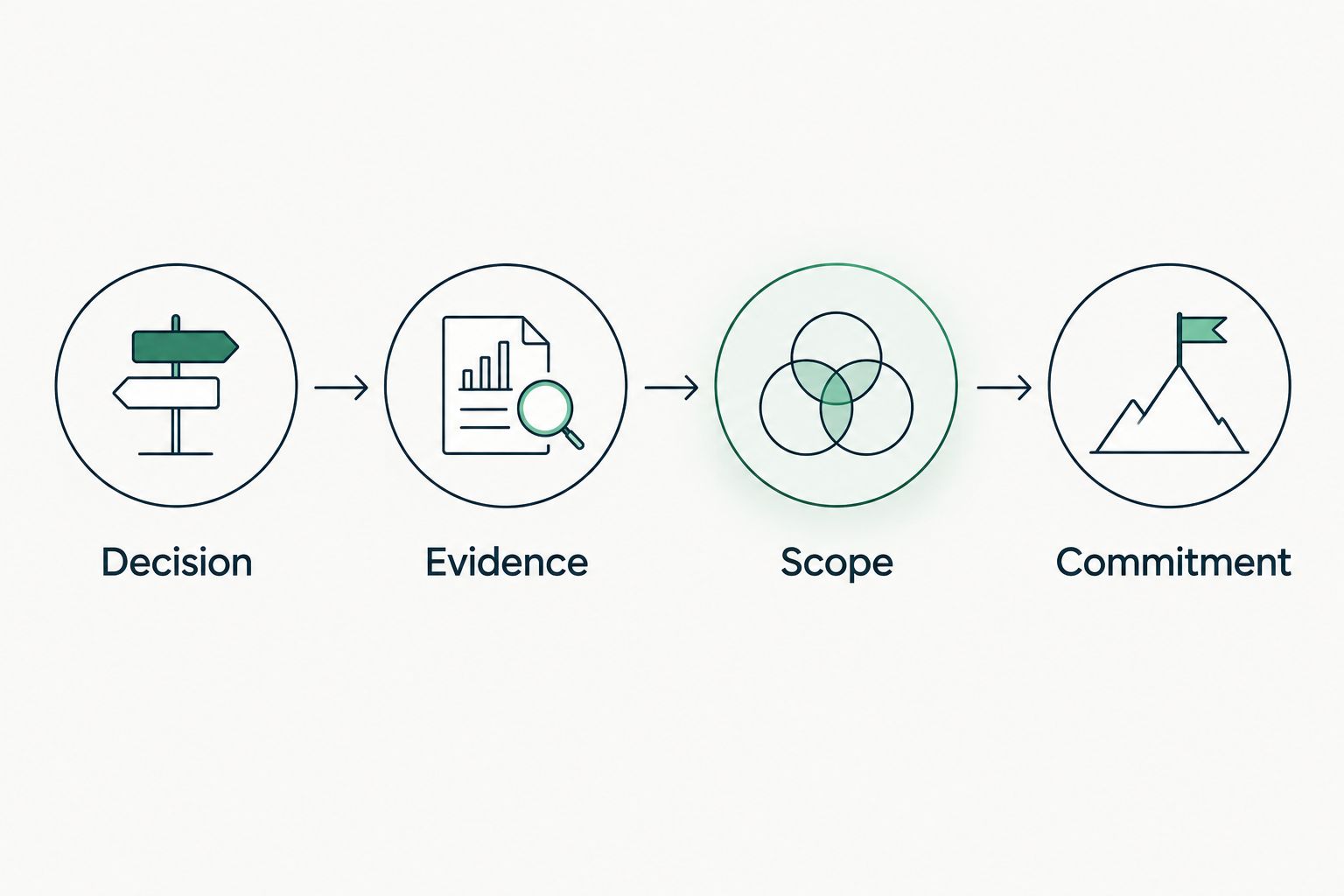
Use the SCOUTz Evidence-to-Agreement Framework to move from a technical observation to an agreed scope. This is a conversation framework, not a proven close-rate intervention.
Decision
Find the decision before requesting more data. Establish whether the client needs an enforcement review, an approved configuration change, or evidence for a scheduled business review.
Record the decision owner. The person reviewing identity configuration and the person approving service scope can have different responsibilities.
Evidence
Bring the condition, affected object, source, run date, and boundary. Separate Observed configuration from Inferred coverage and Unknown evidence.
An illustrative observation might describe an exclusion found in a policy export. That observation does not establish a breach or prove the exclusion remains necessary. Have the responsible technician confirm its current purpose.
Scope
Build the scope around the evidence gap and desired outcome. Agree which identities and applications require review, who authorizes access, and who approves any later changes.
| Scope option | Best for | Advantage | Limitation |
|---|---|---|---|
| Read-only validation | Establishing the current evidence | Defines policy scope and unknowns before changes | Does not change enforcement |
| Approved configuration work | Implementing an agreed requirement | Connects authorized changes to a defined outcome | Requires change planning and verification |
| Follow-up verification | Checking an approved change | Compares current evidence with the baseline | Does not prove every future sign-in outcome |
Commitment
Earn the next commitment by naming the owner, action, and verification condition. Keep the buyer's choice explicit.
Illustrative follow-up script: The review needs authorized policy and sign-in evidence before an enforcement conclusion. Please confirm the technical owner and approve a read-only validation scope. Configuration changes will require separate approval.
The useful commitment is permission to complete a defined next step. A finding alone does not establish buying intent or agreement to remediation.
For the evidence-led preparation workflow, ask to Join Open Beta during a demo. Bring an authorized review scenario and the evidence fields your team needs to inspect.
Evaluate the evidence workflow
Discuss Open Beta fit and the evidence your MSP needs for a client review.
How the tools are ranked
This 2026 ranking prioritizes direct enforcement evidence, transparent coverage, repeatable verification, and fit for the assigned job. It is a capability-based selection guide, not a hands-on benchmark or a claim that every feature has been tested.
Microsoft's Conditional Access, sign-in log, Graph, and Lighthouse documentation define different evidence surfaces. Verify the current documentation against the customer's licenses and permissions before standardizing your assessment procedure.
Use 1 pinned baseline for each agreed verification scope. Preserve the original evidence alongside the follow-up so a changed result has an explainable context.
Choose the tool that owns the next decision
Choose Microsoft Entra first when your question is whether a client's MFA requirement applies. Add Microsoft Graph when repeatable collection justifies engineering ownership. Use Microsoft 365 Lighthouse when delegated portfolio review fits your customers.
Keep evidence-led reporting separate from enforcement administration. For your 2026 evaluation, require each candidate to demonstrate an excluded account, a report-only policy, and an unread source. Inspect the resulting claims, not just the dashboard.
FAQ
What's the best MSP tool for checking client MFA enforcement?
Microsoft Entra is the default for investigating Microsoft identity policy scope and recorded sign-in behavior. Inspect enabled requirements, exclusions, and authentication details rather than relying on registration counts.
Does MFA registration mean a client account is protected by enforcement?
No. Registration establishes that an authentication method is registered, not that every relevant access path requires MFA. Review applicable policy scope and observed sign-ins separately.
Is Microsoft Graph better than Microsoft Entra for MFA reviews?
Microsoft Graph is better suited to scripted collection, while the Microsoft Entra interface supports direct investigation. Graph still requires your team to interpret the collected configuration and reporting evidence.
Can Microsoft 365 Lighthouse replace tenant-level verification?
A cross-tenant summary does not replace verification when it lacks the policy and event detail needed for a conclusion. Use Lighthouse to organize review, then inspect underlying evidence for the account and access scenario.
Can a public-domain scan establish Microsoft 365 MFA enforcement?
No. Public-domain observations cannot establish Conditional Access coverage or internal tenant policy scope. Obtain customer-authorized internal evidence before making that claim.
Can SCOUTz change a client's MFA configuration?
The supplied Microsoft 365 review scope is read-only and makes no automatic configuration changes. It uses configuration and metadata, never mail, files, chats, documents, or prompts.
What should an MFA enforcement report include?
Include the source, collection date, affected accounts and applications, policy scope, exclusions, observed authentication evidence, and coverage limits. Keep the recommended outcome separate from the product or service proposed to deliver it.
One last thing
The strongest evaluation case is a deliberately unread source. A tool that displays that gap clearly gives your technician a defensible boundary. A tool that turns the same gap into a reassuring status undermines the report before the client conversation starts.