
Instead of manually rebuilding prospect context between a public scan and a tenant assessment, use a domain review to Microsoft 365 review handoff that carries dated findings into a separately authorized, read-only review. Preserve the public evidence, record customer consent, confirm the tenant, and return a scoped next action with a baseline for verification.
- The domain review to Microsoft 365 review handoff requires separate authorization and distinct evidence records.
- SCOUTz prospect intelligence suits MSPs preparing evidence-led discovery; Microsoft 365 findings require customer-authorized access.
- Public-domain evidence cannot establish tenant permissions, Conditional Access coverage, or internal sharing configuration.
- Keep unknowns visible, agree on scope, and verify authorized changes against a pinned baseline.
Why this matters
A domain finding gives you a question for discovery. Customer-authorized Microsoft 365 evidence helps establish whether an internal configuration needs further review. Confusing those jobs turns a useful observation into an unsupported sales claim.
SCOUTz is best for MSPs that want dated cybersecurity prospect intelligence before a sales conversation. The relationship, technical judgment, and sale stay with your MSP. Start with the product context on SCOUTz and make Join Open Beta your next step when this workflow fits your practice.
The client-supplied product reference dated October 15, 2026 places Microsoft 365 Review in Open Beta. This guide describes the handoff record and approval gates; it does not assume a shipping automatic transfer or undocumented interface controls.
Before you start
- Have access to the domain review evidence, including the domain, check names, run dates, source details, and unread sources. Identify the MSP owner responsible for interpreting it.
- Identify a customer-authorized Microsoft 365 administrator who can review the requested access and approve the agreed assessment scope. Record the customer decision-maker separately from the technical approver.
- Confirm the tenant before requesting access. An email domain alone does not establish tenant identity, administrator authority, or permission to inspect internal configuration. Keep the public record intact if authorization stops.
The Microsoft 365 review boundary is configuration and metadata only. It excludes mail, files, chats, documents, and prompts; the review makes no automatic configuration changes and requires no agent installation.
Public and authorized evidence boundaries
Use the two review types for different jobs. Neither replaces the other, and their findings should remain distinguishable throughout the handoff.
| Review | Best for | Useful evidence | Limitation | Handoff requirement |
|---|---|---|---|---|
| Domain Review | Preparing public-domain discovery questions | Dated observations about publicly visible domain and email-security conditions | Cannot establish Conditional Access coverage, application permissions, license assignments, device state, or tenant sharing configuration | Preserve source, check, run date, and unresolved questions |
| Microsoft 365 Review | Investigating agreed internal configuration questions | Customer-authorized, read-only configuration and metadata evidence | Conclusions depend on permissions, licensing, readable sources, and assessed scope | Confirm consent, tenant identity, coverage, and excluded sources |
SCOUTz supports the preparation side of this workflow. Its boundary matters: a review supplies evidence for a conversation, while your MSP decides whether the next choice is a service, process change, project, further investigation, or no action.
Public evidence packet
Create the public baseline before introducing internal evidence. For your 2026 handoff procedure, require a traceable record rather than a screenshot detached from its source.
- Confirm the reviewed domain and its relationship to the prospect. Record uncertain ownership explicitly rather than assigning an affiliated domain to the customer without confirmation.
- Preserve each selected finding's check name, affected object, observation, source, and run date. Include source expiry or a review-by date where supplied; otherwise agree when to recheck it.
- Separate the condition from its possible consequence. A published DMARC policy requesting monitoring supports a question about intended enforcement and reporting. It does not establish compromise.
- Assign an evidence state. Keep Observed, Inferred, Possible, Unknown, Unreadable, and Verified distinct; they are not successive steps toward a stronger score.
- Record coverage separately. Use Assessed, Partial, Not assessed, Permission limited, or License limited as applicable, with the reason beside the affected source.
Keep at least 1 domain record attached to the handoff. If several domains are involved, preserve their individual observations and ownership questions instead of treating the company name as the affected object.
Expected result: another technician can reconstruct what the public review observed and identify what remains unknown. Use the finding-validation guide before a salesperson turns that packet into meeting material.
Consent and tenant scope
Treat the move into Microsoft 365 as a new authorization boundary. A prospect's agreement to discuss public findings does not authorize internal access.
- Name the decision the customer wants to make. Examples include understanding an assessed permission condition or deciding whether a deeper configuration review belongs in scope.
- Describe the proposed read-only review, the evidence categories requested, who will receive the results, and the exclusions. Give the customer a clear choice to proceed, narrow the scope, or decline.
- Record approval from the authorized customer representative and identify the administrator responsible for access. Keep the scope and approval date with the handoff record.
- Confirm the intended Microsoft 365 tenant with that administrator. Match the approved organization and tenant before collecting evidence; stop on an identity mismatch.
- Review the access request against the agreed scope. Use the actual consent information presented during setup, and resolve unexpected permissions before approval.
Create 1 tenant record per approved tenant. Link it to the relevant domain records without assuming every domain in the prospect account belongs to that tenant.
Expected result: the MSP and customer can identify the approved tenant, purpose, access boundary, evidence recipients, and technical approver. If any element remains unresolved, retain the public packet and leave the internal review pending.
Authorized review and evidence reconciliation
Run only the approved review. In your 2026 operating procedure, completion means reporting both readable evidence and declared non-reads, rather than treating a finished run as complete coverage.
- Preserve the Microsoft 365 review's run date and source details alongside each relevant finding. Keep at least 2 evidence records distinguishable: the public baseline and the authorized tenant review.
- Inspect coverage before interpreting results. Put declared non-reads under NOT ASSESSED THIS SCAN, with permission or license limits attached to the affected source.
- Reconcile the original discovery question against the evidence actually obtained. Mark it answered, partially answered, or still unknown in your handoff notes; do not stretch an adjacent finding into an answer.
- Keep condition, affected object, unknowns, and recommended outcome separate. Tenant-wide application permission does not establish a malicious application. Backup software presence does not establish recoverability.
- Have a person sign off on the customer-facing explanation. Deterministic checks establish whether a finding exists; interpretation must remain within the collected evidence.
Expected result: the internal review adds attributable evidence without rewriting the public record. Each conclusion retains its source, date, scope, and limits, and each unanswered question remains visible.
Decision and verification record
Use the SCOUTz Evidence-to-Agreement Framework to turn the handoff into an agreed next action. This is a conversation framework, not a validated close-rate intervention.
- Find the decision. Record what the buyer needs to decide and who owns that decision.
- Bring the evidence. Present the observed condition, its source and date, and the boundary of the claim.
- Build the scope. Define the desired outcome, affected objects, exclusions, responsible owner, and acceptance evidence before selecting a vendor or service.
- Earn the next commitment. Ask for approval of a bounded next step, then record who will act and how completion will be verified.
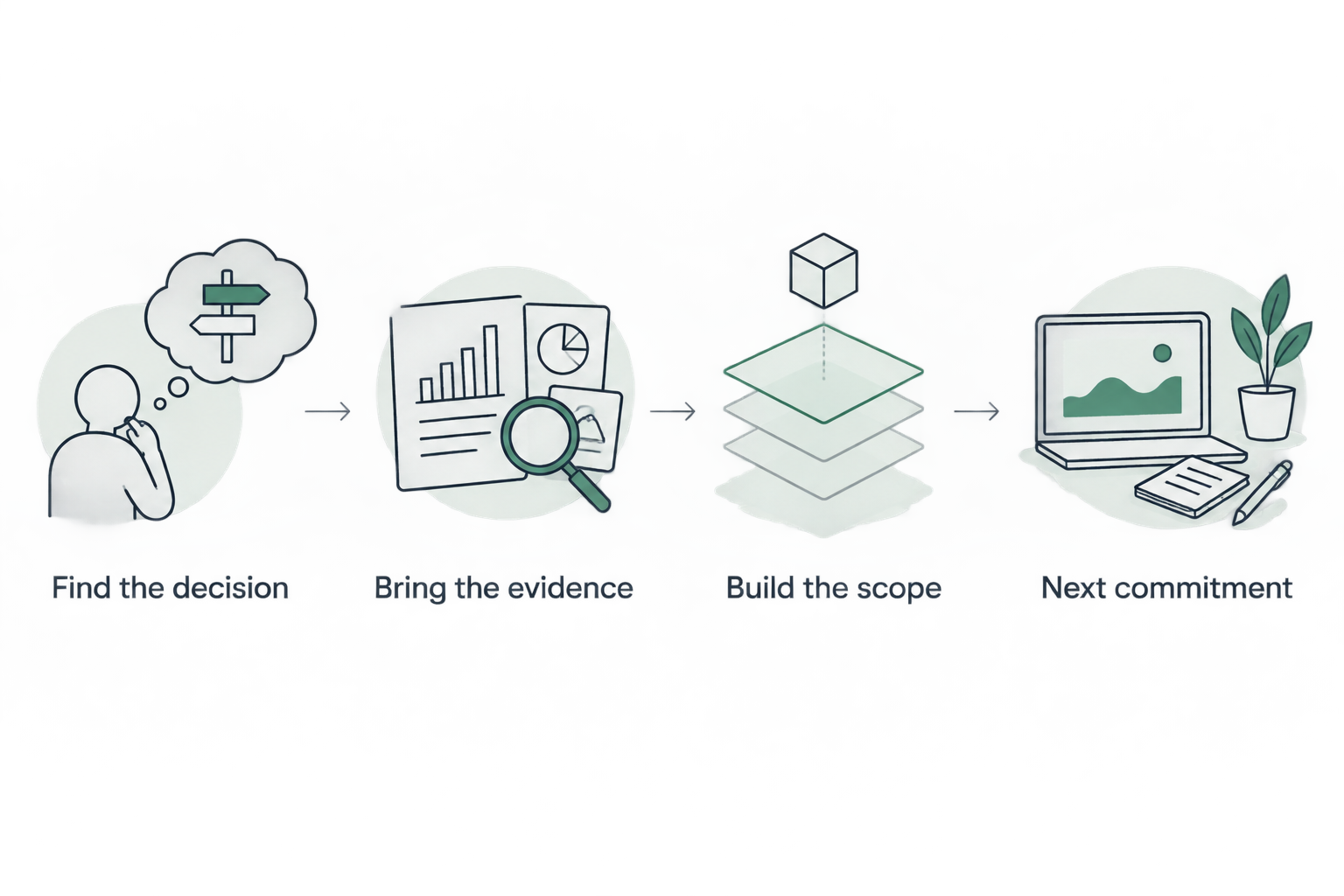
The final step can be a scoping session, an authorized investigation, or a decision to leave the configuration unchanged. Record the customer's choice, including a decision to stop. For 2026 proposal records, attach the agreed evidence baseline rather than copying a score without its supporting observations.
Illustrative dialogue, not a customer quotation:
- MSP: The public review observed a monitoring-only DMARC policy. That does not establish your internal identity controls. Who owns the reporting and enforcement decision?
- Prospect: We already have an IT provider.
- MSP: Keep that owner involved. The next choice is whether to review the evidence together and decide if any further assessment is useful.
Expected result: the proposal or follow-up identifies the evidence, decision owner, bounded work, exclusions, and verification method. A finding alone is not recorded as buyer agreement.
Repeat the handoff after a change
A second workflow applies when the customer authorizes a configuration change or a later review. Reuse the evidence structure, but confirm that the authorization still covers the intended activity.
- Preserve the earlier baseline and its coverage limits. Do not overwrite it with the latest run.
- Record the authorized change, affected object, responsible owner, and intended outcome separately from the scan results.
- Rescan the relevant scope and compare like-for-like evidence. Distinguish configuration change from changed permissions, licensing, collector coverage, or unavailable sources.
- Report what changed, what persisted, and what cannot be compared. Treat a newly unreadable source as unknown rather than resolved.
For recurring reviews in 2026, agree on the review cadence with the customer instead of presenting an arbitrary interval as a product requirement. Keep public-domain and tenant evidence separate even when both appear in the same meeting packet.
Troubleshooting
Tenant identity does not match the prospect
Stop the internal review and ask the authorized administrator to confirm the correct tenant and domain relationship. Correct the handoff record before requesting or using access; preserve the mismatch as an unresolved setup issue.
Approval exists, but evidence is unreadable
Inspect the reported coverage limitation and the approved access scope. Record Permission limited, License limited, or the applicable state, then ask the administrator whether to resolve the limitation or accept a narrower review. Do not request broader access without a scoped reason.
Public evidence and tenant evidence appear inconsistent
Compare the affected objects, sources, and run dates first. Check whether the records describe the same condition before treating them as contradictory. Preserve both observations and investigate the difference without inventing an incident explanation.
A salesperson calls an unknown control missing
Replace the claim with the evidence state and coverage limit. Identify the specific source needed to answer the question, assign an owner, and remove unsupported language from the proposal before sending it.
Customize your workflow
Keep account ownership and follow-up in your CRM. Keep technical delivery in the systems your MSP uses for that work. This guide does not assume a native integration, automatic transfer, or automatic remediation.
Use a handoff template containing the prospect, domain, tenant, authorization reference, evidence dates, coverage limits, decision owner, agreed next action, and verification method. Carry source, confidence, expiry, observation, implication, questions, and safe offer with the account context.
An illustrative follow-up structure is: the review observed a named condition on its recorded date; specified sources remained unread; the customer agreed to a bounded next action owned by a named person. Confirm that summary with the customer before treating it as approved scope.
FAQ
What is a domain review to Microsoft 365 review handoff?
A domain review to Microsoft 365 review handoff carries dated public findings into a separately authorized tenant review. It preserves the original evidence while adding consent, tenant identity, internal coverage, and an agreed next action.
Can a public domain review show Microsoft 365 Conditional Access coverage?
A public domain review cannot establish Conditional Access coverage. That question requires appropriate customer-authorized internal evidence, with permission and coverage limits recorded.
Does Microsoft 365 Review read customer emails or files?
The stated SCOUTz review boundary is configuration and metadata only. It excludes mail, files, chats, documents, and prompts, and the review makes no automatic configuration changes.
What happens if the prospect declines tenant access?
Keep the handoff at the public-evidence stage and record the customer's decision. Offer a discussion of the dated public observations without implying that internal controls were assessed.
Does a completed review mean every control was assessed?
A completed review does not establish complete coverage. Report assessed sources separately from partial, unreadable, permission-limited, license-limited, and unassessed sources.
How should an MSP verify work after the handoff?
Verify authorized work by comparing a rescan against a pinned baseline. Keep scope and coverage comparable, and distinguish an observed configuration change from newly missing evidence.
One last thing
A finding disappearing from a later report does not, by itself, prove resolution. The source might no longer be readable. Require comparable evidence before marking the agreed outcome verified.
SCOUTz prepares the conversation. The relationship and the sale stay yours. Make Join Open Beta the next step if this evidence-led preparation fits your MSP.