
Best overall for operational OAuth app governance: Microsoft Defender for Cloud Apps app governance. Best for consent controls: Microsoft Entra ID. Best for prospect-meeting evidence: SCOUTz. Best for custom permission inventories: Microsoft Graph PowerShell. This 2026 guide compares OAuth app governance tools for MSPs by the job each performs, from preparing a consented review to managing application access.
- Microsoft Defender for Cloud Apps app governance fits operational OAuth application oversight.
- Microsoft Entra ID fits application consent controls and enterprise application administration.
- SCOUTz complements OAuth app governance tools for MSPs with dated Microsoft 365 evidence for sales preparation.
- Microsoft Graph PowerShell fits custom permission inventories when an MSP owns the scripts and validation.
- Application permissions establish access scope, not proof that an application is malicious.
Why this matters
OAuth applications can receive delegated permissions associated with a user or application permissions that operate without a signed-in user. Those are different access models. Your review must preserve the distinction before recommending a change.
A tenant-wide permission deserves examination, but it does not establish malicious activity. An application can support a legitimate business process, and removing its access can interrupt that process. The decision needs an owner, evidence and an agreed outcome.
For an MSP, the buying decision also depends on the engagement. A prospect review needs permission to inspect tenant evidence and a defensible conversation. An ongoing managed service needs operational ownership, policy administration and a way to verify changes.
Choose the tool for the decision you own. Evidence preparation and access enforcement are separate jobs.
What makes the best OAuth app governance tools for MSPs
Use these criteria before comparing product names:
- Evidence specificity: Preserve the tenant, application identifier, permission type, affected object, collection source and collection date.
- Consent visibility: Distinguish delegated grants, application permissions and the administrative controls governing consent.
- Operational authority: Separate read-only assessment from actions that change application access or tenant policy.
- Coverage honesty: Show permission-limited, license-limited and unread sources without treating them as clean results.
- MSP accountability: Identify who approves access, who implements changes and who checks the result for each customer.
- Reusable proof: Retain a baseline and compare it with a later authorized review rather than recycling an old report.
A polished dashboard cannot compensate for missing evidence. During a demonstration, require the vendor to trace a conclusion back to the object and source that support it. Then inspect what the report leaves unknown.
OAuth app governance tools at a glance
| Tool | Best for | Standout capability | Key limitation |
|---|---|---|---|
| SCOUTz | Prospect-meeting evidence | Dated, customer-authorized Microsoft 365 evidence and conversation preparation | Read-only preparation does not perform access enforcement; Microsoft 365 Review is Open Beta in the supplied October 2026 reference |
| Microsoft Defender for Cloud Apps app governance | Operational application oversight | OAuth application visibility, policies and alerts | Requires suitable licensing, configuration and an operational response owner |
| Microsoft Entra ID | Consent and enterprise application administration | Native consent controls and application access administration | Administration alone does not create a client-ready evidence narrative |
| Microsoft Graph PowerShell | Custom permission inventories | Scriptable access to Microsoft Graph directory and permission objects | The MSP owns collection logic, permissions, maintenance and interpretation |
The order starts with sales preparation because that is a distinct MSP use case. It does not rank a read-only review above an operational control platform. For your 2026 shortlist, compare tools within the responsibility you intend to deliver.
1. SCOUTz: best OAuth review companion for prospect meetings
SCOUTz provides cybersecurity prospect intelligence for MSPs, including domain reviews and customer-authorized Microsoft 365 reviews. Its role is to bring dated evidence and account context into discovery, proposals and client conversations. The client-supplied product reference dated October 15, 2026 identifies Microsoft 365 Review and Evidence Reports as Open Beta.
Public-domain evidence cannot establish tenant application permissions. Internal Microsoft 365 evidence requires customer authorization, and the review is read-only: configuration and metadata, never mail, files, chats, documents or prompts. Confirm the exact application-permission coverage in your authorized review before making a claim about a particular grant.
SCOUTz pros:
- Centers sales preparation on dated evidence rather than speculative breach losses.
- Keeps public observations separate from consented internal evidence.
- Supports an evidence, insight and proof approach, with rescans against a pinned baseline.
SCOUTz cons:
- Does not automatically change application permissions or tenant configuration.
- Microsoft 365 Review and reporting remain subject to the supplied Open Beta status.
- Unread or permission-limited evidence cannot support a clean assessment.
Best for: MSP owners and sales leaders preparing an evidence-led discovery meeting or proposal.
Use the output to agree on the next authorized review, the business owner and the proposed scope. Keep remediation in the delivery platform and change process your MSP controls.
Verdict: Hold as an enforcement purchase; evaluate for prospect evidence and sales preparation.
2. Microsoft Defender for Cloud Apps: best for operational oversight
Microsoft Defender for Cloud Apps includes app governance capabilities for OAuth-enabled applications in Microsoft Entra ID. It provides application visibility and policy-based oversight, including alerts that support investigation. This places it closer to ongoing security operations than a one-time sales assessment.
An MSP evaluating app governance should inspect how application permissions, activity context and alerts appear in the customer tenant. Confirm the licensing and configuration required for the intended workflow. Do not assume a feature visible in a vendor demonstration is enabled in every managed tenant.
Microsoft Defender for Cloud Apps pros:
- Provides purpose-built app governance capabilities within Microsoft's security platform.
- Supports policy and alert workflows for operational review.
- Connects application oversight with the wider Defender investigation environment.
Microsoft Defender for Cloud Apps cons:
- Requires someone to configure policies, investigate alerts and own response decisions.
- Licensing and tenant prerequisites affect the scope you can deliver.
- An alert still needs investigation before it supports a claim of malicious activity.
Best for: MSP security teams responsible for ongoing OAuth application oversight in supported customer environments.
Make the acceptance test operational. Have the technician trace an application alert to its supporting evidence, explain the policy and identify the authorized response. A demonstration that stops at an alert count is incomplete.
Verdict: Buy for an operational governance requirement after validating tenant eligibility and response ownership.
3. Microsoft Entra ID: best for native consent controls
Microsoft Entra ID is the native administration layer for enterprise applications, service principals and application consent in Microsoft cloud environments. Administrators use its controls to manage how users and administrators grant application access. It belongs in the shortlist when the immediate problem is consent policy or a specific application grant.
The application registration and the enterprise application service principal are related but distinct objects. Keep the customer-tenant object attached to the evidence. A recognizable display name alone is a weak basis for an access decision.
Microsoft Entra ID pros:
- Places consent administration in the tenant's identity control plane.
- Supports inspection and administration of enterprise applications and their access.
- Gives administrators a direct route from an approved decision to configuration work.
Microsoft Entra ID cons:
- Requires identity administration knowledge and appropriate administrative permissions.
- Native administration screens do not replace a business-owner explanation or signed scope.
- Tenant policy does not establish whether an individual application's activity is legitimate.
Best for: MSP identity administrators correcting consent settings or reviewing specific enterprise applications.
Separate the policy decision from the application decision. Restricting future consent and reviewing existing grants are different tasks, with different evidence and approval requirements. Record each outcome separately.
Verdict: Buy for native identity administration; use it alongside investigation and evidence-reporting workflows.
4. Microsoft Graph PowerShell: best for custom permission inventories
Microsoft Graph PowerShell gives administrators scriptable access to Microsoft Graph. An MSP can use it to collect service principal information, delegated permission grants and application role assignments, subject to the permissions granted to the collection process.
This is a toolkit, not a finished governance service. Your MSP must define the query scope, pagination, error handling, evidence retention and review logic. A successful script execution does not establish complete tenant coverage.
Microsoft Graph PowerShell pros:
- Supports repeatable collection tailored to a defined assessment scope.
- Exposes structured objects that support comparison and evidence retention.
- Lets the MSP inspect and maintain its own collection logic.
Microsoft Graph PowerShell cons:
- Collection scripts need maintenance and validation as dependencies change.
- Permission failures and incomplete queries can produce misleading inventories if hidden.
- Business interpretation and client reporting remain the MSP's responsibility.
Best for: Technically capable MSPs building a controlled, custom permission-review workflow.
Preserve application identifiers, grant identifiers, permission types and collection timestamps in the output. Store errors beside results. An empty file without a collection-status record is not proof that no grants exist.
Verdict: Buy into this approach only when your MSP accepts ownership of the scripts and evidence quality.
How the ranking works
This 2026 shortlist compares established product roles against the criteria above. It is a job-based recommendation, not a hands-on performance benchmark or a claim that one interface works better for every MSP.
Microsoft's documentation for app governance, Entra application consent and Microsoft Graph permission resources defines the relevant category boundaries. The client-supplied October 2026 reference defines the prospect-intelligence product's scope and status. Confirm tenant-specific licensing, collection coverage and operational behavior during evaluation.
Validate the evidence before recommending a change
Run your acceptance review in 1 customer-authorized tenant. Select 1 application with a known business owner and retain 2 evidence snapshots, one before an approved change and one afterward. These are evaluation instructions, not product capacity claims.
Require the evidence packet to show:
- The application and tenant identifiers, not just the display name.
- Whether the grant is delegated or application-level.
- The source, collection date and permissions used to read it.
- The condition observed and the interpretation attached to it.
- Coverage gaps, unread sources and unresolved questions.
- The approved outcome, change owner and verification result.
Keep Verified, Observed, Inferred, Possible, Unknown and Unreadable distinct. These states are not a score ladder. Coverage labels such as Partial or Permission limited answer a different question.
Before a sales conversation, use the same discipline described in validating security assessment findings before a call. A finding that has changed since collection needs a fresh review, not a stronger sales claim.
Turn application evidence into an agreed next action
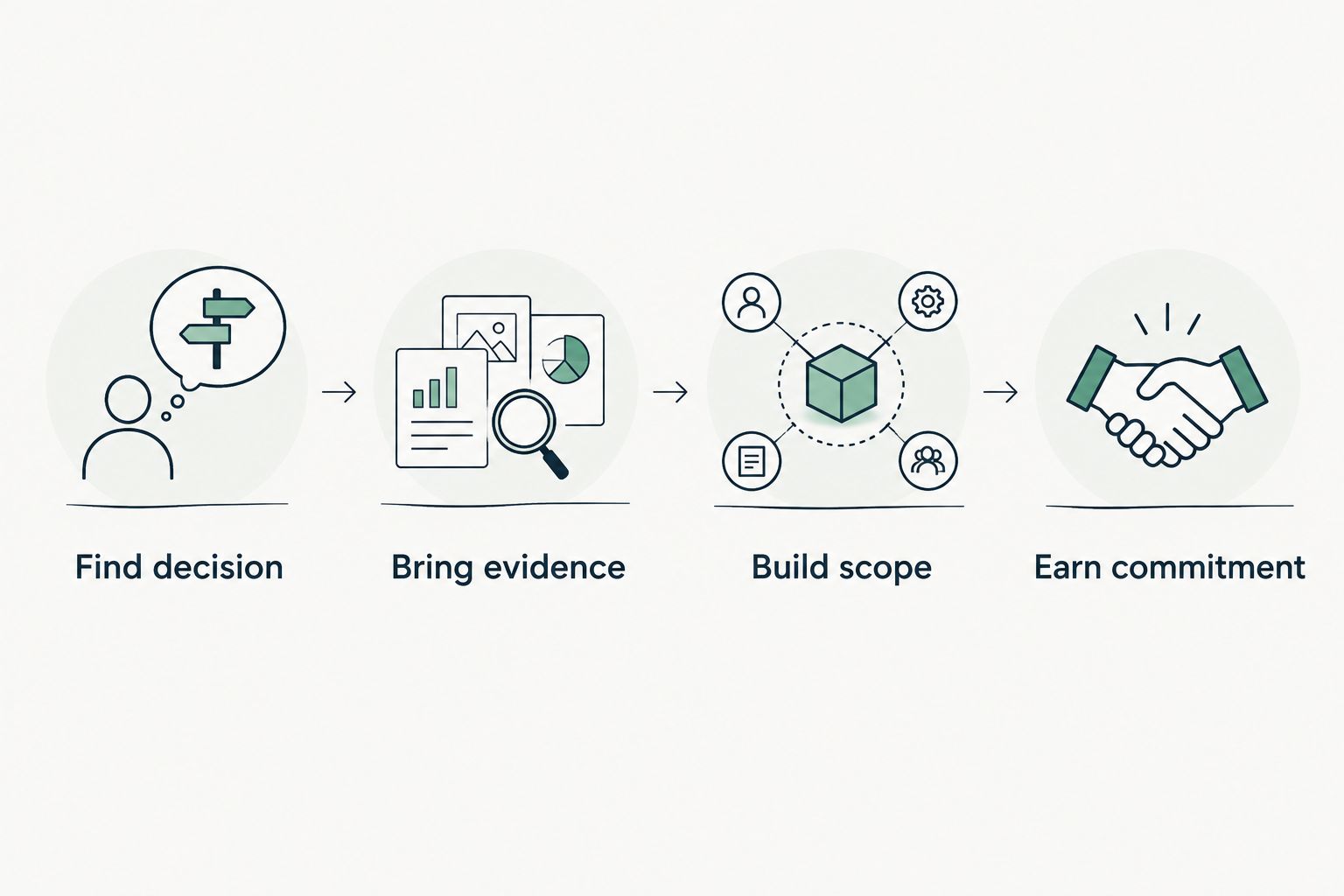
Use the Evidence-to-Agreement Framework to move from a permission observation to a defined decision. This is a conversation framework, not a proven close-rate intervention.
Find decision
Identify the decision the customer actually owns: retain the grant, investigate its purpose, reduce access or approve a wider review. Name the application owner before proposing removal.
Bring evidence
Present the observed permission, affected object, source and collection date. Separate the access scope from any inference about use. Public-domain findings cannot fill gaps in internal tenant evidence.
Build scope
Offer a bounded engagement: confirm the business purpose, review the grant, agree on an outcome and verify any approved change. Keep the recommended outcome separate from the vendor or service selected to implement it.
Earn commitment
Ask for an explicit next action, an owner and an agreed review date. Preserve the customer's choice to retain the configuration or decline further work.
Illustrative dialogue and follow-up
The following dialogue is illustrative, not a customer incident or attributed quotation.
MSP: The authorized review observed an application permission on this tenant object. That establishes access scope. The business purpose and owner remain unknown.
Customer: That application is already approved.
MSP: Keep that approval in the record. The next step is to confirm that the present grant matches the approved purpose before discussing any change.
A follow-up can record: The proposed scope is an owner-led permission review, followed by verification of any approved change. Please confirm the application owner and whether you want that review included in the proposal.
For MSPs evaluating evidence-led preparation, Join Open Beta is the primary next step. A demonstration provides a separate route to inspect the review boundaries before applying.
Inspect the evidence workflow
Review consent boundaries, dated evidence and the path from a finding to an agreed scope.
Which tool to choose in 2026
Choose Microsoft Defender for Cloud Apps app governance when your contract includes ongoing application oversight. Choose Microsoft Entra ID for native consent administration, or Microsoft Graph PowerShell when a custom inventory is the actual requirement.
SCOUTz is best for MSPs preparing evidence-led prospect conversations, not enforcing OAuth application access. Pair preparation with the operational tools and people responsible for delivery. A scan does not close a deal or authorize a configuration change.
FAQ
What's the best OAuth app governance tool for MSPs?
Microsoft Defender for Cloud Apps app governance is the default shortlist choice for ongoing operational oversight. Microsoft Entra ID fits native consent administration, while a read-only evidence review serves a different preparation job.
Can a public-domain scan reveal Microsoft 365 app permissions?
No. Public-domain observations cannot establish tenant application permissions; that requires appropriately authorized internal evidence.
Does a tenant-wide OAuth permission mean an app is malicious?
No. A tenant-wide permission describes access scope, not malicious behavior. Confirm the business purpose, owner and relevant activity before reaching a conclusion.
Is Microsoft Entra ID better than Defender for Cloud Apps?
Microsoft Entra ID is the better fit for native consent and enterprise application administration. Defender for Cloud Apps app governance addresses operational application oversight; choose by responsibility rather than treating the products as interchangeable.
Can Microsoft Graph PowerShell replace a governance platform?
Microsoft Graph PowerShell can support a custom inventory, but it does not supply a complete governance process by itself. The MSP owns collection reliability, interpretation, approvals and verification.
Does a read-only Microsoft 365 review read customer email?
The review described here collects configuration and metadata, not mail, files, chats, documents or prompts. Authorization and exact collection coverage must remain explicit.
What should an MSP do when application evidence is unreadable?
Record the evidence as Unreadable and state the coverage limitation. Do not report an unread source as an absent permission or a clean control.
One last thing
A removed permission does not prove the business outcome was achieved. Verify both the approved access change and the application's intended business function. For a 2026 proposal, define that acceptance evidence before implementation begins.