
Best overall for cross-client Microsoft Secure Score review: Microsoft 365 Lighthouse. Best for custom score tracking: Microsoft Graph; best for native tenant investigation: Microsoft Defender; best evidence-led conversation companion: SCOUTz, which belongs alongside score tracking rather than being presented as its replacement.
- Microsoft 365 Lighthouse is the default starting point for cross-client Microsoft Secure Score review.
- Microsoft Graph suits MSPs that can maintain their own score collection, history, and reporting.
- Microsoft Defender provides tenant-level Secure Score detail for investigating recommended actions.
- SCOUTz supports evidence-led Microsoft 365 conversations; a dedicated Secure Score tracking capability is not established here.
Why This Matters
The best tool to track Microsoft Secure Score across MSP clients must preserve tenant identity, collection dates, and the reasons behind changes. A portfolio average alone gives your account team little to explain.
In 2026, choose the tracking workflow before choosing the presentation. Your technicians need recommendation detail. Your sales leaders need an accurate account of what changed, what remains unknown, and which decision belongs to the client.
Use Secure Score to organize improvement work. Use dated evidence to support the recommendation. A score does not establish compromise, prove compliance, or predict a breach.
What Makes The Best Secure Score Tracking Tool
Use these criteria to separate portfolio monitoring from a tenant dashboard or a sales report:
- Tenant separation: Each result stays attached to the correct customer and authorized access context.
- Historical evidence: Collection dates, score values, and recommendation status remain available for comparison.
- Recommendation detail: Your team can investigate the actions behind a score instead of repeating a percentage.
- Coverage visibility: Failed collection, missing permissions, and licensing limits remain visible.
- Operational ownership: Someone owns onboarding, access reviews, collection failures, and interpretation.
- Client explanation: A report separates observed configuration, possible consequences, and agreed next actions.
Treat these as acceptance criteria for a 2026 evaluation. A dashboard that looks clear during a demonstration still needs to survive a permission failure and a changed recommendation set.
Secure Score Tools At A Glance
| Tool | Best For | Standout Feature Or Role | Key Limitation |
|---|---|---|---|
| Microsoft 365 Lighthouse | Cross-client operational review | Microsoft-native multitenant management with Secure Score visibility | Tenant eligibility, permissions, and supported management coverage need checking |
| Microsoft Graph | Custom collection and historical reporting | Programmatic access to Secure Score data | Your team owns collection, storage, failures, and reporting |
| Microsoft Defender | Investigating an individual tenant | Native Secure Score recommendations and supporting detail | Tenant investigation is different from a consolidated MSP reporting workflow |
| SCOUTz | Evidence-led discovery, proposals, and QBR preparation | Dated domain and customer-authorized Microsoft 365 evidence | Dedicated Secure Score ingestion and cross-client score tracking are not established by the supplied product reference |
These options perform different jobs. The ranking favors the tool closest to the tracking query, then distinguishes custom reporting, investigation, and conversation preparation.
1. Microsoft 365 Lighthouse: Best For Cross-Client Review
Microsoft 365 Lighthouse is the default starting point for an MSP seeking a Microsoft-native view across customer tenants. Its Secure Score capabilities belong within a broader multitenant management workflow.
Start by checking customer eligibility, delegated access, and the coverage your intended workflow actually receives. A visible customer record does not establish that every security signal is available.
Microsoft 365 Lighthouse Pros
- Keeps cross-customer administration within Microsoft's management environment.
- Supports Secure Score review in a multitenant context.
- Gives operational teams a starting point for customer-specific follow-up.
Microsoft 365 Lighthouse Cons
- Eligibility and access requirements need validation against your customer estate.
- A portfolio view does not explain every recommendation without tenant-level investigation.
- Your own evidence-retention requirements still need testing.
Best for: MSP operations teams that want a Microsoft-native starting point before building a separate reporting system.
For a 2026 evaluation, inspect a customer with complete access and another with restricted access. Confirm that your operators can distinguish a lower score from unavailable evidence. Then trace a recommendation back to its tenant and collection context.
Verdict: Buy into the Lighthouse workflow first when cross-client visibility is the immediate requirement.
2. Microsoft Graph: Best For Custom Score History
Microsoft Graph provides programmatic access to Microsoft Secure Score resources, including secureScores and secureScoreControlProfiles. An MSP can use that access to build a collection pipeline and a reporting model it controls.
This is a build-and-maintain choice. The API supplies data; your team supplies the schedule, storage, customer mapping, exception handling, and presentation.
Microsoft Graph Pros
- Supports custom collection and historical storage.
- Lets your team define customer groupings and reporting fields.
- Provides access to score records and control-profile information for interpretation.
- Fits reporting workflows with requirements beyond a standard dashboard.
Microsoft Graph Cons
- Engineering work continues after the initial connection.
- Permissions, authentication, collection failures, and API changes need an owner.
- A successful request does not establish complete assessment coverage.
Best for: MSPs with engineering capacity and a defined requirement for retained history or custom reporting.
Store the tenant identifier, retrieval time, source record date, score, denominator, and collection status. Keep control-profile context alongside the score where relevant. Otherwise, a later chart can preserve the number while losing the explanation.
Verdict: Buy into Microsoft Graph when control over the reporting model justifies ongoing engineering ownership.
3. Microsoft Defender: Best For Tenant-Level Investigation
Microsoft Defender is the native destination for examining Microsoft Secure Score within an individual tenant. It connects the headline result to recommended improvement actions and their status.
Use it when an account manager needs an engineer to explain a change. A cross-client report should lead back to this level of detail rather than become the final authority on its own.
Microsoft Defender Pros
- Exposes native Secure Score recommendations for investigation.
- Keeps the discussion close to Microsoft's scoring context.
- Supports review of improvement-action status within the tenant.
Microsoft Defender Cons
- Individual-tenant review does not itself provide your complete MSP reporting process.
- Recommendation relevance still requires technical and business judgment.
- Access and product entitlements affect what your team can inspect.
Best for: Technicians validating the reason behind a customer's score movement.
For example, investigate whether the movement reflects an implemented action, a changed recommendation, or another scoring-context change. Record the evidence supporting the explanation. Leave the cause unknown until the underlying detail supports it.
Verdict: Buy into Microsoft Defender as the investigation layer, even when another tool supplies portfolio reporting.
4. SCOUTz: Best For Evidence-Led Client Conversations
SCOUTz is best for MSPs preparing evidence-led Microsoft 365 conversations, rather than choosing a dedicated Secure Score tracker. The client-supplied October 15, 2026 reference identifies Microsoft 365 Review and Evidence Reports / Studio + Reports as Open Beta, with multi-client work and report experience in beta validation.
Its role is dated cybersecurity evidence and prospect context. The supplied product reference does not establish Secure Score ingestion, score-history synchronization, or a consolidated Secure Score dashboard.
Evidence Companion Pros
- Separates public-domain observations from customer-authorized internal evidence.
- Uses read-only Microsoft 365 configuration and metadata review.
- Keeps evidence, interpretation, and proof distinct.
- Supports preparation for discovery, proposals, and client reviews.
Evidence Companion Cons
- It should not be selected as a verified replacement for Secure Score tracking.
- Beta validation matters when evaluating multi-client reporting workflows.
- Public-domain review cannot establish tenant controls such as Conditional Access coverage.
Best for: MSP owners and sales leaders turning authorized findings into a scoped conversation.
Microsoft 365 review does not read mail, files, chats, documents, or prompts. A finding still needs its source, run date, affected object, limits, and owner. Proof means rescanning against a pinned baseline.
Verdict: Hold as the sole Secure Score tracker; evaluate as a separate evidence and conversation-preparation layer.
How The Tools Were Ranked
The ranking follows job fit: cross-client review first, custom collection second, tenant investigation third, and conversation preparation fourth. It makes no claim of hands-on benchmarking or measured sales results.
Apply the same criteria to any additional vendor on your shortlist. Require a demonstration of historical records, tenant separation, failed collection, and recommendation detail before treating dashboard breadth as evidence quality.
Run A Pilot That Exposes Reporting Gaps
Use a 30-day pilot across 2 authorized client tenants. Capture at least 3 dated snapshots per tenant, including an initial baseline and subsequent comparisons. These are evaluation recommendations, not product performance claims.
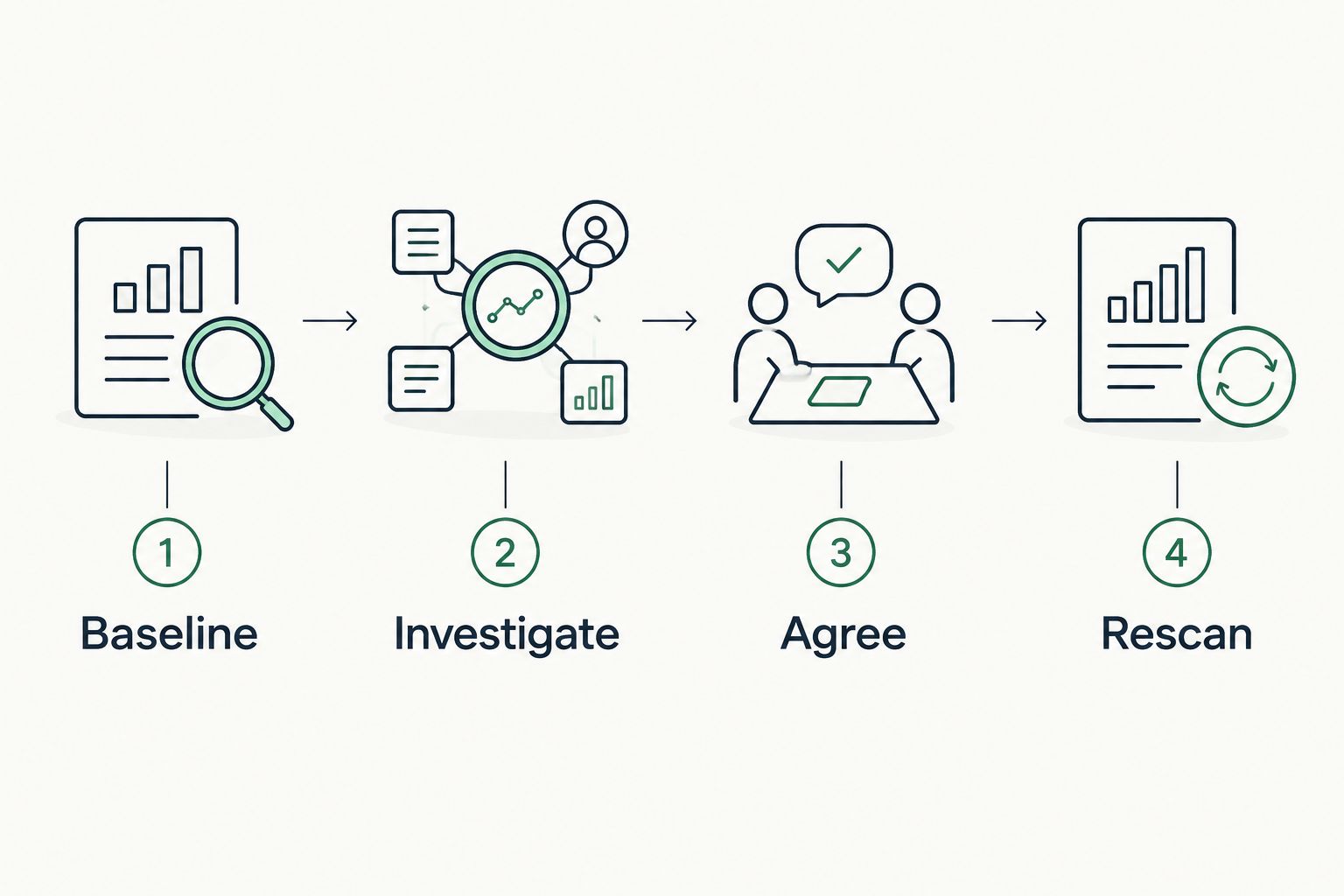
Build the pilot around this sequence:
- Baseline: Record the score, denominator, source date, permissions, and available recommendation detail.
- Investigate: Trace a selected recommendation to its underlying evidence and affected object.
- Agree: Identify the owner, intended outcome, and authorized next action.
- Rescan: Compare against the pinned baseline and explain the difference.
Keep evidence state separate from coverage. Observed, Inferred, Possible, Unknown, and Unreadable describe different evidence conditions. Assessed, Partial, Not assessed, Permission limited, and License limited describe coverage.
A permission failure belongs in the collection record. An unread source belongs under NOT ASSESSED THIS SCAN, rather than being represented as an absent control or a clean result.
Turn Score Tracking Into An Agreed Next Action
The SCOUTz Evidence-to-Agreement Framework connects preparation to a buyer-owned decision: Find the decision, Bring the evidence, Build the scope, Earn the next commitment. It is an original conversation framework, not a proven close-rate intervention.
Use the following sequence in your 2026 client reviews:
- Find the decision: Establish whether the client needs investigation, a configuration change, an exception review, or no action.
- Bring the evidence: Present the dated recommendation and the supporting tenant evidence.
- Build the scope: Separate assessment, implementation, and verification responsibilities.
- Earn the next commitment: Agree the owner and next action before writing the proposal.
Illustrative dialogue, not a customer quotation:
MSP: The score changed between these snapshots. The recommendation detail identifies this configuration condition. We have not established an incident.
Client: Our score is already high. Why spend time on this?
MSP: The decision is whether this specific condition matches your intended policy. We can review the affected scope before recommending a change.
A useful follow-up records the observed condition, remaining unknowns, agreed owner, and authorized next step. It keeps vendor selection separate from the desired outcome. The MSP can recommend a product, service, process, project, or nothing.
Bring Evidence To Your Next Review
Discuss dated domain and authorized Microsoft 365 evidence for MSP sales preparation.
Which Secure Score Tool Should You Choose?
Choose Microsoft 365 Lighthouse first for cross-client review. Add Microsoft Defender for investigation. Choose Microsoft Graph when your retention and reporting requirements justify owning the collection pipeline.
Keep the evidence-led conversation layer separate from the tracking decision. Your 2026 acceptance test should establish what each system reads, what it retains, and how it handles incomplete access. A strong presentation cannot repair an unsupported claim.
FAQ
What's the best tool to track Microsoft Secure Score across MSP clients?
Microsoft 365 Lighthouse is the default starting point for Microsoft-native cross-client Secure Score review. Validate tenant eligibility, permissions, historical visibility, and recommendation detail against your own customer estate.
Is Microsoft Graph better than Lighthouse for tracking Secure Score?
Microsoft Graph is better suited to custom collection and reporting when your MSP can maintain the engineering work. Lighthouse is the simpler starting point for Microsoft-native cross-client review; Graph requires your own storage, scheduling, and failure handling.
Can a public-domain scan retrieve a client's Microsoft Secure Score?
A public-domain scan cannot establish a client's internal Microsoft Secure Score. Internal tenant evidence requires authorized access; DNS and email-security observations do not establish Conditional Access coverage or tenant application permissions.
Does a higher Microsoft Secure Score prove that a client is secure?
A higher Microsoft Secure Score does not prove security or predict whether a breach will occur. Review the underlying recommendations, assessment coverage, and business context before explaining what the score means.
Can SCOUTz replace a cross-client Secure Score dashboard?
The supplied product reference does not establish dedicated Secure Score ingestion or cross-client score tracking. Evaluate it for dated domain and authorized Microsoft 365 evidence used in discovery, proposals, and client reviews.
What should an MSP retain with each Secure Score snapshot?
Retain the tenant identifier, source date, retrieval time, score, denominator, recommendation context, and collection status. Preserve permissions and coverage limitations so later comparisons do not mistake missing evidence for improvement.
How should an MSP prove that remediation worked?
Rescan against a pinned baseline and verify the affected configuration and intended scope. A score change alone is insufficient proof that the specific agreed outcome was achieved.
One Last Thing
A score can move because its scoring context changes. Before labeling movement as improvement or deterioration, compare the denominator, recommendation set, collection coverage, and affected configuration.
Attach the reason to the number. That is what makes a score useful in a client decision.