
Read a domain security scan report by checking its scope and run date, inspecting the evidence behind each finding, and separating observed conditions from possible consequences. Then identify the responsible owner, agree on the next action, and define how a rescan will verify the outcome. A public-domain report cannot establish internal Microsoft 365 controls or prove that a breach occurred.
- Learning how to read a domain security scan report starts with source, date, coverage, and finding evidence.
- Public-domain observations cannot establish internal Microsoft 365 configuration or confirm a breach.
- SCOUTz suits MSPs seeking dated cybersecurity prospect intelligence for sales preparation; the MSP owns interpretation and next steps.
- Keep unreadable evidence explicitly unknown, and verify agreed changes against a pinned baseline.
Why this matters
A report gives you observations. Your job is to establish which observations support a client conversation and which require more evidence. A red indicator alone does not explain business impact, responsibility, or urgency.
SCOUTz provides cybersecurity prospect intelligence for MSPs through domain and Microsoft 365 reviews. Its useful boundary is also its limitation: dated evidence prepares a conversation; it does not replace MSP judgment or establish buying intent. Read a 2026 report as evidence from a particular run, rather than a permanent description of the organization.
How to read a domain security scan report
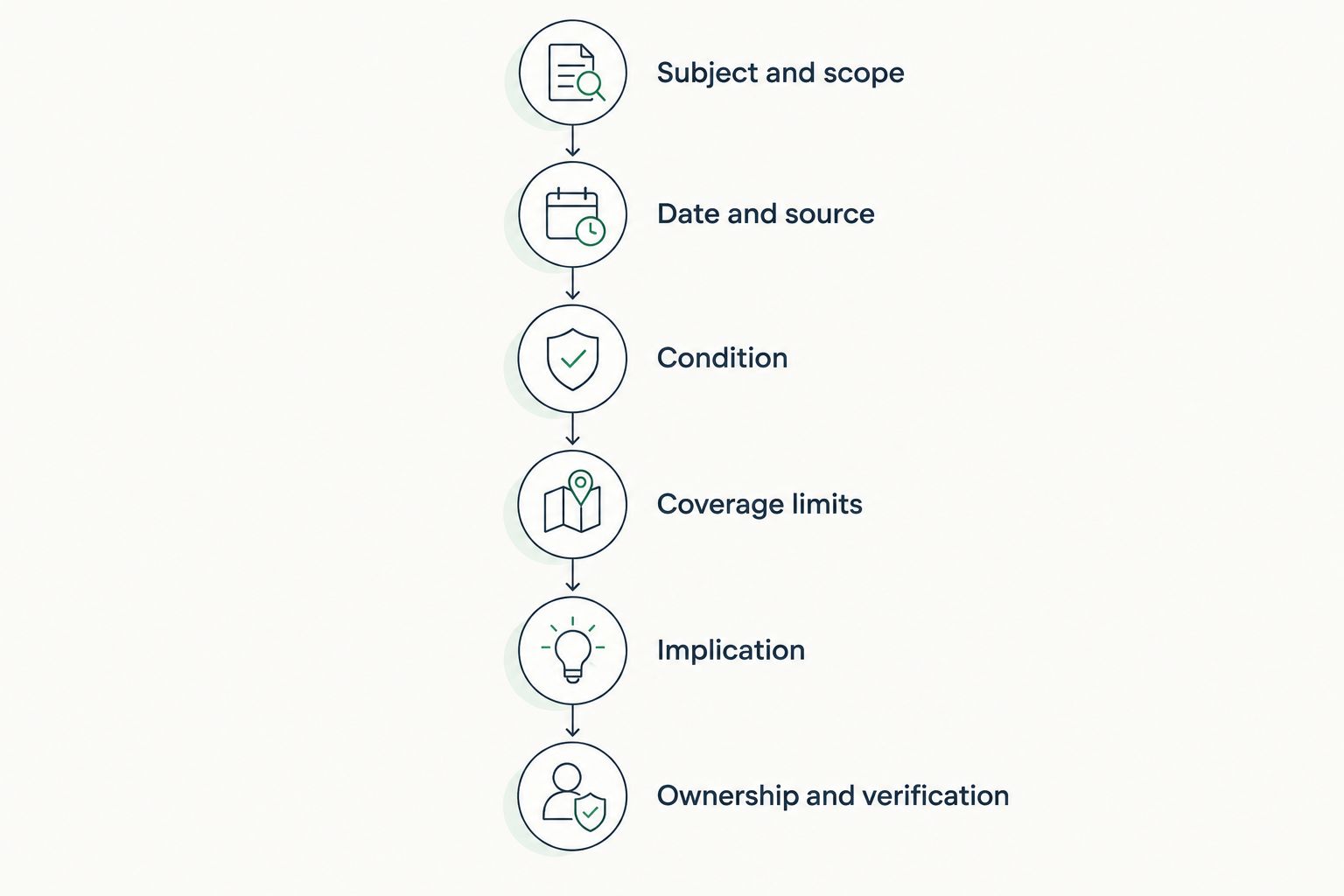
Use this sequence before turning findings into an email, meeting agenda, or proposal. Read the underlying evidence before repeating the summary.
- Confirm the subject and scope. Match the domain, hostname, or other affected object to the prospect. Establish whether the review used public observations, authorized internal access, or both. Keep those sources separate.
- Check the run date and source. Record when the check ran and where its evidence came from. A report-generation date does not establish when every underlying observation was collected.
- Inspect the condition. Read the check name, observed value, affected object, and supporting evidence. Distinguish an unsuccessful read from a successful read that found an absent control.
- Read the coverage limits. Identify sources that were not assessed, permission-limited, license-limited, or unreadable. Carry those limits into the client-facing explanation.
- Separate implication from proof. State the possible consequence without converting it into a confirmed incident. Identify what additional evidence would support a stronger claim.
- Agree on ownership and verification. Name who can confirm intent, authorize work, and accept the outcome. Preserve the baseline so a later review can establish what changed.
A useful reading worksheet has separate fields for condition, affected object, source, run date, unknowns, owner, and recommended outcome. Keep vendor selection outside the finding itself. The appropriate response might be a configuration change, process review, project, additional assessment, or a documented decision to leave the condition unchanged.
Public-domain evidence and authorized tenant evidence
A public-domain review and a customer-authorized Microsoft 365 review answer different questions. Do not use one as a substitute for the other. A 2026 domain report still cannot establish tenant settings that its sources never accessed.
| Evidence source | Best for | Useful evidence | Limitation |
|---|---|---|---|
| Public-domain observations | Preparing domain and email-security questions | Published DNS records and externally observable conditions within the stated scope | Cannot establish Conditional Access coverage, application permissions, license assignments, Intune device state, or tenant sharing configuration |
| Customer-authorized Microsoft 365 review | Examining consented tenant configuration | Configuration and metadata available through approved permissions | Conclusions remain limited by permissions, licenses, source readability, and assessment scope |
Public evidence helps you prepare before a deeper assessment. Its weakness is limited internal visibility. Authorized tenant evidence adds internal context, but requires customer consent and still has coverage boundaries.
For SCOUTz Microsoft 365 reviews, the evidence boundary is configuration and metadata only, never mail, files, chats, documents, or prompts. The review is read-only, with no agent or install and no automatic configuration changes. Those boundaries describe the review; they do not imply that every tenant source was assessed.
Evidence states describe claims, not a score ladder
Keep the evidence state separate from severity and coverage. Verified, Observed, Inferred, Possible, Unknown, and Unreadable describe different relationships between a claim and its supporting evidence. They are not successive grades on a single scale.
An observed published record supports a statement about that record at the time of the check. An inference about operational intent requires confirmation from the owner. A possible consequence describes a scenario, not an event that the report has proved occurred.
Coverage answers another question: what was assessed. Assessed, Partial, Not assessed, Permission limited, and License limited should remain visible alongside findings. An unread source is not a clean source.
When a report declares non-reads under NOT ASSESSED THIS SCAN, preserve that section in your explanation. Removing it makes the report appear broader than its evidence supports. Never combine public-domain and tenant results into one score that obscures their different sources and limits.
Read an email-security finding without overstating it
Consider a clearly illustrative finding: a published DMARC record contains p=none. That policy requests monitoring rather than quarantine or rejection through DMARC enforcement. The record alone does not establish compromise, malicious mail delivery, or the organization's intended policy.
Use the following reading pattern:
- Observed: the published DMARC policy requests monitoring only at the recorded run time.
- Possible consequence: the policy does not request quarantine or rejection of messages that fail DMARC.
- Boundary: the DNS record does not show whether someone reviews aggregate reports or whether legitimate senders are ready for enforcement.
- Owner: the person responsible for email authentication and authorized sending services.
- Next choice: confirm intent and review sender evidence before agreeing on a policy change.
Do not turn p=none into an instruction to switch enforcement immediately. Read the evidence needed to distinguish legitimate senders from authentication failures first. The guide to reading DMARC aggregate reports before changing enforcement covers that next investigation.
Apply the same discipline elsewhere. An answering service does not establish an exploitable service. A breach-data match does not establish a compromised user. A dangling DNS observation does not, by itself, prove a successful takeover.
Why domain security scan results vary
Different findings do not automatically mean one report is wrong. Establish whether the reports examined the same object, at comparable times, through comparable sources and checks.
- Scope: a root domain, individual hostname, and authorized tenant expose different evidence.
- Collection time: records and configurations change after an observation is collected.
- Source readability: a failed lookup or unreadable source limits the conclusion available from that run.
- Permissions and licenses: authorized tenant coverage depends on the access and capabilities available to the review.
- Check definitions: labels and severity depend on the condition each check actually evaluates.
- Context: an intended monitoring policy and an unintended policy require different conversations, even when the published value matches.
For a 2026 comparison, preserve each report's source, collection date, scope, and check definition. Compare the underlying conditions before comparing headline scores. If those inputs differ, explain the difference rather than treating the score movement as remediation or deterioration.
Turn the finding into an agreed next action
Use the SCOUTz Evidence-to-Agreement Framework to move from interpretation to a scoped conversation: Find the decision, Bring the evidence, Build the scope, Earn the next commitment. This is a conversation framework, not a proven close-rate intervention.
Find the decision
Identify the choice the prospect actually needs to make. For the illustrative DMARC finding, the immediate decision is whether to review intended policy and sending sources. Purchasing a replacement security product is a separate decision.
Bring the evidence
Present the condition, affected domain, source, and run date together. State what remains unknown before discussing consequences. Keep the evidence available for the prospect's existing provider to inspect.
Illustrative dialogue:
MSP: The published policy requests monitoring only. That tells us what the record requests, but it does not tell us whether monitoring remains your intended approach.
Prospect: Our current provider handles that.
MSP: The next step can stay with that provider. With your approval, we can share the dated observation and ask them to confirm the intended policy and reporting owner.
Build the scope
Separate a review from a configuration change. A review can establish ownership, intended policy, and the evidence needed for a decision. A change requires authorization, an agreed outcome, and a verification plan.
| Next action | Best for | Benefit | Limit |
|---|---|---|---|
| Evidence review | Confirming intent and ownership | Establishes what the finding means in context | Does not change configuration |
| Authorized configuration work | Implementing an agreed outcome | Addresses the approved condition | Requires scope, access, and verification |
| Documented acceptance | Recording an intentional decision | Makes ownership and rationale explicit | Leaves the observed condition in place |
Earn the next commitment
Ask for a specific, voluntary next step: permission to share the observation, an introduction to the responsible owner, or approval for a defined review. Record who agreed and what evidence will be returned.
Illustrative follow-up:
You agreed to confirm the owner of the published DMARC policy. The attached observation includes its source and run date. After the owner confirms the intended policy, we can agree whether further review or configuration work is appropriate.
Verify change against the original evidence
A later report is useful proof only when you can relate it to the earlier condition. Preserve the original affected object, check, source, and observed value. Record the approved outcome separately from the implementation method.
For a baseline collected in 2026, compare the rescan with that pinned baseline. Explain changes in scope or collection method alongside the result. A different summary score alone does not establish that the agreed work succeeded.
State exactly what changed and what remains unknown. If the published policy changed, report that condition. Do not claim that every legitimate sender now authenticates correctly unless the supporting review establishes it.
FAQ
What's the first thing I should check in a domain security scan report?
Check the domain, assessment scope, source, and run date first. Those details establish what the report examined and when its evidence was collected.
Does a red domain security finding mean the company was breached?
A red domain security finding does not establish that a breach occurred. Read the condition and supporting evidence before making an incident claim.
Can a public-domain scan tell me whether Microsoft 365 MFA is enforced?
A public-domain scan cannot establish Microsoft 365 MFA enforcement. That requires appropriate authorized internal evidence, interpreted within its coverage limits.
Does an unreadable result mean the security control is missing?
An unreadable result means the evidence could not be read, not that the control is missing. Preserve the unknown and identify the access or additional review needed.
Should I change a DMARC policy as soon as the report flags it?
Confirm the intended policy and review legitimate sending sources before changing DMARC enforcement. A monitoring-only policy is an observation that needs context, not proof of compromise.
How do I know whether a finding has been fixed?
Verify the agreed outcome with a rescan against the pinned baseline. Keep the affected object, check, source, dates, and remaining coverage limits attached to the conclusion.
What should an MSP do after reading the report?
Agree on the next decision, responsible owner, authorized scope, and verification method. SCOUTz prepares the conversation; the relationship and the sale stay with the MSP.
One last thing
A finding can remain unchanged after a useful review because the owner confirms that the condition is intentional. Document the rationale, responsible owner, and circumstances that would trigger another review. Evidence supports a decision; it does not require a sale.
Before your next 2026 prospect meeting, prepare an observation, a boundary, and an agreed-next-step request for each finding you plan to discuss. For MSPs evaluating dated domain and tenant evidence, the primary next step is Join Open Beta. Confirm current participation details before applying.