
Structure an MSP security review meeting around a decision: establish the buyer’s concern, show dated evidence, agree on scope, and earn a specific next commitment. Keep public-domain observations separate from customer-authorized Microsoft 365 evidence, and state what each source cannot establish. Close with an owner, an agreed action, and the evidence needed to verify the outcome.
- Learning how to structure an MSP security review meeting starts with a decision, not a findings slideshow.
- SCOUTz suits MSP owners who need dated cybersecurity evidence for prospect meeting preparation.
- Separate public-domain observations from authorized Microsoft 365 configuration evidence; unread sources remain unknown.
- End with agreed scope, a responsible owner, and a verification plan tied to the original evidence.
Why this matters
A security finding gives you something to discuss. It does not establish that the prospect needs a project, wants a new provider, or has an unresolved problem. Your meeting must connect the observed condition to the buyer’s actual concern before proposing work.
SCOUTz is best for MSP owners and sales leaders who need dated cybersecurity evidence for prospect meeting preparation. Its role is preparation. The MSP still owns the interpretation, relationship, recommendation, and sale.
For your 2026 meeting template, make the decision visible before the technical detail. A buyer should understand what you are asking them to approve and which facts support that request.
How to structure an MSP security review meeting
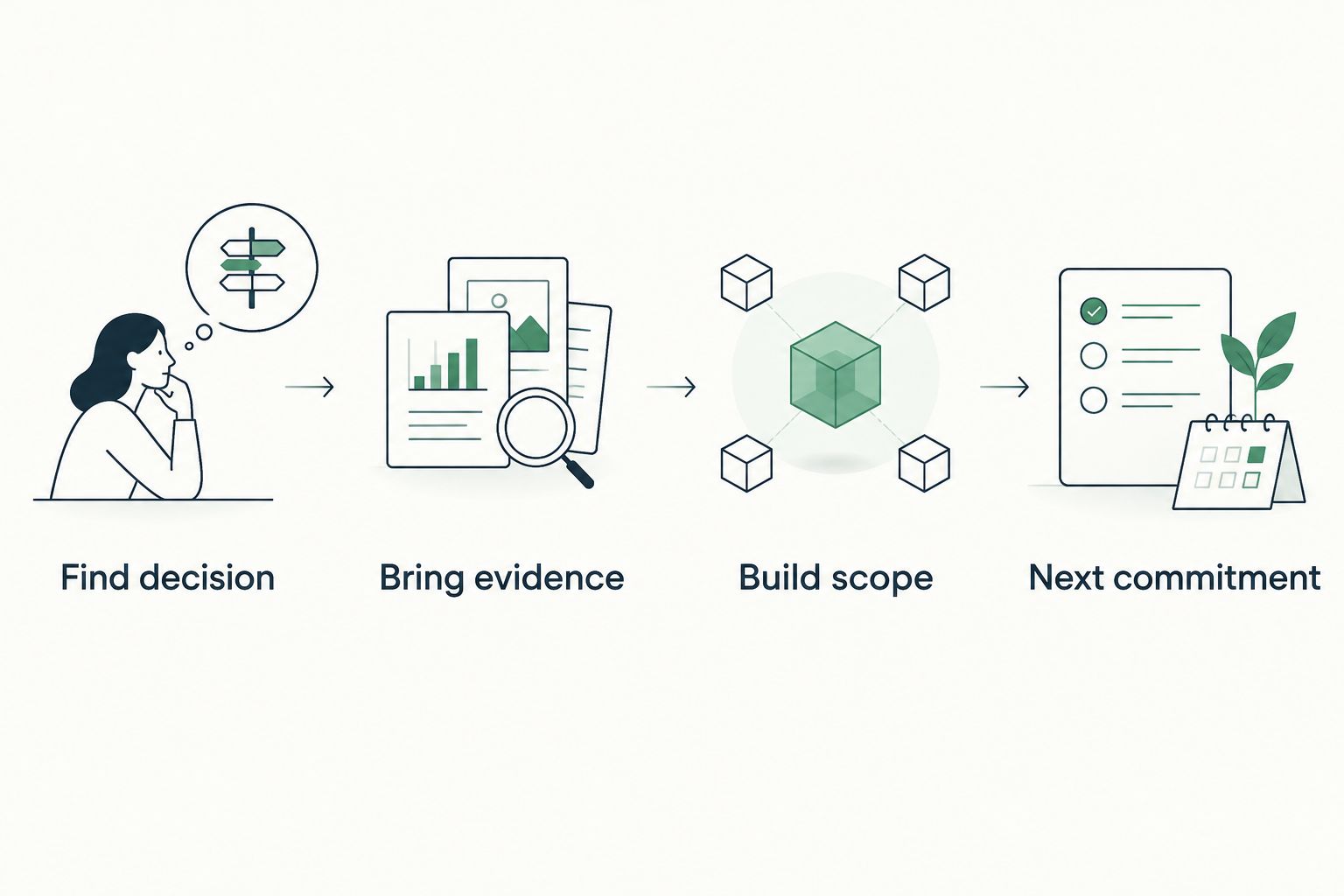
Use the SCOUTz Evidence-to-Agreement Framework: Find the decision, Bring the evidence, Build the scope, Earn the next commitment. The client approved this sales editorial framework on October 24, 2026. It is a conversation structure, not a validated close-rate intervention.
Follow these 4 steps in order. Each step should produce a usable meeting record rather than another slide.
1. Find decision
Start by confirming what the prospect wants to decide. Examples include authorizing a deeper review, clarifying responsibility for email authentication, or deciding whether a proposed service addresses an agreed concern. These are possible meeting objectives, not conclusions you should assign to the buyer.
Identify the business owner and the technical owner. Establish who can authorize access, who understands the current configuration, and who approves any resulting work. One person can fill several roles, but the roles still need names.
Record the desired decision in a sentence. For example: determine whether the organization wants an authorized review of its Microsoft 365 configuration before considering a service proposal. That keeps the meeting focused without treating consent as a foregone conclusion.
2. Bring evidence
Show the condition, the affected object, the check name, the source, and the run date. Then state the boundary. A published domain record can support a domain observation; it cannot establish tenant-wide Conditional Access coverage.
Separate observation from implication. A DMARC policy requesting monitoring supports a conversation about intended enforcement and report ownership. It does not prove mailbox compromise, identify every legitimate sender, or establish that the policy remains unchanged today.
Use these 3 evidence fields on every finding you discuss: source, run date, and limit. Keep the check name and affected object attached as well. If a required source was unreadable, carry that limitation into the meeting rather than presenting an incomplete review as a clean result.
3. Build scope
Translate the buyer’s concern and the evidence into a defined outcome. Specify what you will review or change, the objects included, the approval needed, and how you will verify completion. Keep vendor selection separate from the condition being addressed.
Offer an appropriate choice. The answer can be a review, a process change, a project, an ongoing service, or no action. A buyer who confirms an intentional configuration has supplied useful context, even when that context removes a proposed project.
Make exclusions visible. If the proposal covers domain records but excludes tenant configuration, say so in the scope rather than leaving the buyer to infer coverage from a security-themed title.
4. Next commitment
Finish with an action the buyer explicitly accepts. Examples include introducing the configuration owner, authorizing a read-only review, supplying existing evidence, or reviewing a scoped proposal. Name who owns the action and agree on its timing together.
State what happens after that commitment. An authorized review should lead to an evidence discussion; an approved change should lead to verification against the pinned baseline. Neither a report download nor a polite response establishes agreement to buy.
Record a declined action accurately. Preserve the buyer’s reason without recasting it as an objection that the evidence supposedly disproves.
Choose the review boundary before presenting findings
Public-domain evidence and customer-authorized Microsoft 365 evidence answer different questions. In your 2026 agenda, identify which review produced the material before showing any conclusions. Never combine platforms into a single score.
| Review route | Best for | Useful evidence | Limitation |
|---|---|---|---|
| Public-domain review | Preparing domain and email-security questions | Dated observations about publicly observable domain conditions | Cannot establish internal tenant configuration or compromise |
| Authorized Microsoft 365 review | Discussing tenant configuration with customer consent | Read-only configuration and metadata evidence within granted access | Permission and license limits can leave sources unassessed |
| Baseline comparison | Verifying an agreed configuration outcome | A rescan compared with the pinned baseline | Does not establish conditions outside the assessed scope |
Public observation and active probing also need separate consideration. Do not treat a public-domain review as blanket permission for every assessment technique. Establish authorization appropriate to the activity before proceeding.
For Microsoft 365, the supplied product boundary is configuration and metadata only. It excludes mail, files, chats, documents, and prompts. Read-only review involves no agent or installation and makes no automatic configuration changes.
Prepare an evidence packet the buyer can challenge
Build a short meeting packet around the decision rather than the entire finding inventory. Include the observation, its supporting evidence, its possible consequence, the unknowns, the responsible owner, and the proposed next choice. Keep detailed technical material available for the practitioner who needs to inspect it.
Use evidence states precisely. Verified, Observed, Inferred, Possible, Unknown, and Unreadable are distinct labels, not positions on a single confidence ladder. Coverage is separate: Assessed, Partial, Not assessed, Permission limited, and License limited describe what the review reached.
Place declared non-reads under NOT ASSESSED THIS SCAN. Do not hide them in a closing disclaimer. An owner deciding whether to authorize further review needs that information beside the finding.
For presentation mechanics, use the guide to presenting security evidence in an MSP sales meeting. Keep the same source and boundary visible when you move from the operator evidence to the buyer-facing explanation.
Turn an observation into a scoped next action
The following is an illustrative conversation template, not a customer transcript or a claim about an actual domain. Use it only after replacing the generic condition with evidence from the prospect’s authorized review.
Observed: The reviewed DMARC record requests monitoring. Attach the check name, source, affected domain, and actual run date.
Possible consequence: The published policy does not request rejection through that policy. The observation alone does not establish compromise or explain whether monitoring is intentional.
Ask: Confirm who reviews the reports, whether monitoring remains intended, and which legitimate sending services need consideration before any enforcement change.
Illustrative dialogue
MSP: The reviewed record requests monitoring. Before recommending a change, I want to confirm whether that is your intended policy and who reviews the reporting.
Buyer: Our current provider handles that.
MSP: Then the next step is to confirm the intended configuration with that owner. If it is intentional, we can record the rationale. If you want further review, we can agree on its boundaries first.
Buyer: Send a proposal.
MSP: I can scope a review of the agreed domain and sender evidence. Any configuration change will require separate approval, and the completion record will compare the result with the original baseline.
The proposal now has a defined purpose. It does not depend on proving the incumbent provider wrong or inventing an incident to create urgency.
Why meeting structure varies
Keep the evidence standard consistent while changing the agenda to fit the decision. These factors determine which material belongs in the meeting:
- Buyer role: A business owner needs the decision and consequence; a practitioner also needs the check, object, source, and limitations.
- Access boundary: Public-domain observations support different conclusions from consented tenant configuration evidence.
- Coverage: Permission-limited or unreadable sources require an explicit gap discussion before recommendations.
- Evidence age: A dated observation needs confirmation when the decision depends on the current state.
- Ownership: An existing provider, internal administrator, or business approver changes who must participate in the next action.
- Meeting purpose: Discovery establishes context, a proposal defines work, and a QBR compares agreed outcomes with evidence.
For a 2026 QBR, start with the previous commitment and its pinned baseline. Show what changed, what remains unknown, and which decision now belongs to the customer. A fresh inventory alone does not demonstrate completion of earlier work.
Handle objections without overstating the evidence
When a buyer says the issue is already resolved, ask for current evidence or authorization to verify the relevant condition. Preserve the original observation as historical. A prior finding does not prove an unresolved problem.
When a buyer asks whether a finding means a breach occurred, answer within the evidence boundary. A breach-data match differs from a compromised user; a tenant-wide permission differs from a malicious application. Do not substitute a frightening interpretation for the missing proof.
When a buyer asks for a guarantee, return to the agreed deliverable. Define the review, approved work, and verification evidence. Do not promise security, remediation outcomes, contracts, or sales results that the evidence cannot support.
Send a follow-up that preserves the agreement
Use the meeting record to write the follow-up. State the decision discussed, the evidence reviewed with its source and date, the open questions, the accepted action, and the responsible owner. Include timing only as agreed with the buyer.
A useful follow-up separates agreed scope from proposed scope. If the prospect only authorized an additional review, do not describe that consent as approval for remediation or an ongoing service. Preserve deferred and declined work accurately.
SCOUTz cybersecurity prospect intelligence supports this preparation with dated evidence and account context. Under the client’s October 15, 2026 product reference, Microsoft 365 Review and evidence reporting carry Open Beta labels. Confirm the current product scope before building your workflow around it.
Join Open Beta is the primary next step for MSPs evaluating that approach. The relationship and the sale remain yours.
FAQ
How should I open an MSP security review meeting?
Open an MSP security review meeting by confirming the decision the buyer wants to make. Identify the business owner, technical owner, and authorization boundary before presenting findings.
What evidence should I bring to an MSP security review?
Bring dated evidence with the check name, source, affected object, and limitations attached. Separate the observed condition from its possible consequence and the question you want the buyer to answer.
Can a public-domain review tell me whether a prospect’s Microsoft 365 tenant is secure?
A public-domain review cannot establish Microsoft 365 tenant security. Conditional Access coverage, application permissions, license assignments, device state, and tenant sharing configuration require appropriate internal evidence.
What should I do if part of the security review was unreadable?
Keep unreadable evidence explicitly unreadable and show the coverage limitation. Place declared non-reads under NOT ASSESSED THIS SCAN rather than treating the source as clean.
How do I turn a security finding into a proposal?
Turn a security finding into a proposal by agreeing on the desired outcome, included objects, approval boundary, owner, and verification method. The finding supports discovery; the buyer’s accepted scope defines the proposed work.
What if the prospect says their current MSP already fixed the issue?
Treat the claimed resolution as context to verify with current evidence. Keep the original observation dated and do not describe it as an unresolved problem without supporting evidence.
How should I end an MSP security review meeting?
End an MSP security review meeting with an explicitly accepted next action, a responsible owner, and agreed timing. State what evidence or decision that action should produce, including how approved changes will be verified.
One last thing
An accepted decision to do nothing is still a decision. Record the owner’s rationale, the evidence considered, and the condition that would trigger another review. That is more useful than leaving an unwanted project ambiguously open in your pipeline.