
Instead of manually chasing report receipts and reconstructing client decisions, use a versioned handoff: review dated evidence, deliver the client-safe report through an authorized channel, then record the client's scope decision separately. This SCOUTz portal client report delivery workflow connects report preparation to sign-off without treating a report view as approval.
- SCOUTz portal client report delivery works best as an evidence handoff, with client approval recorded separately.
- Keep public-domain observations separate from customer-authorized Microsoft 365 configuration evidence.
- Attach the source, run date, coverage limits and report version to every decision.
- Join Open Beta is the primary next step; confirm report and portal behavior before designing automation.
Why this matters
A delivered report establishes that information was sent. It does not establish that the recipient understood the findings, approved a project or authorized configuration changes. Your workflow needs a separate record for each of those decisions.
SCOUTz is best for MSPs that need dated cybersecurity prospect intelligence to prepare client conversations. Its role is evidence and account context. Your CRM holds the relationship; your agreement process records the commitment.
The client-provided October 15, 2026 product reference places Evidence Reports and the multi-client report experience in beta validation. This guide therefore describes an MSP-controlled handoff, not a verified click-by-click portal integration. Confirm current delivery controls before relying on them. The SCOUTz platform provides the starting point for evaluating that fit.
Before you start
- Have an authorized operator, the correct client account and the intended decision-maker's verified delivery details. Confirm the recipient may receive the evidence included in the report.
- Have the completed review, source records, run dates, coverage limitations and a client-safe deliverable. Microsoft 365 evidence requires customer authorization and remains read-only configuration and metadata, excluding mail, files, chats, documents and prompts.
- Choose where you will record approval before sending anything. Portal delivery, native electronic signatures and automated approval reminders are not established features in this workflow; use your existing approved systems for capabilities you have not verified.
For your 2026 operating procedure, require 1 report version, 1 accountable MSP owner and 1 named client decision-maker per approval request. These are recommended handoff rules, not product limits. They keep a later reply attached to an identifiable decision.
Report scope
Select the evidence boundary
- Identify whether the report contains public-domain observations, customer-authorized Microsoft 365 evidence or both. Keep each source's findings and limitations distinct.
- Separate evidence state from coverage. Preserve Verified, Observed, Inferred, Possible, Unknown and Unreadable as supplied; record coverage independently as Assessed, Partial, Not assessed, Permission limited or License limited.
- Remove unsupported conclusions. A public-domain observation cannot establish Conditional Access coverage, application permissions, license assignments, Intune device state or tenant sharing configuration.
Use the comparison below to choose the report scope. Neither option establishes that a breach occurred or that a prospect intends to buy.
| Evidence scope | Best for | Strength | Limitation | Decision it supports |
|---|---|---|---|---|
| Public-domain review | Initial domain and email-security conversations | Uses externally observable evidence | Cannot establish internal tenant controls | Whether to discuss the observation or seek authorized internal review |
| Customer-authorized Microsoft 365 review | Internal configuration discovery | Adds consented configuration and metadata evidence | Conclusions remain bounded by permissions, licenses and readable sources | Whether to investigate or scope an identified configuration outcome |
A missing observation is not proof that a control exists. Keep declared non-reads under NOT ASSESSED THIS SCAN. If a source is unreadable, leave its condition unknown rather than describing the account as clean.
Expected result: You have a report whose conclusions stay within its evidence sources and coverage. The client can distinguish what was observed from what remains unassessed.
Client-safe report package
Prepare the decision copy
- Give the deliverable an unambiguous version identifier in your document-control process. Preserve the underlying review date separately from the report's preparation date.
- For each finding selected for discussion, retain the check, affected object, source, run date, evidence state, coverage and unknowns. Add the possible consequence without converting it into a confirmed incident.
- Identify the responsible client role and the decision being requested. Keep the recommended outcome separate from any proposed vendor or product.
- Have a person review the claims before delivery. Validate that every consequential statement traces to the evidence and that operator-only material has not entered the client-safe copy.
For a 2026 handoff, date the evidence itself rather than relying on a current-looking cover page. A newly prepared report can still contain older observations. A preparation date does not refresh a scan.
Consider a DMARC observation. A published monitoring-only policy supports a conversation about intended enforcement and reporting. It does not prove compromise or establish that the policy is an unresolved mistake. Attach the observation, explain its boundary and ask the responsible owner whether that configuration remains intended.
Use a short finding record:
- Condition: the specific configuration or observation supported by the check.
- Evidence: the source, affected object and run date.
- Boundary: what the review cannot establish, including unread sources.
- Owner: the person responsible for confirming intent or approving investigation.
- Next choice: clarify intent, authorize further review, scope work or take no action with a recorded rationale.
The finding-validation workflow belongs before delivery because client-safe wording still needs technically defensible evidence.
Expected result: You have a versioned decision copy with traceable findings, visible limits and a specific next choice. A practitioner has reviewed the claims before a business owner receives them.
Delivery record
Deliver the reviewed version
- Confirm the recipient, account and authorized delivery channel against your client record. For a shared report, verify access using your organization's approved test procedure before inviting the client.
- Use only the delivery capability verified in your current environment. If portal sharing is unavailable or unsuitable, use your existing approved secure document-delivery process and record the handoff in the account record.
- State the report version, review date, scope and requested decision in the delivery message. Explain that receipt and review do not authorize remediation.
- Record the delivery event and its evidence. Distinguish sent, delivery failure, recipient acknowledgment and any available access event rather than collapsing them into an approved status.
In the October 15, 2026 client reference, client reports on the MSP website are planned. Do not build this process around website embedding or assume a client portal supplies approval controls. Check actual behavior before adding it to your operating procedure.
A portal can support delivery while a separate agreement system captures authorization. The advantage is a clear division of responsibilities; the trade-off is that your MSP must maintain the connection between the report version and the approval record.
Use this delivery-message structure in your own correspondence:
- Report: identify the version and evidence dates.
- Scope: name the domain or authorized tenant review and its limitations.
- Request: ask the recipient to confirm the decision-maker and select a review meeting or written scope response.
- Boundary: state that changes require separate authorization.
Expected result: The intended recipient has a tested route to the reviewed report. Your account record shows what was sent and what response was requested, without inventing evidence of agreement.
Decision and sign-off record
Capture the agreed next action
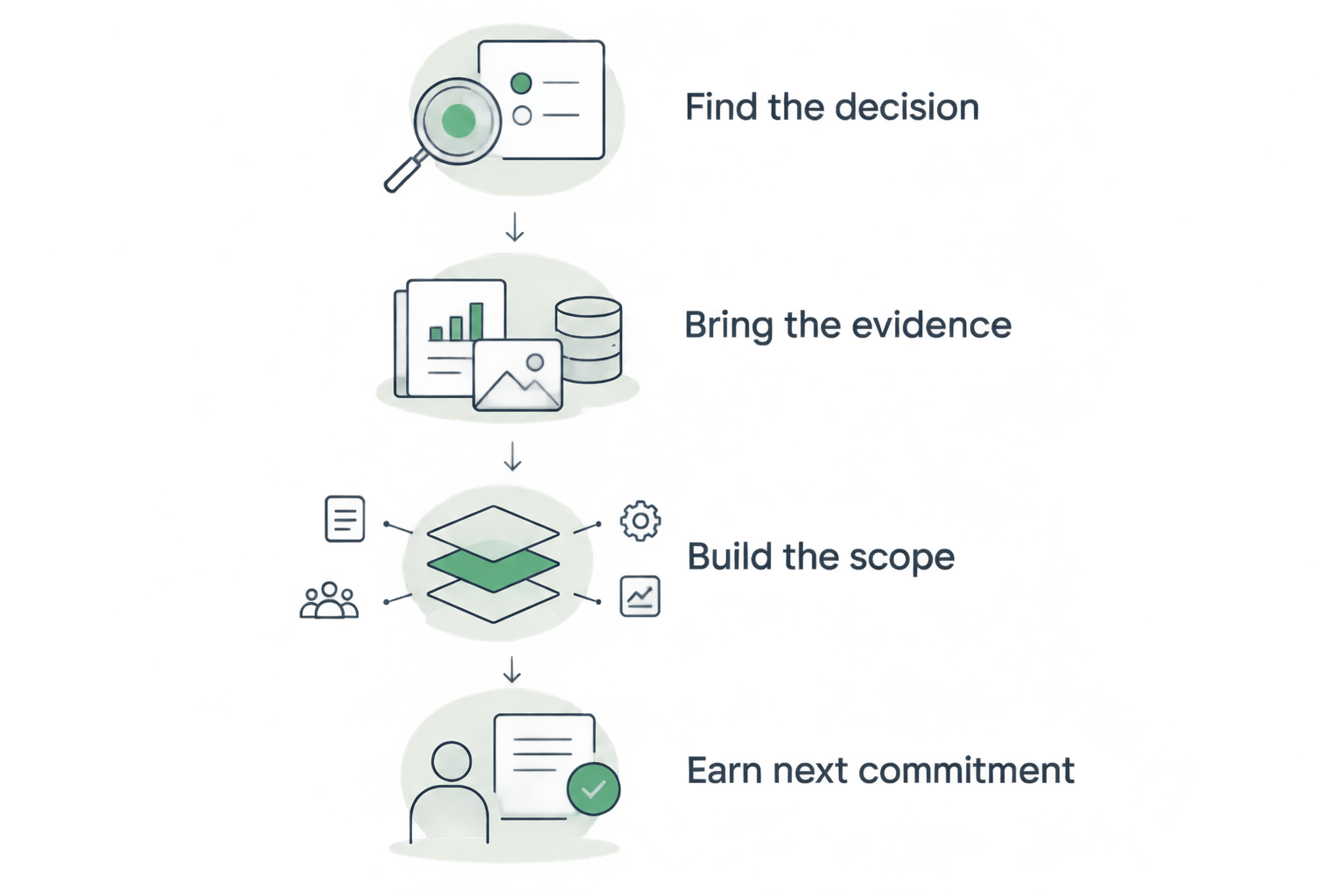
- Find the decision. Ask the client which outcome needs agreement now: clarification, additional assessment, a scoped project or no action with an explanation.
- Bring the evidence. Refer to the exact report version, finding and run date. Separate the observed condition from its possible business consequence and unresolved questions.
- Build the scope. Specify included objects, exclusions, responsible parties, required access, dependencies and the evidence that will demonstrate completion.
- Earn the next commitment. Record the client's explicit decision through your approved agreement process, including the approver, date, report version, scope and next review point.
These steps apply the SCOUTz Evidence-to-Agreement Framework. It is a conversation framework, not a proven close-rate intervention. The MSP remains responsible for the relationship and the sale.
For your 2026 approval record, distinguish 3 decisions: acknowledgment of receipt, authorization of defined work and acceptance of completion evidence. A single report view establishes none of them by itself.
Where your approval system supports automatic approval reminders, bind follow-up to the named approver and pending decision rather than a generic report-open event. Stop or revise the reminder when the client requests changes, declines or identifies another decision-maker. Reminder delivery is not consent.
Illustrative follow-up script
The following is illustrative MSP wording, not a customer quotation or product-generated message:
The report records the configuration observed on the stated review date. Please confirm whether you want an explanation meeting, an authorized follow-up review or a proposal for the defined outcome. Any proposal will identify exclusions and completion evidence before changes are authorized.
If the client says the existing provider already handles the issue, ask for the intended outcome and evidence needed to confirm it. Do not turn the objection into an accusation. If the client declines work, preserve that decision without rewriting it as remediation approval.
Expected result: Your record contains an explicit next commitment tied to evidence and scope. Receipt, work authorization and completion acceptance remain separate.
When updated evidence changes the report
Use a second handoff whenever a rescan changes a condition that matters to the agreed decision. Preserve the earlier version and connect the new report to the pinned baseline. Proof is the comparison against that baseline, bounded by what both runs assessed.
For example, a changed public DMARC policy supports a statement about the newly observed policy. It does not establish successful mail delivery or prove that every authorized sender is correctly configured.
- Compare the same affected object and check across the baseline and rescan.
- Identify changes in permissions, licensing or source readability that affect comparability.
- Explain what changed, what remains unknown and whether the original scope still fits.
- Request fresh authorization if the proposed work changes. Request completion acceptance separately when the agreed evidence is ready.
This 2026 workflow keeps a rescan from silently replacing the evidence on which the client made an earlier decision. The benefit is traceability; the cost is maintaining version links and asking for another decision when scope changes.
Troubleshooting
| Problem | Fix |
|---|---|
| The recipient cannot access the report | Verify the recipient identity and delivery settings in the system you actually use. Retest through an approved procedure without making the report public. |
| The client approved an older version | Preserve the original approval. Explain the material differences and obtain a decision on the changed scope before treating it as authorized. |
| The report looks clean because sources were unreadable | Restore the coverage limitations and declared non-reads. Request authorized access where appropriate or leave the condition unknown. |
| A report view is marked as approval | Correct the account record. Obtain explicit authorization through the approved agreement process. |
| The proposed outcome lacks completion criteria | Define the affected objects, expected condition and rescan evidence before requesting work authorization. |
Customize your workflow
Extend the handoff into your existing CRM and delivery processes with a shared report identifier. Ticket-ready text can support a manual transfer, but native ConnectWise sending is planned in the supplied product reference. Do not describe that transfer as an available integration.
Join Open Beta is the primary next step for MSPs evaluating SCOUTz report workflows. Confirm the current client-safe report experience, recipient access and version handling before adopting them in production. A demonstration can resolve workflow questions before you design a handoff around unverified controls.
Review the report handoff
Discuss report preparation, client-safe delivery and the approval process your MSP already uses.
FAQ
Does SCOUTz portal client report delivery include electronic sign-off?
Electronic sign-off is not established by the supplied product reference. Confirm current portal capabilities and use your approved agreement system for explicit authorization.
Does opening a security report count as client approval?
Opening a security report does not establish client approval. Record acknowledgment, work authorization and completion acceptance separately against the relevant report version.
What should an MSP include with a client security report?
Include the report version, evidence sources, run dates, affected objects, coverage limits and requested decision. Keep unknown and unreadable evidence visible.
Can a public-domain report show Microsoft 365 tenant security?
A public-domain report cannot establish internal Microsoft 365 tenant controls. Customer-authorized internal evidence is needed for conclusions about the assessed configuration, subject to permissions and license limits.
What happens when a client approves an outdated report?
Preserve the original approval and explain any material changes. Obtain a new decision where updated evidence changes the proposed scope or requested authorization.
Can approval reminders authorize remediation?
Approval reminders cannot authorize remediation. They prompt a response; your approved agreement process must capture the client's explicit authorization for defined work.
What proves that approved work is complete?
Completion evidence must match the criteria agreed in the scope. A rescan against a pinned baseline supports a bounded statement about the assessed conditions, not a guarantee of security.
One last thing
Write the completion criteria before asking for approval. If the client and MSP cannot identify what evidence will demonstrate the agreed outcome, the scope is not ready for sign-off. A dated report starts the conversation; the recorded decision determines what happens next.