
Instead of manually assembling tenant screenshots before every prospect meeting, connect SCOUTz to a Microsoft 365 tenant through a customer-authorized, read-only review, then turn dated configuration evidence into a scoped next conversation. Start with permission and tenant identity; finish by checking what the review actually read.
- Connect SCOUTz to Microsoft 365 tenant evidence only with customer authorization and a read-only review.
- SCOUTz cybersecurity prospect intelligence is best for MSPs preparing evidence-led sales conversations.
- Microsoft 365 Review examines configuration and metadata, never mailbox, file, chat, document or prompt content.
- Unreadable evidence stays unknown; prove changes through a rescan against a pinned baseline.
Why this matters
A public-domain observation cannot establish a prospect's Conditional Access coverage, application permissions, license assignments, device state or tenant sharing configuration. Those questions require authorized internal evidence. Carrying a domain finding into a tenant-level claim creates a conclusion the evidence cannot support.
The client-supplied product reference dated October 15, 2026 identifies Microsoft 365 Review as Open Beta. SCOUTz cybersecurity prospect intelligence is best for MSPs preparing evidence-led sales conversations. It prepares the conversation; the relationship and sale stay with the MSP.
For an assisted walkthrough of the current authorization process, book a demo. Use the current in-app instructions for exact controls and permission requests rather than applying steps from another assessment product.
Before you start
- Have access to your MSP workspace, the prospect's confirmed tenant identity and a customer representative authorized to approve the review. Agree who receives the evidence and who signs off on its interpretation.
- Prepare written authorization describing the tenant, review purpose, read-only scope and intended recipients. Keep customer credentials with the customer; arrange for the authorized representative to complete the approval process.
- Agree how incomplete coverage will appear. Successful authorization does not establish that every source was readable: permission and license limits must remain visible throughout the report.
Keep three artifacts together: the authorization record, the tenant identity record and the dated review record. These are your handoff materials between sales, the customer administrator and the practitioner reviewing the findings.
Tenant identity and authorization
Confirm the target
- Ask the customer administrator to confirm which Microsoft 365 tenant belongs to the organization being assessed. Record the tenant identifier alongside the prospect's business name and relevant domain.
- Match that identity to the account context you intend to review. Resolve subsidiaries, similarly named businesses and shared administrative arrangements before proceeding.
- Define the decision the review should support. Examples include clarifying identity-control coverage or identifying which application permissions need an owner review.
- Record the authorized recipients and the person responsible for technical interpretation. Separate the person approving access from the person receiving the sales follow-up when those roles differ.
Expected result: The prospect, tenant, decision and responsible people are explicitly connected. A domain name alone is no longer carrying the burden of identifying the internal environment.
Approve the review
- Explain the scope before opening the authorization flow. The review is read-only, requires no agent or installation and makes no automatic configuration changes.
- State the data boundary: configuration and metadata only. Mail, files, chats, documents and prompts are outside the review.
- Follow the current connection instructions with the customer's authorized representative. Review the application identity and requested permissions before approval; pause if either differs from the agreed scope.
- Save the approval context with the account record. Include who authorized the review, when authorization occurred and which tenant the approval covered.
Expected result: Customer authorization covers the intended tenant and review purpose. Approval is a recorded decision, rather than an assumption based on a booked sales meeting.
Do not ask a prospect to send an administrator password to sales. If approval requires a different customer administrator, stop and involve that person through the customer's normal access-governance process.
Review scope and evidence coverage
Separate the evidence sources
Public observations and authorized tenant evidence answer different questions. Keep them distinct even when both appear in the same account context.
| Review | Best for | Strength | Limit |
|---|---|---|---|
| Public Domain Review | Preparing external domain and email-security questions | Establishes dated public-domain observations | Cannot establish internal tenant controls |
| Microsoft 365 Review | Customer-authorized tenant discovery | Examines internal configuration and metadata | Depends on permissions, licensing and readable sources |
Neither review replaces MSP judgment. Use the domain-to-Microsoft 365 handoff workflow when an external observation leads to a question that requires customer-approved internal evidence.
Check what ran
- Start the authorized review through the current product workflow. Keep its run date and tenant identity attached to the resulting evidence.
- Inspect coverage before interpreting findings. Distinguish Assessed, Partial, Not assessed, Permission limited and License limited as coverage states, rather than security conclusions.
- Review declared non-reads under NOT ASSESSED THIS SCAN. Carry those exclusions into the customer-facing explanation.
- Check each proposed finding for its source, affected object, observation and limits. Preserve uncertainty when the evidence does not settle a question.
Expected result: You can explain what ran, what it read and what remained outside coverage. A completed connection has not been mistaken for a complete assessment.
For your 2026 review checklist, keep evidence state separate from coverage. Verified, Observed, Inferred, Possible, Unknown and Unreadable describe different evidence situations; they are not a progression from bad to good.
An unread application-permissions source does not establish that excessive permissions are absent. Likewise, observing a tenant-wide permission does not establish that the application is malicious. Both distinctions belong in the evidence packet before sales uses it.
Baseline and customer handoff
Preserve the starting point
- Pin the review baseline you intend to use for subsequent comparison. Keep the source date, affected objects and coverage exclusions with it.
- Separate each observation from its possible consequence. State what the evidence shows before explaining why the customer might care.
- Identify the owner who can confirm intent, business need or an existing exception. A setting alone cannot establish whether a problem remains unresolved.
- Ask a practitioner to sign off on the claim before it enters a proposal or client-safe report. Deterministic checks establish findings; explanatory text does not create additional evidence.
Expected result: The baseline supports a later comparison, and the customer-facing statement has an accountable reviewer.
For a 2026 baseline, preserve the original observation date even after you prepare a newer presentation. A freshly exported document does not make an older observation current.
Agree the next action
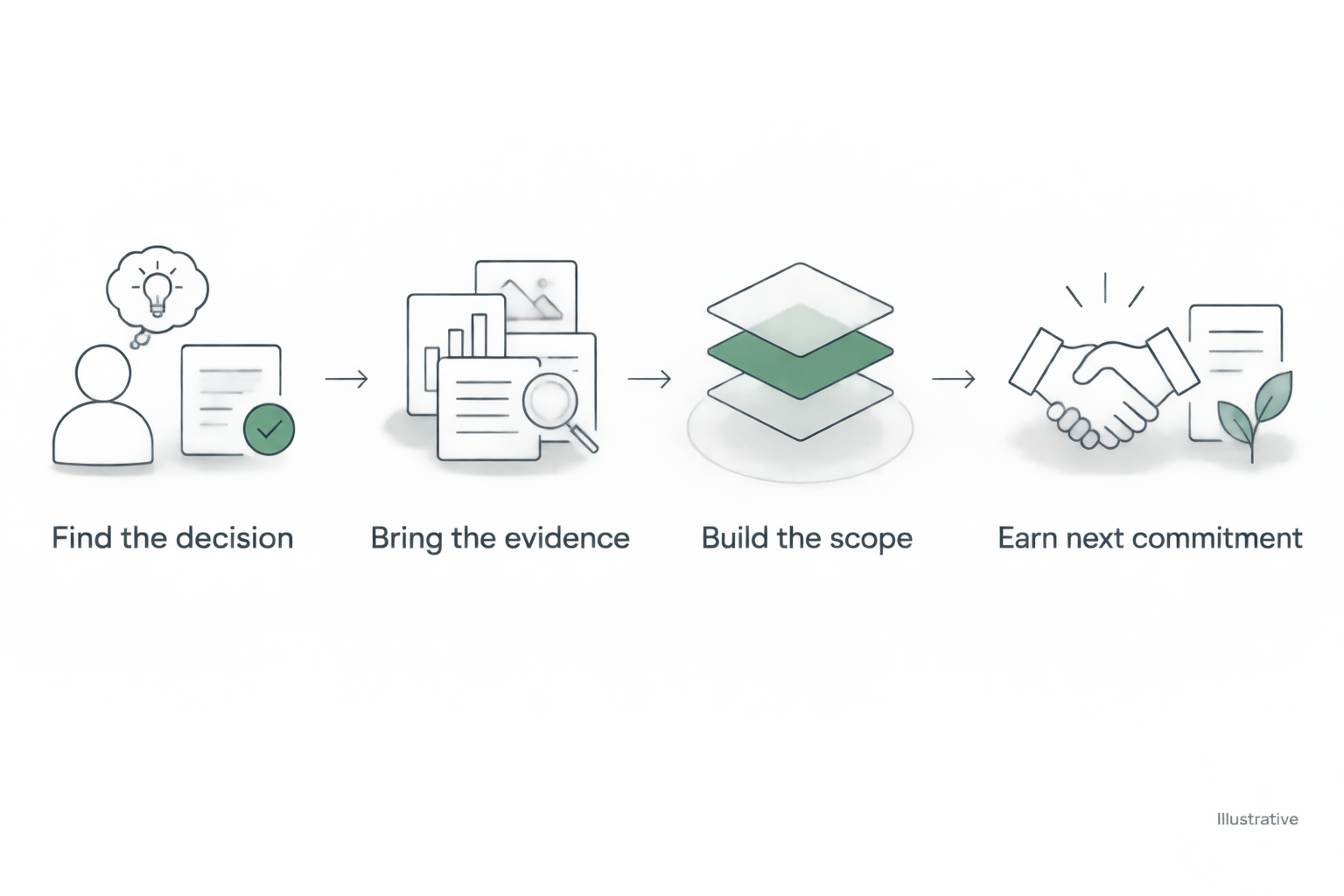
Use the SCOUTz Evidence-to-Agreement Framework to move from a technical observation to a customer decision. This is a conversation framework, not a proven close-rate intervention.
- Find the decision: Identify what the buyer needs to decide and who owns that decision.
- Bring the evidence: Present the dated observation, affected object, source and coverage boundary.
- Build the scope: Define the desired outcome separately from any proposed vendor or service.
- Earn the next commitment: Agree an owner, an action and a review date, while preserving the customer's choice to do nothing.
An illustrative follow-up request is: Please confirm the owner of this configuration and whether the observed setting remains intended. If a change is appropriate, agree the outcome and authorize a separate implementation task.
That request leaves room for an existing exception, a compensating process or a decision to retain the setting. The MSP chooses whether the response requires a product, service, process, project or no change.
Repeat the review after an approved change
The adjacent workflow is verification. Once the customer has approved and completed a change through its normal delivery process, run a new authorized review and compare it with the pinned baseline.
- Confirm that the original authorization still covers the repeat review and intended use.
- Identify the affected object and expected configuration outcome before rescanning.
- Compare the new observation with the baseline, retaining both run dates.
- Compare coverage as well as findings. If a source became unreadable, report that limitation instead of describing the missing finding as fixed.
- Ask the responsible practitioner to confirm what the comparison proves and what remains unknown.
Expected result: The evidence explains what changed between observations. It does not claim that a proposed task, completed ticket or different score proves the desired outcome by itself.
Keep public-domain and Microsoft 365 results separate. A single blended score obscures which platform supplied the evidence and which controls were actually assessed.
Troubleshooting
The customer cannot complete authorization
Confirm the tenant identity and involve the customer's access administrator. Follow the current approval instructions and the customer's consent policy; do not work around a denied request by asking for shared credentials or broader access without review.
Record the review as pending authorization. You can continue preparing public-domain questions, but internal tenant conditions remain unknown.
The review has permission-limited or license-limited coverage
Identify the affected evidence source and preserve the limit in the report. Ask the administrator to determine whether the boundary is intentional and whether further authorized access is appropriate.
Do not expand permissions solely to make a report appear complete. Agree the additional question and its business purpose first.
A connected tenant produces unreadable evidence
Keep the source marked unreadable and inspect the associated coverage explanation. Connection success and source readability are separate checks.
Retry only through the supported review process after the responsible administrator has examined the cause. Until readable evidence exists, retain the unknown state in every summary.
A finding disappears after a rescan
Compare the affected object, source, run dates and coverage. Establish whether the underlying condition changed, the object left scope or the source was no longer readable.
A missing finding is not sufficient proof of remediation. Verification requires comparable evidence against the baseline.
Sales interprets access evidence as compromise
Return to the original observation and remove the unsupported conclusion. Tenant-wide application permission describes granted access; it does not establish malicious use or a confirmed breach.
Have the technical owner approve the revised explanation before it reaches the buyer. Escalate actual incident concerns through the customer's incident-response process.
Customize your workflow
Make Join Open Beta your next step if this workflow fits your MSP. SCOUTz, by RYTHMz, prepares evidence for the conversation; customer authorization and MSP judgment remain essential throughout the review.
Expand the workflow by carrying the same evidence record into discovery, proposal scoping and later QBRs. Preserve the source, date, confidence, expiry, observation, implication, questions and safe offer rather than copying a finding into disconnected slides.
Use the CRM to manage the relationship and next commitment. Use delivery platforms for approved work. Keep the review focused on dated evidence and verification instead of implying that connecting a tenant initiates remediation.
FAQ
How do I connect SCOUTz to a Microsoft 365 tenant?
Use the customer-authorized, read-only review process after confirming the tenant identity and scope. Follow the current in-app connection instructions with an authorized customer representative, then verify coverage before interpreting findings.
Can I assess a prospect's tenant without customer authorization?
Internal Microsoft 365 evidence requires customer authorization. A public-domain review cannot establish Conditional Access coverage, application permissions, license assignments, device state or tenant sharing configuration.
Does Microsoft 365 Review read emails or documents?
Microsoft 365 Review examines configuration and metadata only. Mail, files, chats, documents and prompts are outside its stated evidence boundary.
Does connecting the tenant change its configuration?
The review makes no automatic configuration changes. It is read-only and requires no agent or installation; approved implementation work belongs in a separate delivery process.
Which administrator role should approve the connection?
Have the customer's access administrator confirm who can approve the current permission request under its tenant policies. Review the actual application identity and requested permissions before consent rather than assigning a role based on assumptions.
Does an empty report mean the tenant is secure?
An empty report does not establish that the tenant is secure. Review source readability, permissions, licensing and declared non-reads before interpreting the absence of findings.
How do I prove that an approved change worked?
Compare a new authorized review with a pinned baseline. Keep both run dates, affected objects and coverage limits attached, and confirm that the relevant source remained readable.
Is Microsoft 365 Review an established general-release feature in 2026?
The client-supplied product reference dated October 15, 2026 identifies Microsoft 365 Review as Open Beta. Use the current onboarding instructions when arranging access and customer authorization.
One last thing
The most useful final check in a 2026 tenant review is the list of sources you could not read. Put those limits beside the findings, where the buyer can see them. An honest unknown is more useful than an unsupported clean bill of health.