Higher education Microsoft 365 assessment is a review of tenant configuration and access evidence with the aim of helping your MSP agree a defensible security-services scope with a college or university. This 2026 guide explains how to separate public observations from authorized tenant evidence, account for different campus stakeholders, and turn findings into an agreed next action.
- Choose a Microsoft 365 assessment tool for higher education that preserves source, date, permissions and coverage limits.
- SCOUTz suits MSP sales preparation; its Microsoft 365 Review is Open Beta under the dated client reference.
- Public-domain evidence cannot establish Conditional Access coverage, application permissions or tenant sharing configuration.
- Build proposals around verified conditions, institutional owners and a rescan against a pinned baseline.
Why Microsoft 365 assessment matters for higher education
SCOUTz is best for MSPs preparing evidence-led Microsoft 365 sales conversations. The assessment gives that conversation a starting point: what was observed, what remains unknown, and which institutional owner can authorize the next step.
A university assessment needs an explicit population and authority map. Establish whether the engagement covers staff, faculty, students, researchers, guests, affiliated organizations or separate tenants. A finding about one population does not describe every campus user.
For your 2026 engagement, establish the institution's constraints before choosing checks. Ask the sponsor to identify delegated administration, research collaboration requirements, academic change windows and approval responsibilities. These are discovery topics, not conditions to assume every institution shares.
The useful output is a decision record. It should let the institution approve further investigation, accept a documented condition, commission a bounded project or decline additional work without overstating what the assessment proves.
How to assess a higher education Microsoft 365 prospect
Define the institutional scope
Start manually with a worksheet and an authorized institutional contact. Write down the tenant, domains, included populations and decision owner before requesting access. Record who can approve evidence collection separately from who can approve changes or purchase services.
Higher education is not a substitute for an asset list. Confirm whether a department, foundation, research group or affiliated organization belongs inside the engagement. Where ownership remains unclear, leave that boundary unresolved rather than expanding the assessment by inference.
Define the intended decision as well. An initial sales assessment, a configuration review and an implementation project have different deliverables. Your assessment should support the agreed decision without becoming an unapproved implementation engagement.
- Record the tenant identifier and institution-confirmed domains.
- Identify included and excluded user populations.
- Name the assessment sponsor and technical approver.
- List affiliated organizations requiring separate authorization.
- Agree the evidence deliverable and acceptance criteria.
Separate public evidence from tenant evidence
Begin with an institution-approved inventory and documented public observations. Keep 2 evidence layers distinct: public-domain evidence and customer-authorized Microsoft 365 evidence. Permission to discuss a domain does not establish permission to access its tenant.
A published DMARC policy can show the requested handling of messages that fail DMARC evaluation. It cannot establish Conditional Access coverage, application permissions, license assignments, Intune device state or internal sharing configuration.
For tenant review, obtain approval through the institution's process and document the requested permissions. Distinguish public observation from active probing; authorization and applicable legal requirements need their own review. Offer outreach assessments as opt-in courtesies after a reply, rather than treating a public domain as blanket authorization.
- Label each source as public-domain or authorized tenant evidence.
- Record permission scope and the approving institutional owner.
- Keep internal configuration claims out of public-only reports.
- Describe unread sources under NOT ASSESSED THIS SCAN.
- Separate observation permissions from permission to make changes.
Collect dated configuration evidence
The manual path is an authorized administrator reviewing relevant Microsoft administration views and recording configuration evidence. Preserve the affected object, source and collection date. Record 2 dates for each reviewed finding: when the evidence was collected and when a person validated the interpretation.
SCOUTz Microsoft 365 Review offers a software-assisted path for this preparation. The client-provided product reference dated October 15, 2026 identifies it as Open Beta. Its stated boundary is read-only configuration and metadata collection, with no agent, installation or automatic configuration changes. Microsoft 365 evidence excludes mail, files, chats, documents and prompts.
Evaluate the output against your agreed scope rather than collector totals. Ask whether each relevant check ran, whether the necessary permissions existed and whether a practitioner can inspect the basis for the conclusion.
- Preserve the check name, affected object and run date.
- Record the source and requested permissions.
- Keep evidence state separate from coverage status.
- Mark permission-limited and license-limited collection explicitly.
- Require practitioner review before presenting a claim.
Validate findings against campus context
Use the manual review to test whether the observation supports the proposed interpretation. MFA registration and MFA enforcement are different questions. An application permission identifies authorized capability; it does not establish malicious use. An external-sharing setting does not prove that information was disclosed.
Ask the institution to explain the intended condition and the responsible owner. A collaboration exception might be deliberate, but its purpose, approval and review responsibility still need evidence. Conversely, an unanswered question remains unknown rather than becoming evidence of a missing control.
Keep the evidence states Verified, Observed, Inferred, Possible, Unknown and Unreadable distinct. They are not a severity ladder. Use the guide to validating assessment findings before a call to structure practitioner sign-off.
- Confirm that the affected object belongs inside scope.
- Check collection dates before reusing an observation.
- Separate configuration evidence from incident evidence.
- Ask the owner to document intended exceptions.
- Record unresolved interpretation questions alongside the finding.
Explain consequences without inventing incidents
Draft the explanation manually before putting it into a report. Use a short sequence: condition, evidence, boundary, owner and next choice. This keeps the conversation attached to something the institution can inspect.
For example, a public DMARC observation showing a monitoring-only policy supports a discussion about intended enforcement and report ownership. It does not establish account compromise or show that the institution has ignored the issue. Internal Microsoft 365 questions still require authorized tenant evidence.
Translate the technical observation into a decision the owner can make. For a guest-access review, that might mean confirming a sponsor and reviewing continued access. The scope should identify the affected population and evidence needed before recommending configuration changes.
- State the observed condition without an incident claim.
- Attach the source, collection date and affected object.
- Describe possible consequences as possibilities.
- Identify the institutional owner who can confirm intent.
- Offer investigation, documented acceptance or a scoped change.
Build the scope and earn agreement
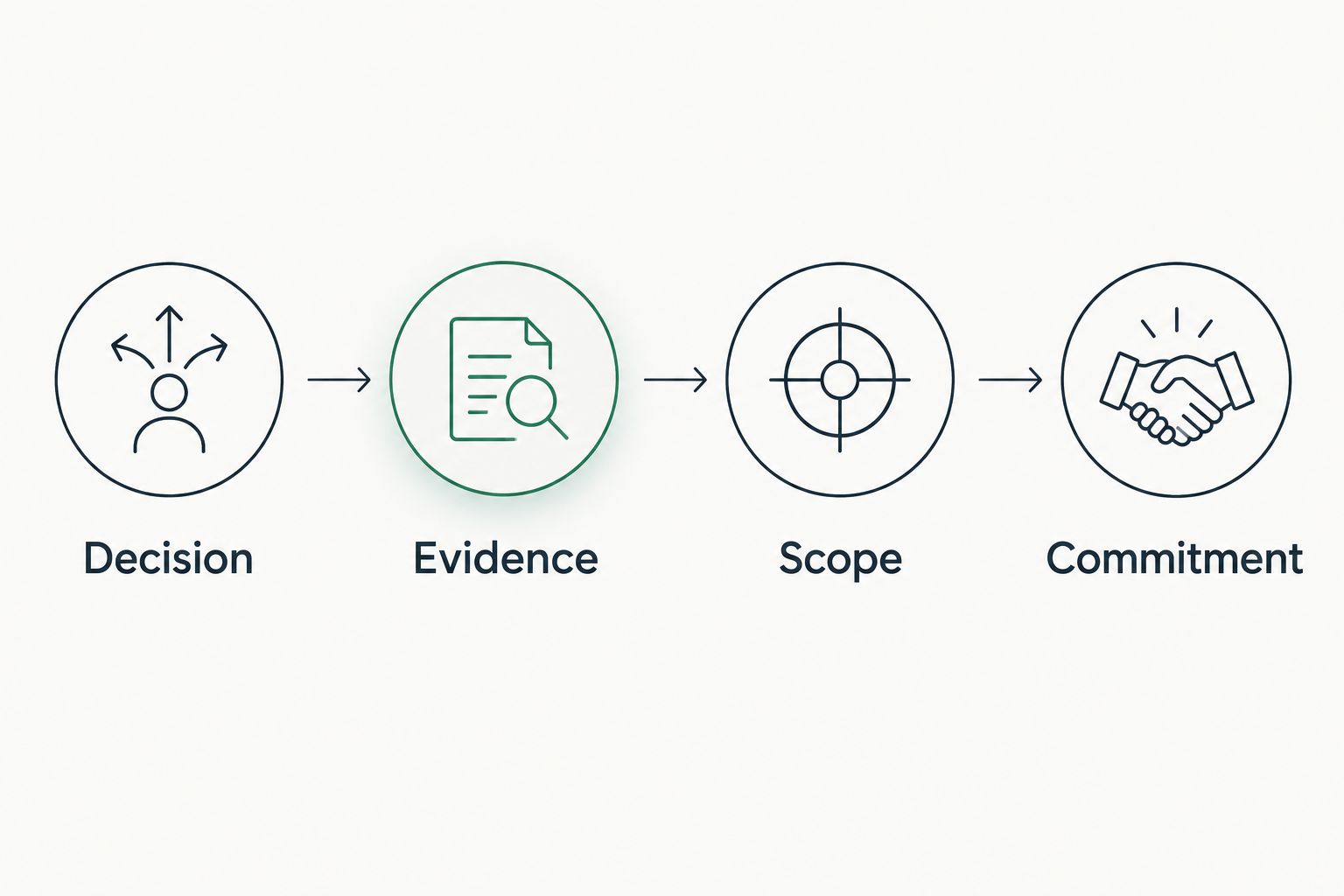
Use the SCOUTz Evidence-to-Agreement Framework: Find the decision, Bring the evidence, Build the scope, Earn the next commitment. This is an original conversation framework, not a validated close-rate intervention. Start with a shared document; software supports preparation while the MSP owns the recommendation and relationship.
Organize the discussion around Decision, Evidence, Scope and Commitment. Present bounded choices that preserve the institution's right to defer or decline. A technically interesting finding is not automatically a reason to purchase a project.
Illustrative follow-up language: The review observed the attached configuration on the recorded collection date. Its purpose and approval remain unconfirmed. We propose an owner-validation session before recommending any change; please confirm the institutional approver and included population.
If the institution says an exception supports research collaboration, acknowledge that requirement. Offer to verify ownership and safeguards before discussing a change. Do not turn an objection into an unsupported risk claim.
- Define the decision the institution needs to make.
- Bring only reviewed evidence relevant to that decision.
- Compare validation-only, change-project and recurring-review scopes.
- State exclusions and institution-owned dependencies.
- Record the next action, owner and agreed review date.
Verify changes against a pinned baseline
Start with a saved baseline and a change record. After an authorized change, repeat the relevant assessment and compare the same affected objects where possible. A different score alone does not explain what changed.
For a campus engagement, confirm that any new term, collaboration arrangement or organizational change has not altered the agreed population. Treat newly included objects as added coverage rather than evidence that the earlier review was wrong.
A read-only assessment verifies observations within its coverage. It does not perform remediation or establish that every related system is secure. Keep the implementation owner's change evidence separate from the assessment result, then connect them in the client report.
- Pin the original evidence and collection scope.
- Record the approved change and implementation owner.
- Repeat the relevant checks after the change.
- Explain differences in permissions or assessed populations.
- Carry remaining unknowns into the next review.
Compare assessment options for a 2026 engagement
Choose by the job your MSP needs to complete. Native review supports direct inspection; public-domain review establishes external context; assessment software supports repeatable evidence preparation. None removes the need for institutional authorization and practitioner judgment.
| Option | Best for | Practical advantage | Key limitation |
|---|---|---|---|
| Manual Microsoft administration review | Practitioners investigating a defined tenant question | Direct inspection of relevant settings using authorized access | Your MSP must maintain its own evidence records, interpretation and comparison process |
| Public-domain review | Early domain and email-security discovery | Establishes externally observable conditions before internal review | Cannot establish internal Microsoft 365 configuration or tenant-wide coverage |
| SCOUTz Microsoft 365 Review | MSPs preparing evidence-led prospect conversations | Supports dated configuration and metadata evidence for sales preparation | Open Beta under the dated client reference; coverage depends on readable, authorized sources |
Before committing to a workflow, test it against an institution-approved example. Require the operator to show the evidence behind a finding, explain a declared non-read and distinguish a rescan from a newly expanded assessment. A polished report is insufficient if those boundaries disappear.
Common mistakes MSPs make with higher education assessments
Treating one sponsor as authority for every campus unit
A meeting with a departmental contact does not define institution-wide authorization. Confirm the approving owner and scope before tenant access. Document separately controlled affiliates and excluded populations so the proposal matches the engagement the institution actually approved.
Treating collaboration settings as proof of a leak
A guest, sharing setting or application permission needs context. Identify the affected object, purpose and approval owner before proposing restrictions. Preserve the difference between an available capability, observed activity and evidence of unauthorized disclosure.
Presenting missing coverage as a clean result
Permission limits, unavailable sources and unreadable evidence belong in the report. Show coverage separately from findings. The institution needs to know which identity, device, application or sharing questions remain unanswered before accepting the proposed scope.
Turning a sales review into a compliance conclusion
Keep the assessment's configuration observations separate from any compliance engagement. Ask the institution to define applicable obligations, systems and evidence requirements. A Microsoft 365 configuration review alone does not establish institution-wide compliance or replace the responsible legal and compliance reviewers.
Sending a proposal before agreeing the next action
A report explains observations; an agreement defines work. Confirm the decision owner, deliverable, exclusions and acceptance evidence before writing the project scope. If the institution chooses further validation rather than implementation, reflect that choice in the proposal.
FAQ
What's the best Microsoft 365 assessment tool for higher education?
Choose a tool that preserves dated evidence, affected objects, permission limits and explicit coverage boundaries. For MSP sales preparation, evaluate whether the output supports an institution-approved decision and a defensible proposal scope.
Can an MSP assess a university's Microsoft 365 tenant from its public domain?
A public-domain review cannot establish internal Microsoft 365 configuration. Conditional Access coverage, application permissions, license assignments and tenant sharing configuration require authorized internal evidence.
Does a Microsoft 365 assessment need access to student emails or documents?
A configuration-and-metadata assessment does not require reading student emails or documents. Confirm the specific collection scope and permissions with the institution before authorizing any tool.
Does an external-sharing finding prove a university had a data leak?
An external-sharing setting does not prove a data leak. Establish the affected object, actual evidence, intended use and institutional owner before making a disclosure or incident claim.
How should an MSP report checks it could not read?
Report unread evidence explicitly and separate it from assessed results. Identify whether the limitation concerns permissions, licensing, partial coverage or an unreadable source; do not describe the control as absent or clean.
Can an MSP use the assessment to recommend a campus-wide configuration change?
A campus-wide recommendation requires evidence and authorization covering the proposed scope. Validate affected populations, collaboration requirements, exceptions and change ownership before proposing implementation.
What should happen after the institution accepts the assessment findings?
Agree a bounded next action with a named owner and acceptance criteria. Preserve the baseline, document authorized work and rescan relevant checks to show what changed within the assessed scope.
One last thing
Ask to see a declared non-read before choosing an assessment tool. A tool's treatment of evidence it could not collect reveals whether its report preserves uncertainty or hides it. That matters when a campus buyer must decide whether the proposed work is justified.
For your 2026 evaluation, make that demonstration part of acceptance. Then test whether the same workflow connects an observation to an owner, a bounded proposal and a rescan.
If SCOUTz fits that preparation job, make Join Open Beta your next step and confirm current scope during onboarding. SCOUTz prepares the conversation. The relationship and the sale stay yours.