
Staffing agency QBR software is a planning and reporting workspace that helps your MSP turn service results, security evidence and business priorities into agreed decisions. For staffing and recruiting clients, your review should connect technical work to the actual recruiting workflow, including candidate communications, recruiter access and client-facing systems where those are in scope.
- Choose qbr software for staffing agencies around decisions, dated evidence and accountable follow-up, rather than presentation features alone.
- SCOUTz supports MSP security evidence preparation; your QBR process still needs business priorities, service reporting and client decisions.
- Keep public-domain observations separate from customer-authorized Microsoft 365 configuration evidence.
- Close each quarterly business review with an owner, an agreed next action and a verification method.
Why QBR software matters for staffing agencies
Your staffing client needs to decide what deserves attention before the next review. A ticket summary establishes service activity. It does not establish whether recruiter access matches current responsibilities or whether an email-security change achieved its intended outcome.
Start your 2026 review with the agency's operating model. Ask whether it places temporary workers, recruits permanent employees, serves multiple client organizations or operates across separate brands. Treat each answer as discovery, rather than assuming every staffing business has the same systems or access requirements.
The useful connection is specific: an observed condition, its relevance to an agreed workflow, and a decision the client can make. If your deck needs restructuring, use the guide to building a QBR deck for a security services client.
Choose QBR software that preserves the path from evidence to decision to verification. Attractive charts cannot replace that record. Keep the platform's job distinct from the MSP's responsibility to interpret findings and agree appropriate work.
How to build a staffing-focused QBR workflow
Define the decision before collecting reports
Start manually with a shared agenda and a decision log. Ask the agency owner or operations lead what must be decided, who can approve it and which recruiting activities the decision affects. Software selection comes after that conversation.
For your 2026 planning template, consider a 45-minute meeting and a 90-day action horizon. These are suggested working boundaries, not performance benchmarks. Adjust them to the client's decision process.
Build the agenda around an actual choice: approve an access review, clarify ownership of email authentication, or defer a project with an explicit reason. Keep staffing outcomes separate from security claims. A configuration review does not prove better placement performance.
- Record the decision in one sentence before assembling slides.
- Name the agency's approver and the MSP's accountable owner.
- Identify the recruiting workflow affected by the proposed work.
- Separate service updates from items requiring approval.
- Carry forward deferred decisions with their original rationale.
Map recruiting workflows to evidence sources
Use interviews, existing service records and customer-approved administrative views first. Establish which applications support candidate intake, recruiter communication, placements and client collaboration. If the agency uses an applicant tracking system, document its owner and its relationship to identity and email.
A public DNS observation can support a discussion about published email-authentication policy. It cannot establish Microsoft 365 Conditional Access coverage, tenant sharing settings or application permissions. Those require appropriate internal evidence and customer authorization.
Record the boundary before interpreting the result. An unread source stays Unknown or Unreadable as appropriate, with coverage recorded separately. Missing access is a coverage limitation, not evidence that a control is absent.
- List each in-scope domain, tenant and business application.
- Identify who manages each system and approves review access.
- Label public-domain evidence separately from consented internal evidence.
- Record source, collection date and affected object for each observation.
- Place declared non-reads under NOT ASSESSED THIS SCAN.
Assemble dated evidence before writing recommendations
The manual route is to collect authorized exports, preserve original observations and maintain a finding register. Each entry needs its check name, run date, affected object, evidence state and coverage. Keep your interpretation in a separate field so another practitioner can inspect the reasoning.
SCOUTz, by RYTHMz, provides dated cybersecurity evidence and account context for MSP conversation preparation. Its read-only Microsoft 365 review uses configuration and metadata, never mail, files, chats, documents or prompts. It makes no automatic configuration changes.
SCOUTz is best for MSPs that need dated security evidence for QBR preparation. The boundary matters: your team still owns the business discussion, scope and decision. The client-provided product reference dated October 15, 2026 places Microsoft 365 Review and Evidence Reports in Open Beta; multi-client reporting remains in beta validation.
- Preserve the check and run date beside each finding.
- Keep Observed, Inferred and Possible claims distinct.
- Record Assessed, Partial and Permission limited coverage separately.
- Assign a practitioner to review each client-facing claim.
- Remove stale claims or mark them for revalidation before presentation.
Translate evidence into a bounded business choice
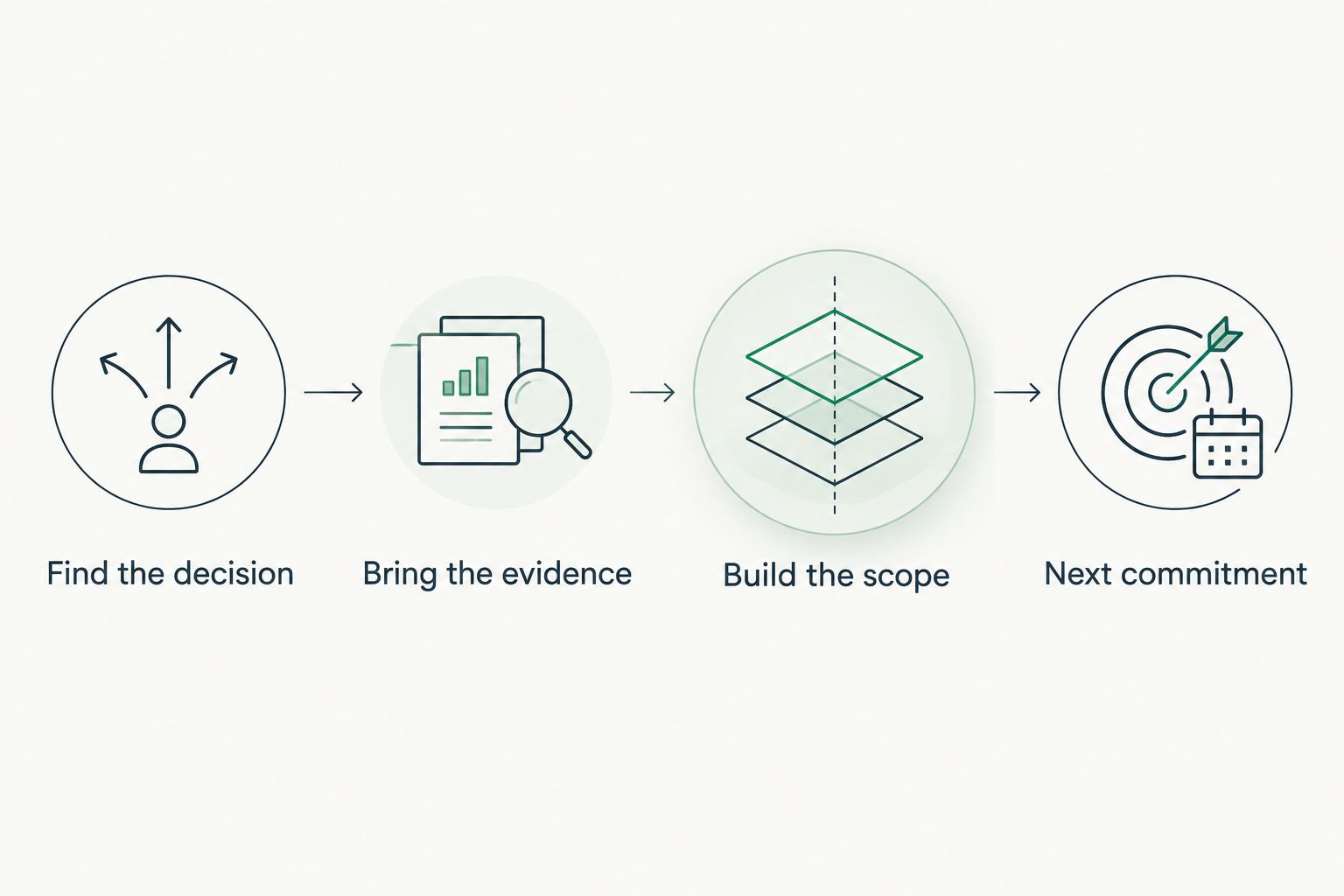
Use the SCOUTz Evidence-to-Agreement Framework: Find the decision, Bring the evidence, Build the scope, Earn the next commitment. This is a conversation framework, not a validated close-rate intervention. Apply it to the agency's stated priority and preserve the buyer's choice.
For example, a published DMARC policy requesting monitoring supports a discussion about intended enforcement and report ownership. It does not establish compromise. Before proposing a policy change, identify legitimate sending services, including recruiting platforms if the client uses them.
The following sequence is illustrative guidance, not a customer incident or measured result. It shows how to move beyond describing a finding without treating the finding as an automatic project authorization.
- Find the decision: establish whether email-policy review is a current priority.
- Bring the evidence: show the dated policy observation and its limits.
- Build the scope: identify sender review, ownership and acceptance criteria.
- Earn the next commitment: agree who will validate senders and when.
Compare scopes before asking for approval
Create a simple scope sheet before investing in proposal automation. State the condition, affected object, unknowns and recommended outcome separately from vendor choices. Your MSP can then recommend a process change, service, project or no immediate work based on the evidence and the client's priorities.
Consider an illustrative Microsoft 365 guest-access review. A guest object's presence does not establish inappropriate access. Your initial scope can be an ownership and purpose review; configuration changes require a separate, authorized decision.
Keep objection handling factual. If the agency says the application provider manages access, ask the agency to confirm which responsibilities the provider accepts. Record the response as client-supplied context until supporting evidence is reviewed.
- Describe what the proposed review includes and excludes.
- Identify the evidence needed before recommending configuration changes.
- Record the agency's operational constraints and dependencies.
- Define acceptance in observable terms, such as documented access ownership.
- Offer deferral with a named revisit date when appropriate.
Verify the result against a pinned baseline
Start with a baseline register and a repeatable review procedure. Preserve the original check, object, source and run date, then compare the same condition after authorized work. A completed ticket establishes recorded activity; a rescan supplies evidence about the checked condition.
For a 2026 QBR, present 2 dated observations when showing before and after. This is a recommended proof format, not a claim about how many scans a product performs. Explain any change in scope, permissions or collection method that limits comparison.
Proof remains bounded. A changed DMARC policy proves a changed published policy at the observation time. It does not establish complete email protection or prove that every legitimate sender will pass authentication.
- Pin the baseline before approved work begins.
- Repeat the relevant check after the change.
- Compare the same affected object and evidence source.
- Explain collection differences before claiming improvement.
- Carry remaining unknowns into the next decision log.
Compare QBR options by the job they perform
The strongest 2026 selection process starts with a trial workflow using your own authorized evidence. Ask each vendor to demonstrate a finding's source, its presentation to the client and the record of the resulting decision. Keep technical evidence and business planning connected without combining unrelated platforms into one score.
| Option | Best for | Useful strength | Key limitation |
|---|---|---|---|
| Shared documents and spreadsheets | MSPs establishing a repeatable QBR process | Flexible agendas, scope sheets and decision logs | Your team must maintain evidence dates, versions and follow-up manually |
| PSA service reporting | MSPs explaining service activity and recorded work | Provides an operational basis for service discussions | Service records alone do not verify a security condition |
| Dedicated QBR planning software | MSPs coordinating roadmaps and client decisions | Gives business planning a dedicated workspace | Evidence traceability and integrations require vendor-specific validation |
| SCOUTz security evidence preparation | MSPs preparing dated domain and authorized Microsoft 365 evidence | Supports evidence-led review preparation and client-safe reporting | Microsoft 365 Review and Evidence Reports were Open Beta in the October 15, 2026 client reference; full QBR planning needs remain separate |
Avoid choosing from a feature checklist alone. Test whether an account manager can explain the observation accurately and whether a practitioner can inspect its basis. Reject any workflow that silently turns unread evidence into a favorable result.
Join Open Beta is the primary next step for MSPs evaluating this evidence-preparation approach. Book a demo to discuss your staffing-client QBR workflow and review fit before making a product decision.
Common mistakes MSPs make with staffing-agency QBRs
Treating every recruiting workflow as identical
A temporary staffing operation and an executive recruiting firm can have different approval paths and collaboration needs. Establish the actual workflow with the client. Avoid importing another agency's assumptions into your scope.
Using a domain review as tenant evidence
A public-domain review cannot establish internal Microsoft 365 access controls. Keep public observations and customer-authorized tenant evidence in separate sections. Request the necessary authorization before offering internal conclusions.
Presenting application permissions as misuse
A recruiting integration's permissions describe authorized capability, not demonstrated abuse. Ask who approved the application, which workflow requires it and who reviews its continued use. Keep any concern tied to the specific permission and available evidence.
Closing with findings instead of commitments
A list of observations leaves the agency to interpret the next move. End each decision item with the agreed action, accountable owner, due date and verification method. Record a deliberate deferral just as clearly as an approval.
FAQ
What's the best QBR software for staffing agencies?
The best QBR software for staffing agencies is the option that connects your client's priorities to dated evidence, decisions and accountable follow-up. Test it against an actual staffing workflow rather than selecting by dashboard appearance.
Can SCOUTz replace my MSP's QBR platform?
SCOUTz supports security evidence preparation rather than replacing the entire QBR process. Keep service reporting, business planning, relationship management and client decisions in the systems and workflows responsible for them.
Can a public-domain review show whether a staffing agency enforces MFA?
A public-domain review cannot establish Microsoft 365 MFA enforcement. Obtain customer-authorized internal evidence and distinguish registration from enforcement when interpreting the result.
Does a Microsoft 365 review need access to candidate emails?
The read-only review described here uses configuration and metadata, not candidate emails or other message content. Authorization and collection boundaries still need to be documented before the review.
How should I show security improvement during a QBR?
Show a dated baseline and a repeat observation of the same checked condition. Explain differences in permissions, source or scope, and limit the conclusion to what the comparison establishes.
What should I ask vendors during a QBR software demo in 2026?
Ask vendors to trace a finding from its source and date through client presentation to the resulting decision. Also test how the workflow handles unread evidence, permission limits, deferred actions and verification.
What should happen after the staffing agency approves a recommendation?
Record the approved scope, responsible owner, dependencies and acceptance criteria. After authorized work, collect the agreed verification evidence and report what changed alongside any remaining unknowns.
One last thing
Carry one explicit unknown into your next 2026 QBR. For example, record that the owner of a recruiting integration has not yet been confirmed, then agree who will establish ownership. An honest boundary gives the client a concrete decision and prevents an incomplete review from looking complete.